
A report can refresh successfully and still contain data the business cannot trust.
Missing information, conflicting dates, inconsistent classifications and broken relationships can all flow into a dashboard without causing a technical failure. The numbers appear, but the people using them spend time checking, correcting and questioning the underlying records.
Data quality reporting makes those problems visible and measurable. Microsoft Fabric provides a place to bring data together, apply agreed checks and retain the results. Power BI gives business teams a clear view of what needs attention and whether their work is improving the position.
The exercise usually has two phases: first, raise data quality to an agreed target; then, keep it at that level as new records and changes enter the business.
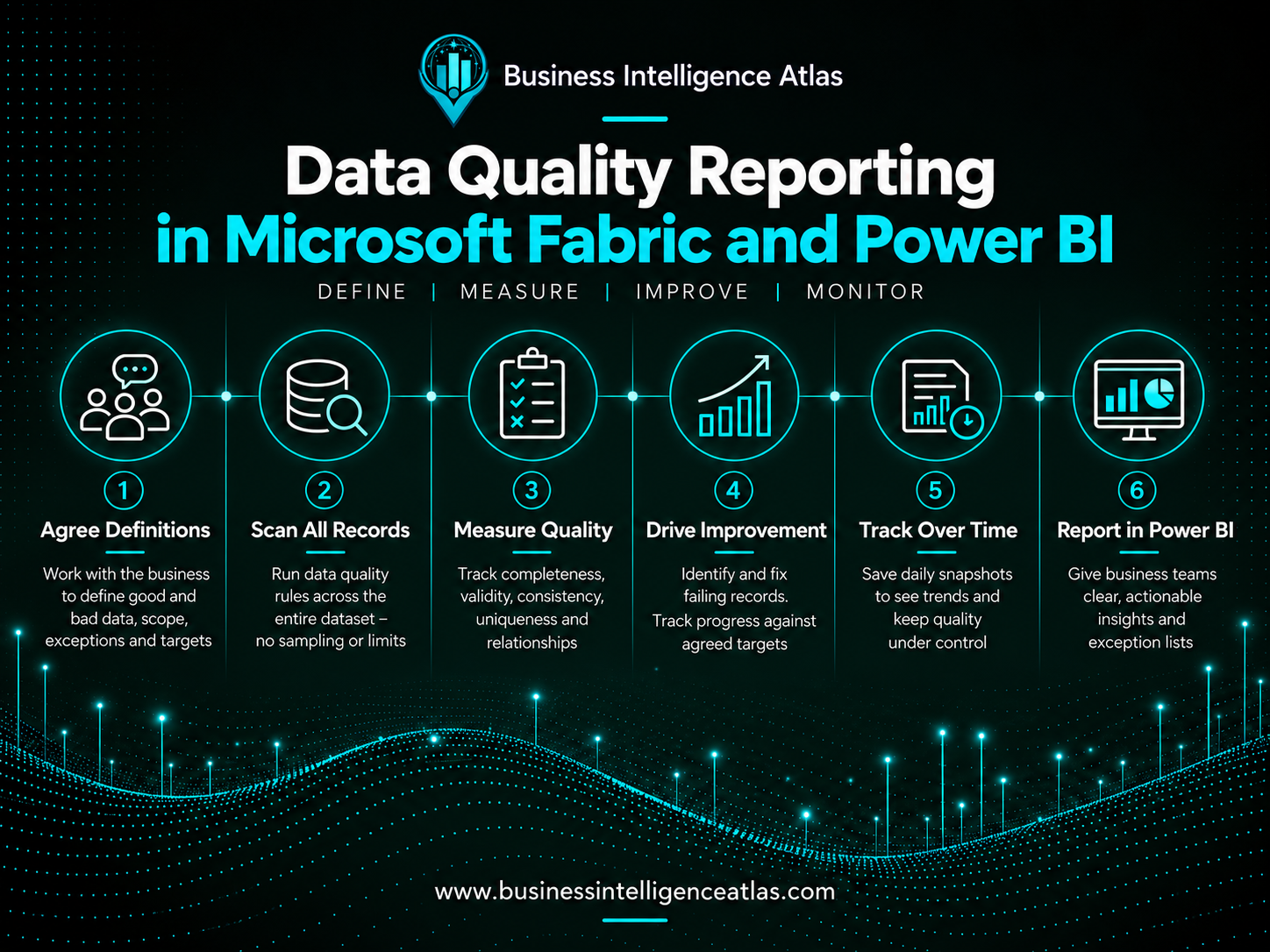
Start with the business definition of good and bad data
Before building a data quality measure, agree what it means with the business.
A technical team can identify an empty field or an unusual value. It cannot decide on its own whether that record is wrong, whether the information is required in that situation, or whether an exception is acceptable.
An empty field might be a failure for a live operational record and entirely valid for a historical one. Two records with similar details might be duplicates, or they might represent separate entities. A date that looks incorrect may reflect a legitimate process.
For every measure, agree:
- Scope: which records should be checked, and which are excluded?
- Good data: what conditions must a record meet to pass?
- Bad data: what specifically makes it fail?
- Exceptions: which cases are accepted, require review or cannot yet be assessed?
- Ownership: who approves the definition and who corrects the records?
- Target: what quality percentage is required, and by when?
Document the definition in language that users can understand. Validate it against real examples before using it to report performance.
Every measure should have an agreed business definition of good and bad data. Without that agreement, a percentage can look precise while measuring the wrong thing.
Build measures that reflect how the business works
Data quality goes beyond checking whether a field contains a value. Information can be complete and still be incorrect.
Useful checks cover completeness, validity, consistency, uniqueness and relationships between records. Accuracy may also require comparison with an authoritative source or business confirmation; a populated field alone does not prove it is correct.
The following are generic examples of how checks can be defined.
| Area | Example check | Business decision required |
|---|---|---|
| Workforce data | Contracted working hours fall within the permitted range for that employment arrangement | Agree the valid ranges and treatment of variable-hours arrangements |
| Finance data | A transaction uses a currency permitted for its legal entity | Agree permitted currencies and approved exceptions |
| Customer data | Required onboarding information is complete before an account becomes operational | Agree which fields are mandatory at each process stage |
| Operational data | An effective-from date does not fall after the corresponding effective-to date | Agree how open-ended records and future changes should be treated |
| Master data | A referenced classification exists and is valid for the record’s effective date | Agree the authoritative reference list and relevant date |
Some checks should produce a list for investigation rather than immediately label every match as bad data. Potential duplicates are a good example: matching logic identifies candidates, but the business may need to confirm whether they are genuinely duplicates.
Start with a manageable set of measures connected to business risk, and apply each one across the full dataset wherever it is relevant. Prioritising the rules does not mean sampling the records.
Scan the full dataset and identify every failing record
The assessment should scan the complete dataset against the business-approved good-data and bad-data rules. There is no fixed record limit: whether the dataset contains thousands or millions of records, every record should be evaluated against every applicable rule.
Some rules apply only to particular types or states of records. Agree that applicability with the business, document it and report the coverage. Records outside a rule’s scope must be identifiable; they should not disappear silently from the assessment.
For each rule, retain the complete list of failing records. Include the source system, record identifier, failed rule, reason for failure, relevant values and responsible owner. Power BI should let authorised users filter and drill through to these records, so the report provides a practical correction list as well as summary percentages.
A record that fails several rules should retain every failure reason. The business can then see both the distinct number of records needing attention and the total number of issues to resolve. Potential issues awaiting business confirmation should remain visible as a separate review queue.
The objective is to identify every record requiring correction under the agreed rules, across the full dataset. The percentage summarises that assessment; the detailed results tell the business what to fix.
Create a current view of data quality
The first reporting objective is straightforward: show the latest assessed position.
For each measure, Power BI should show the full eligible record count, how many passed, how many failed, assessment coverage, the quality percentage and the agreed target. Users should be able to move from a summary into the complete list of records that require attention.
A useful current view answers:
- Where are the biggest problems?
- Which areas are below target?
- Which failures carry the greatest business impact?
- Who needs to act?
- Which records need correcting?
Show the source-data timestamp and the assessment time. “Current” means the latest successfully assessed data available to the report, which may lag behind changes in the operational system.
Failed loads or checks must also be visible. An assessment that did not run should appear as unavailable or stale, rather than showing a misleading zero-error result.
The report should support action. Give authorised users enough detail to identify an affected record, understand why it failed and locate it in the source system. Corrections should normally happen there, so the same problem does not reappear on the next extract.
Make the percentage meaningful
A simple measure can be expressed as:
Data quality % = passing records ÷ assessed eligible records × 100
Calculate this percentage from the full population of records to which the rule applies. A quality level of 96% means 4% of assessed eligible records failed that rule. The report should show the actual counts and identify every failing record, regardless of the dataset’s size.
The denominator matters. It should reflect the agreed scope, rather than every record in the table. If a rule applies only to operational accounts, historical accounts should not dilute its result.
Where eligible records cannot be assessed, show that count and assessment coverage separately. Otherwise, quality can appear to improve simply because difficult records were not checked. Where no records qualify, show the measure as not applicable.
Always present the percentage alongside the failure count. One hundred failures may represent a small proportion of a large dataset while still creating substantial work or risk.
Take care with overall scores too. One record can fail several checks, so adding all failures together does not give the number of distinct bad records. If an overall quality percentage is needed, define how overlapping failures, rule applicability and critical checks are handled. A simple average of unrelated percentages can hide a serious problem.
Use Fabric to apply repeatable checks
A practical implementation can follow a medallion architecture: Bronze retains source data, Silver prepares and standardises it, and Gold provides curated reporting outputs. Microsoft documents this pattern for Fabric. [1]
Quality checks should run where they can test the relevant business condition. Some validate incoming records; others need prepared relationships or business mappings. Preserve visibility of source failures even when a transformation repairs or excludes them downstream.
For reusable checks, implement the rule logic centrally in Fabric using an appropriate SQL or notebook approach. Power BI then presents the results through a semantic model, with measures for percentages, targets and trends. This avoids maintaining competing definitions across several reports.
Fabric Data Factory pipelines can run notebooks and be scheduled, providing an orchestration option for repeatable assessments and saved results. [2]
These are implementation choices. The agreed business rules should remain understandable regardless of the technology used to calculate them.
Save daily snapshots to measure improvement
A current report tells you where the data stands now. To demonstrate progress, retain the results over time.
After a successful daily assessment, save a dated snapshot of each measure into a historical table. Power BI can use those stored results to show whether quality is improving, remaining stable or deteriorating.
For example, the same rule could show the following improvement after full-dataset assessments:
| Assessment point | Coverage of eligible records | Passing records | Failing records |
|---|---|---|---|
| Initial baseline | 100% | 82.0% | 18.0% |
| During remediation | 100% | 96.0% | 4.0% |
| Target achieved | 100% | 98.5% | 1.5% |
Illustrative percentages only. Each assessment covers every eligible record in the dataset. The live report should also show actual record counts and the complete correction list.
A snapshot should retain the assessment date, rule identifier and version, reporting scope, counts and target applicable at that time. Keep source timestamps and run status so users can distinguish a valid assessment from an incomplete one.
Save snapshots after ingestion and validation have completed successfully. Make reruns safe so the same assessment is not accidentally counted twice.
Refreshing a Power BI report does not, by itself, create a retained daily history. The snapshot needs to be explicitly saved in the data platform.
Summary snapshots show trends. If the business also needs to prove exactly which records failed on a particular day, retain suitable exception-level history. That is a separate requirement, with access and retention decisions appropriate to the data.
Version changes matter. If the business changes a rule’s definition or scope, mark that change in the history. Otherwise, a jump in the percentage could be mistaken for improvement when the measurement itself has changed.
First raise quality to the desired level
The initial phase is usually a focused remediation exercise.
Establish a baseline, agree targets and prioritise the measures with the greatest business impact. Assign the affected records to the people who can correct them, then use the next assessments to confirm whether the corrections have worked.
Power BI can support this with an overview of performance against target, detailed exception lists, trend charts and a heatmap showing which measures remain below the required level.
Targets should reflect the risk. A business might agree a high percentage for a general completeness measure while requiring no unresolved failures for a critical payment control. The threshold should be approved by the responsible business owner.
During remediation, review both percentages and counts. Fewer failures do not automatically prove records were corrected: they may have left the reporting population. Where useful, distinguish resolved issues, newly introduced issues and records that have gone out of scope.
The aim is to reach the agreed level through verified improvement.
Then keep quality at that level
Achieving the target is the start of ongoing control.
New records, organisational changes, integrations and altered processes can introduce problems again. Continue running the agreed checks and retaining daily snapshots so deterioration becomes visible early.
Long-term reporting should show whether each measure remains within its target, where recurring failures originate and which issues need attention. Agree who reviews breaches, how quickly they should act and when an issue should be escalated.
Persistent failures deserve more than repeated correction. They may point to missing validation in a source application, unclear responsibilities or a process that allows incomplete records to progress. Use the reporting to identify those causes and prevent recurrence.
Definitions also need periodic review. Keep the rules aligned with the business while preserving a clear record of changes.
Make data quality part of everyday reporting
Useful data quality reporting connects four things: an agreed business definition, a current view, retained history and someone responsible for action.
Fabric and Power BI can support that process, but the value comes from using the results. Teams can see what needs fixing, verify improvement and recognise when standards begin to slip.
Start by raising data quality to the desired level. Keep the same measurement process running to protect that improvement over the long term.
If your organisation needs a practical data quality reporting framework, contact Business Intelligence Atlas to discuss defining the measures, building the Fabric foundation and creating Power BI reporting that supports both remediation and ongoing control.
Technical references
1. Microsoft Learn: Medallion architecture in Fabric with OneLake
2. Microsoft Learn: Run notebooks within Fabric Data Factory pipelines
Comments are closed