
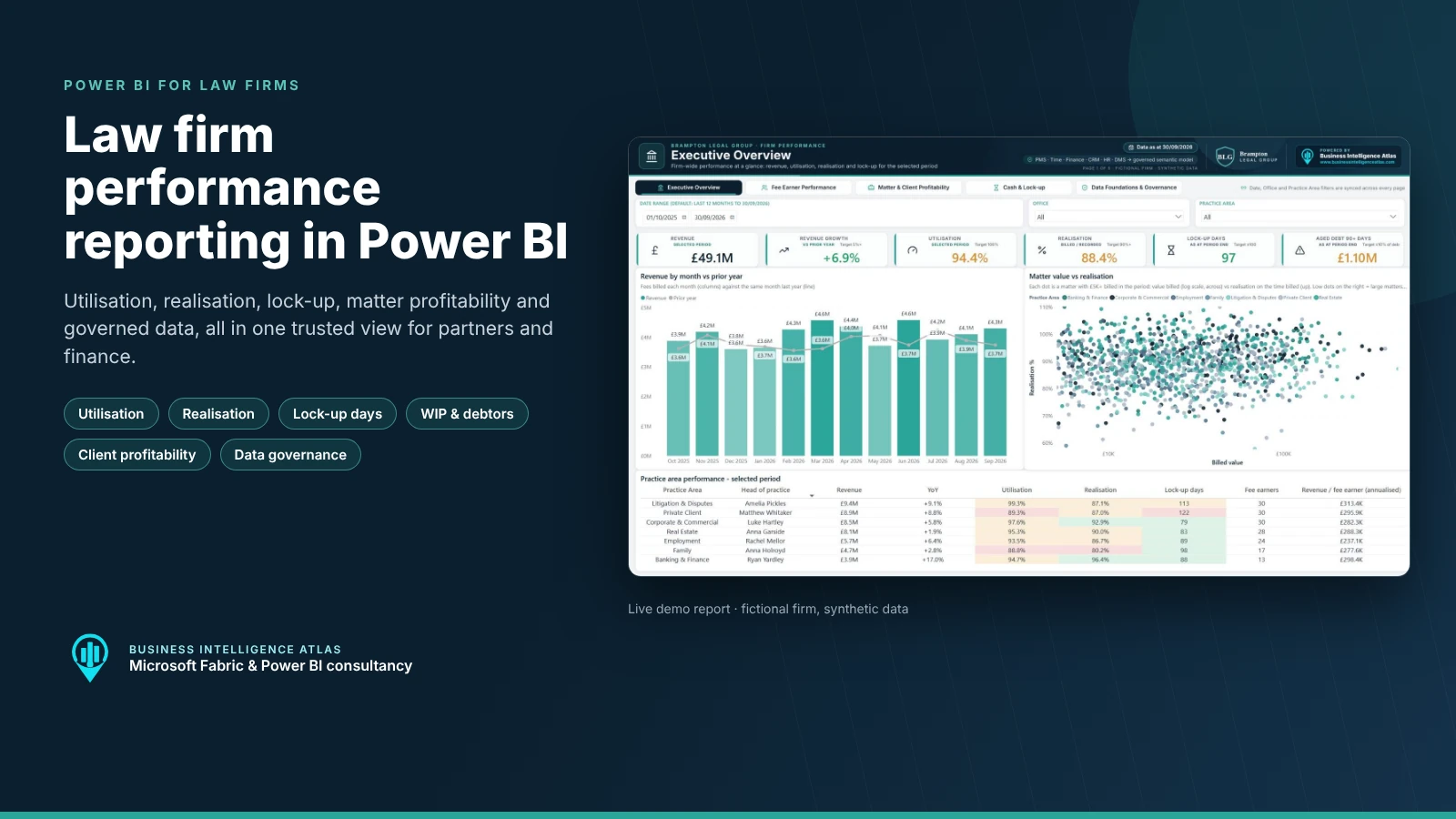
Most law firms already have the data they need to run the business well. It sits in the practice management system, time recording, the finance system, CRM, HR and the document management system. The problem is that each system tells a slightly different story. Month-end packs are rebuilt by hand, partners question the numbers, and the conversation drifts from what should we do to which figure is right.
This article walks through a law firm Power BI dashboard we built to show what good law firm reporting looks like when the data underneath is governed. The demo covers the KPIs management teams ask about most: utilisation, realisation, recovery, lock-up, WIP, debtor days, aged debt, matter profitability and client concentration. It ends with a page most reports leave out: a view of where every number comes from, who owns it and how complete it is.
The firm in the demo, Brampton Legal Group, is fictional and every figure is synthetic. The model, measures and design are exactly what we deliver for real firms in Microsoft Fabric and Power BI.
Watch the law firm Power BI dashboard demo
A short walkthrough of all five pages of the law firm Power BI dashboard, including synced filters and the data governance view:
Key takeaways
- One governed semantic model brings together practice management, time, finance, CRM, HR and document data in a clean star schema.
- Five pages cover firm performance, fee earners, matters and clients, cash and lock-up, and data governance.
- Every KPI has one agreed definition, a target and a red / amber / green status, so partners discuss actions rather than numbers.
- Filters for date, office and practice area stay in sync across every page.
- A data lineage view shows each source system, its data owner and its completeness, so the board can trust what it sees.
- A first release (Phase 1) typically takes four to six weeks. Further phases then extend it as new requirements come up.
Why law firm reporting is harder than it should be
Law firms are data-rich. A mid-sized firm records hundreds of thousands of time entries a year, raises thousands of bills and opens thousands of matters. Yet when we start working with a firm, we usually find the same issues:
- Different numbers for the same KPI. Finance calculates realisation one way, the practice heads another. Lock-up in the board pack does not match lock-up in the credit control report.
- Spreadsheets in the middle. Exports from the practice management and finance systems are stitched together in Excel every month. It is slow, fragile and hard to audit.
- No single view of the fee earner. Chargeable hours live in time recording, targets live in HR, and grades and offices are held differently in each system.
- Data quality nobody owns. Matters without a responsible partner, time entries without narratives, clients without a sector. Each one quietly distorts the reports.
- Reports that look good but are not trusted. Without clear ownership and lineage, a dashboard is just a prettier spreadsheet.
Good reporting fixes the foundations first and then makes the numbers easy to use. That is the approach behind this demo.
The law firm KPIs that matter, and how we define them
Every measure in the report is defined once, in a single _Measures table in the semantic model. The same definition is used on every page, in every export and in every conversation. These are the core law firm KPIs in the demo:
| KPI | What it tells you | How it is calculated | Example target |
|---|---|---|---|
| Utilisation % | Are fee earners recording enough chargeable time? | Chargeable hours / target hours for the period, pro-rated for joiners and leavers | 100% of target |
| Realisation % | How much of the value of time recorded is actually billed? | Billed value / recorded value at standard rates | 90% or more |
| Recovery % | How much of the value of time recorded turns into cash? | Collected value / recorded value | 85% or more |
| WIP days | How long work sits unbilled | Unbilled WIP at period end / last 3 months’ recorded value x 91 | Firm-specific |
| Debtor days | How long clients take to pay | Debtors at period end / last 3 months’ billing x 91 | Firm-specific |
| Lock-up days | How long it takes to turn work into cash | WIP days + debtor days | 100 days or fewer |
| Aged debt 90+ | Cash at risk | Unpaid bills more than 90 days old at period end | 10% or less of debt |
| Revenue per fee earner | Productivity of the fee-earning team | Annualised revenue / fee earners at period end | By grade and practice |
| Top 10 client share | Client concentration risk | Revenue from the ten largest clients / total revenue | Board-set threshold |
| Data completeness % | Can the numbers be trusted? | Records passing every data quality rule / records checked | 98% or more |
The targets above are illustrative and can be configured for each firm. The important point is that they are agreed, visible and applied consistently.

Inside the law firm Power BI dashboard, page by page
The report has five pages. Each has the same layout: a navigation bar, synced filters, KPI cards, two or three focused visuals and a detail table at the bottom for anyone who wants to check the rows behind a number.
1. Executive Overview
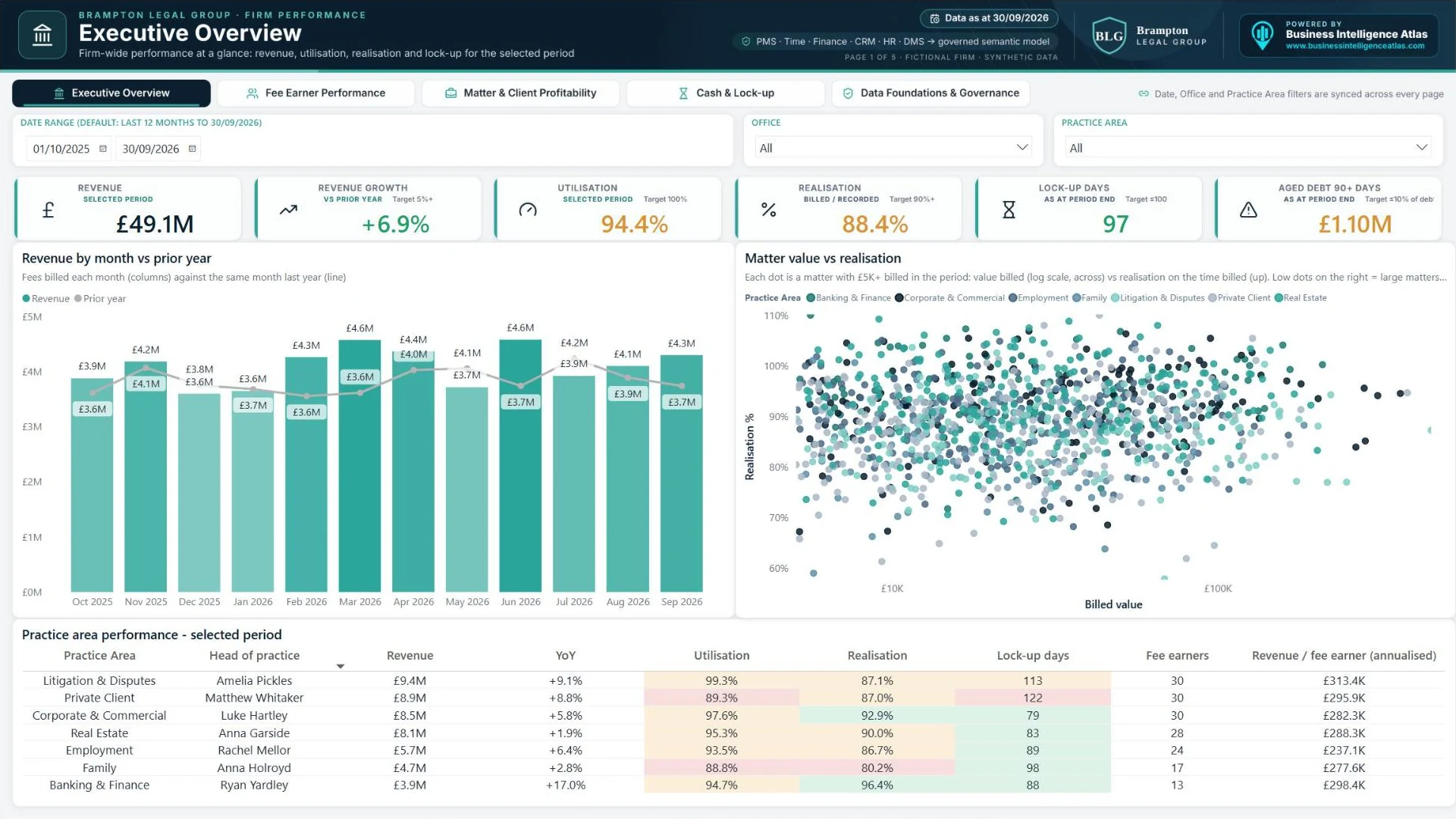
The page a managing partner opens first. It shows revenue against last year month by month, the realisation of every matter billed in the period, and a performance table by practice area. Each practice area row is colour-coded against target for utilisation, realisation and lock-up.
Who uses it: Managing partner, COO, finance director and the board.
Questions it answers:
- Are we ahead of last year, and is the growth coming from rates, volume or a few large matters?
- Which practice areas are below target on utilisation or realisation?
- Where is cash tied up in lock-up, and how much debt is over 90 days?
2. Fee Earner Performance
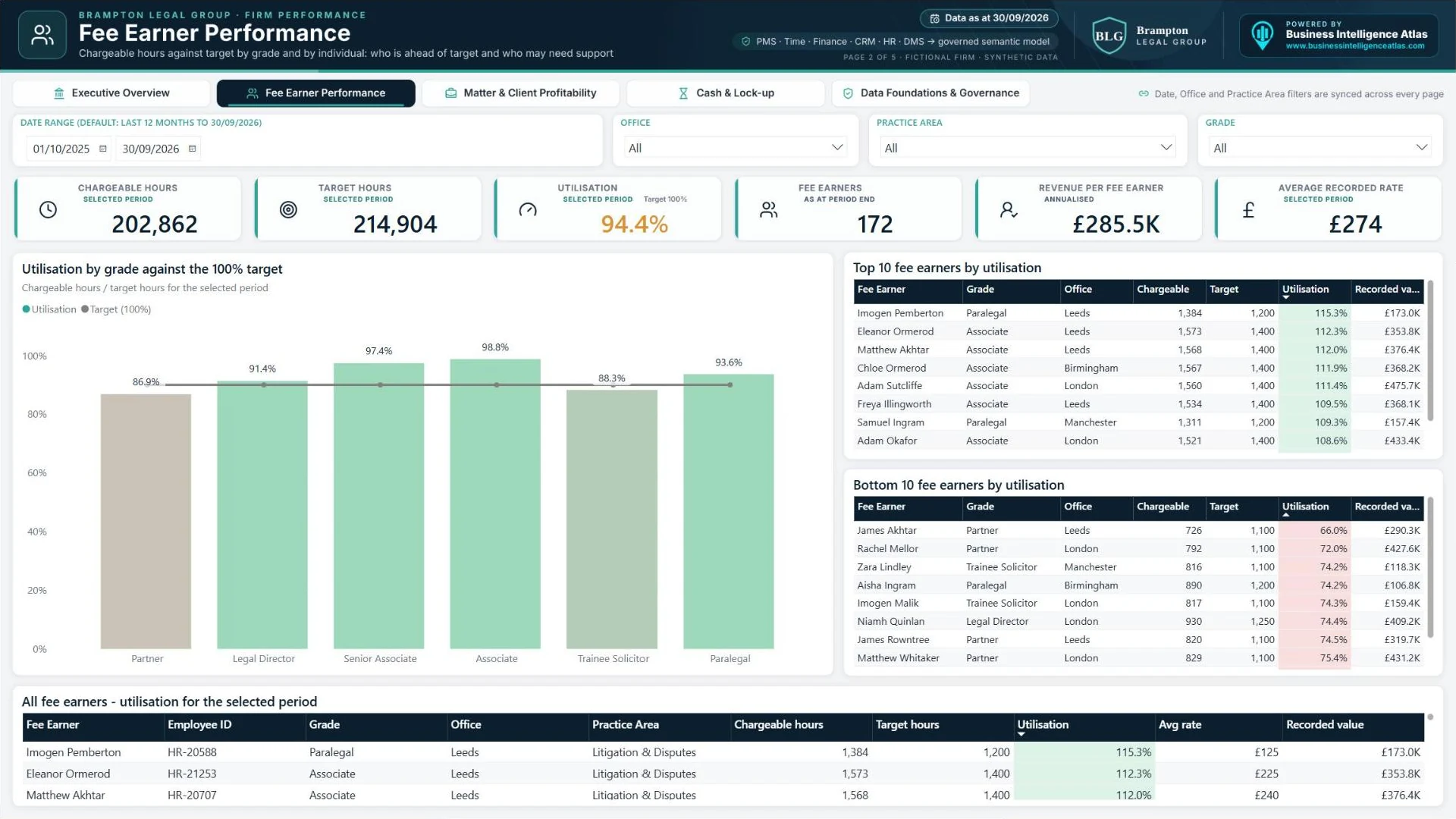
Utilisation is the most sensitive KPI in any firm, so this page is built to be fair. Target hours are pro-rated for joiners and leavers and for any part-month in the date range. Chargeable time is compared with the target in context. Seasonal dips in August and December are visible in the trend instead of being hidden in an annual average.
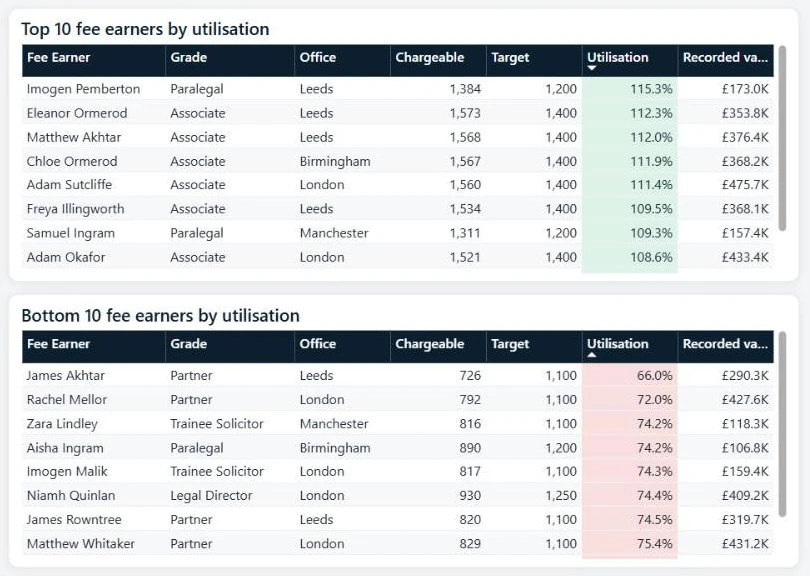
Who uses it: Practice heads, HR, COO and partners responsible for supervision.
Questions it answers:
- Which grades are consistently above or below target?
- Who is over capacity and at risk of burnout, and who has room for more work?
- Is recorded value keeping pace with chargeable hours?
3. Matter & Client Profitability
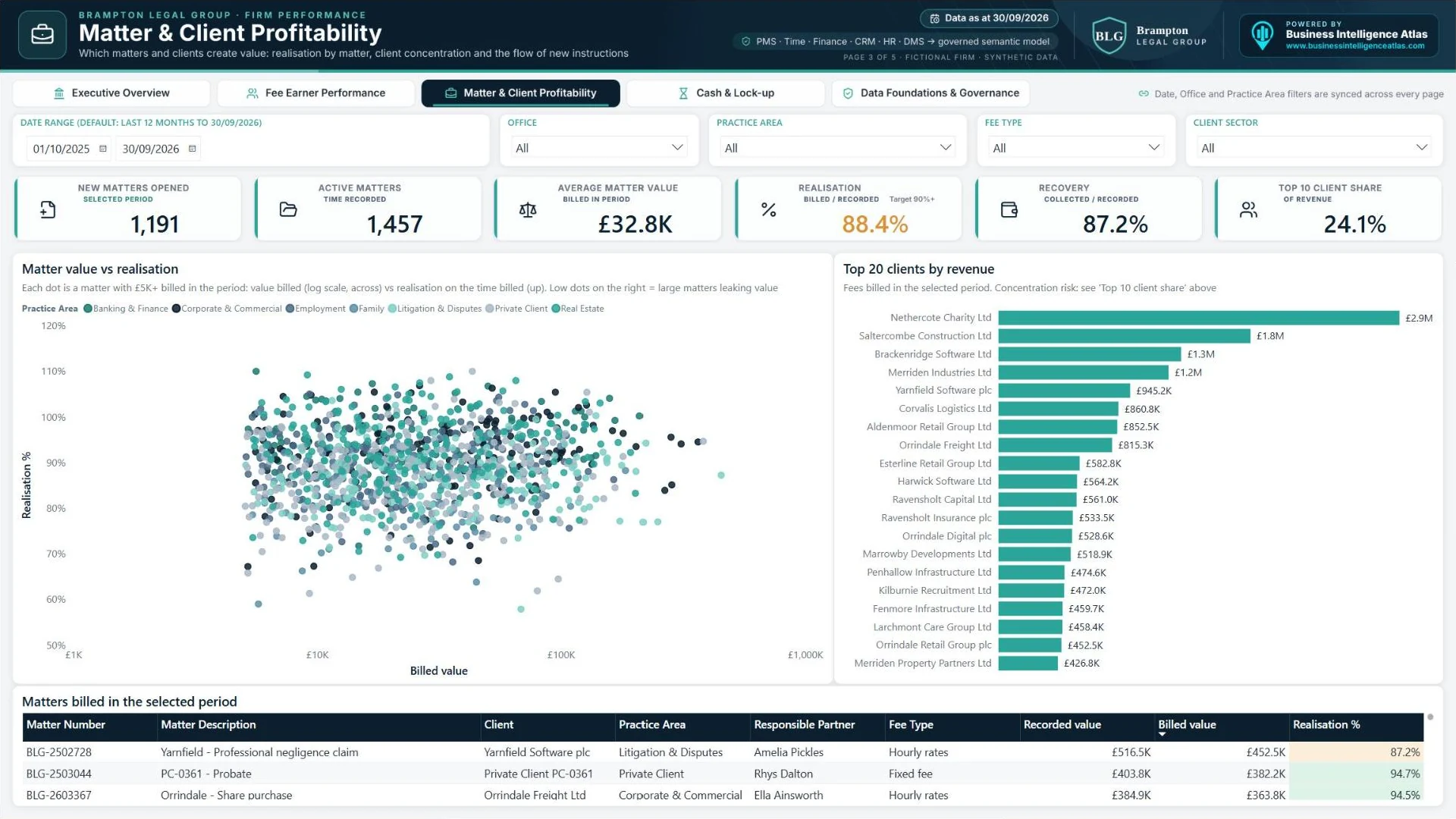
Each dot on the scatter chart is a matter billed in the period. Across is the value billed (on a log scale); up is realisation on the time billed. Large matters sitting low on the chart are where value is leaking, usually through write-offs on fixed or capped fees. Next to it, the top 20 clients by revenue and the top 10 client share show concentration risk at a glance. The new matters trend gives an early warning of future revenue.
Who uses it: Partners, practice heads, business development and pricing teams.
Questions it answers:
- Which matters and fee types are writing off the most time?
- How dependent are we on our largest clients?
- Are new instructions keeping pace in each practice area?
4. Cash & Lock-up
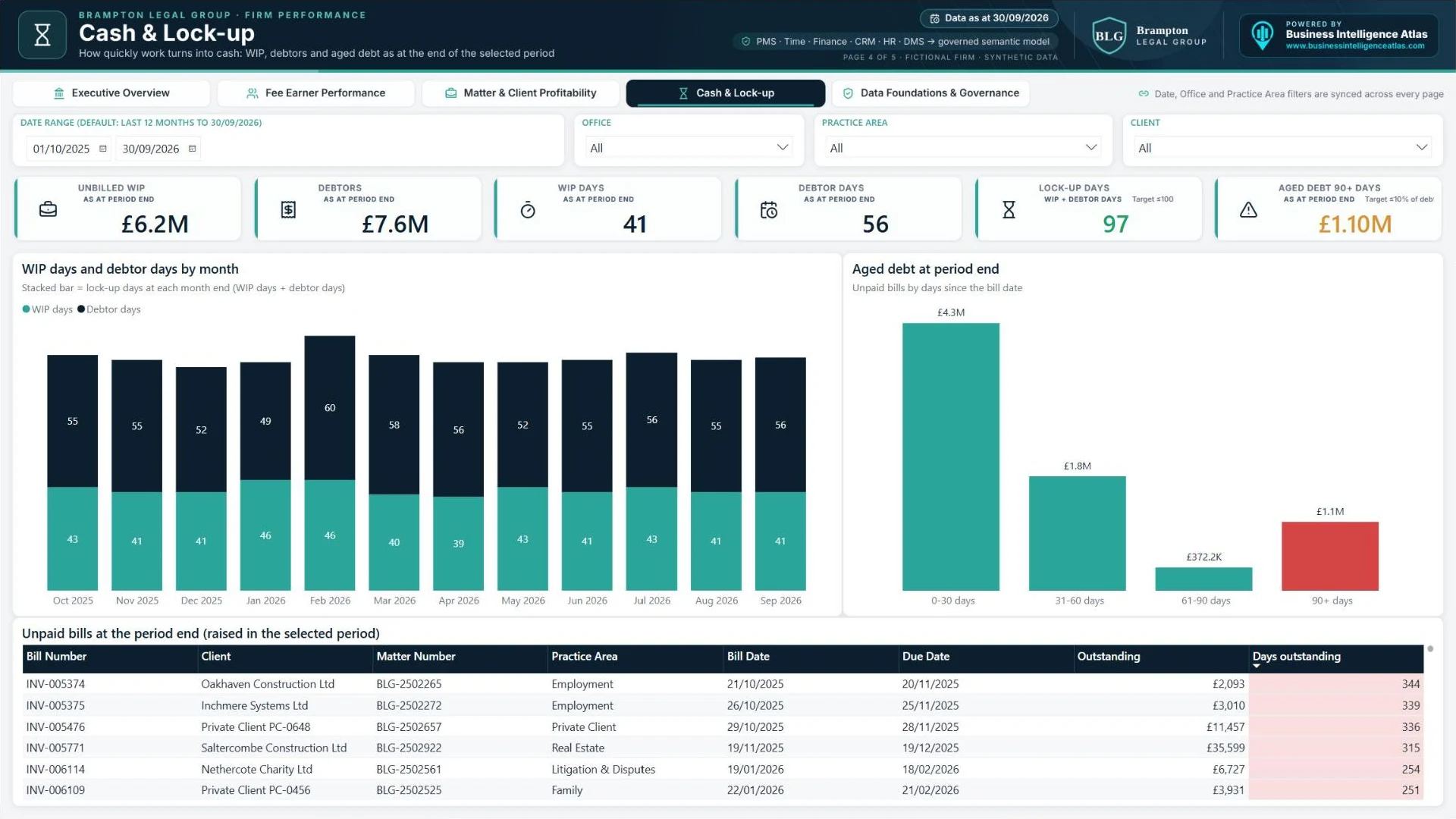
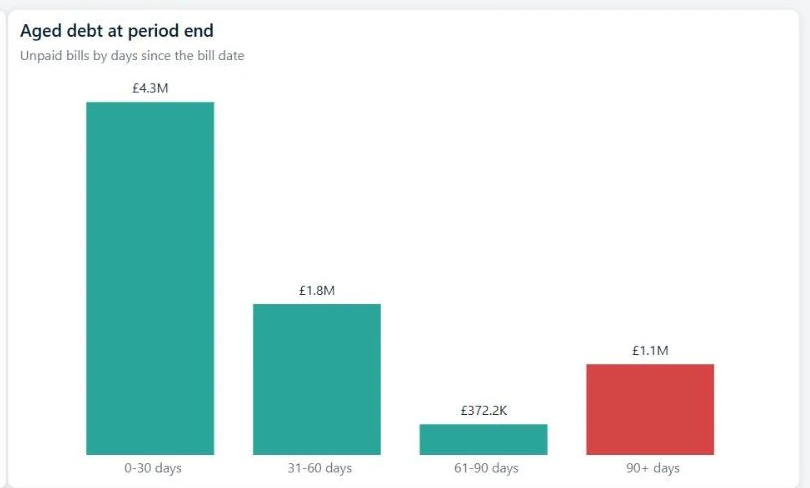
Lock-up is where profit becomes cash, or does not. This page shows WIP days and debtor days at every month end, so it is clear whether a lock-up problem is a billing problem or a collection problem. Aged debt is grouped into 0-30, 31-60, 61-90 and 90+ day buckets as at the end of the selected period. The detail table lists the unpaid bills behind it, oldest first.
Who uses it: Finance director, credit control and billing teams, and practice heads.
Questions it answers:
- Is lock-up improving, and is the issue unbilled WIP or unpaid bills?
- Which practice areas and clients hold the most aged debt?
- Which bills should credit control chase first?
5. Data Foundations & Governance
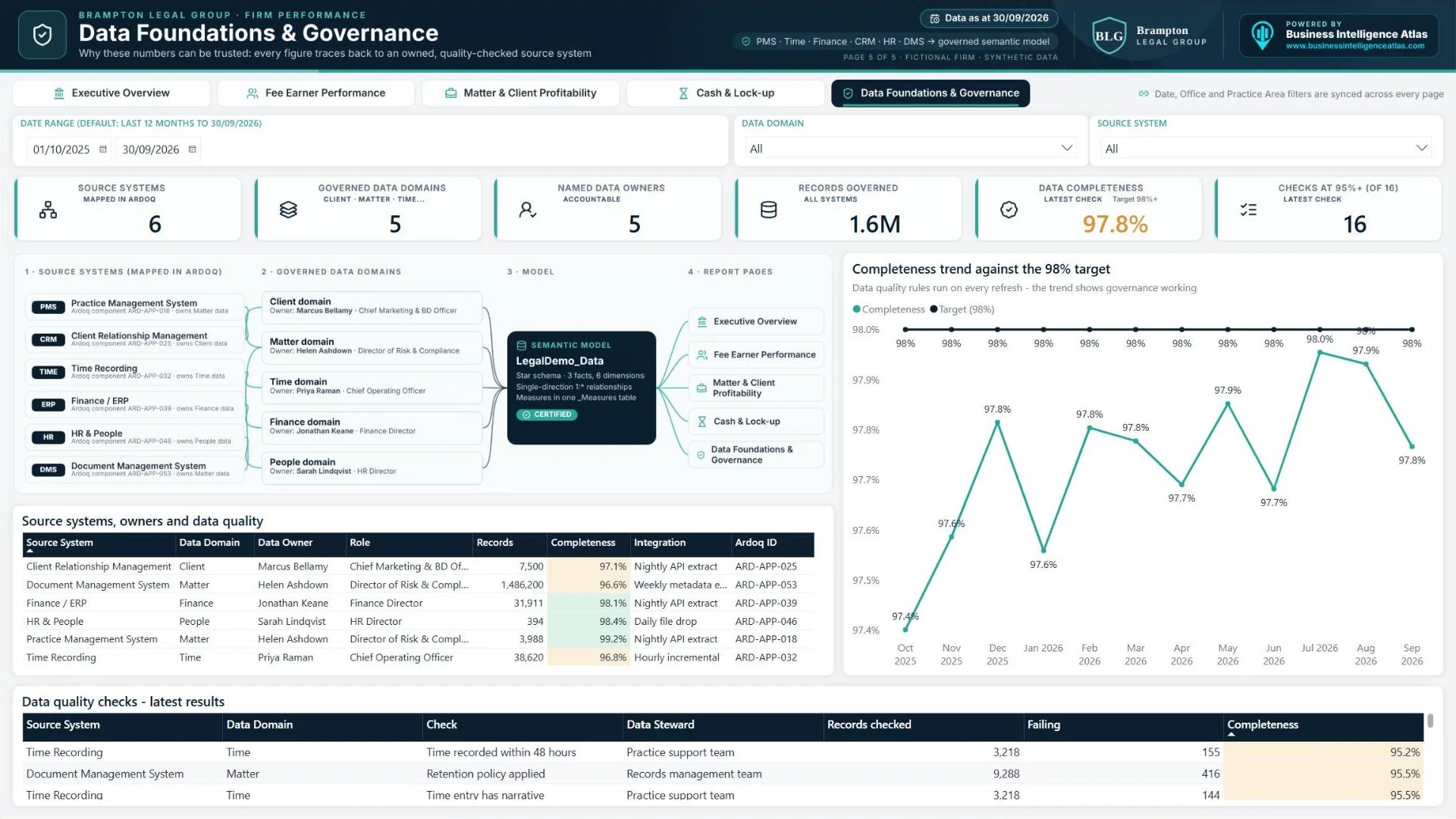
This is the page that makes the rest of the report credible. It lists each source system, the data domain it owns (Client, Matter, Time, Finance or People), the named data owner and data steward, the number of records and the completeness score from the latest data quality checks. A completeness trend shows quality improving over time against a 98% target. The detail table lists every rule, such as time recorded within 48 hours or matter has a responsible partner, with the records failing it.
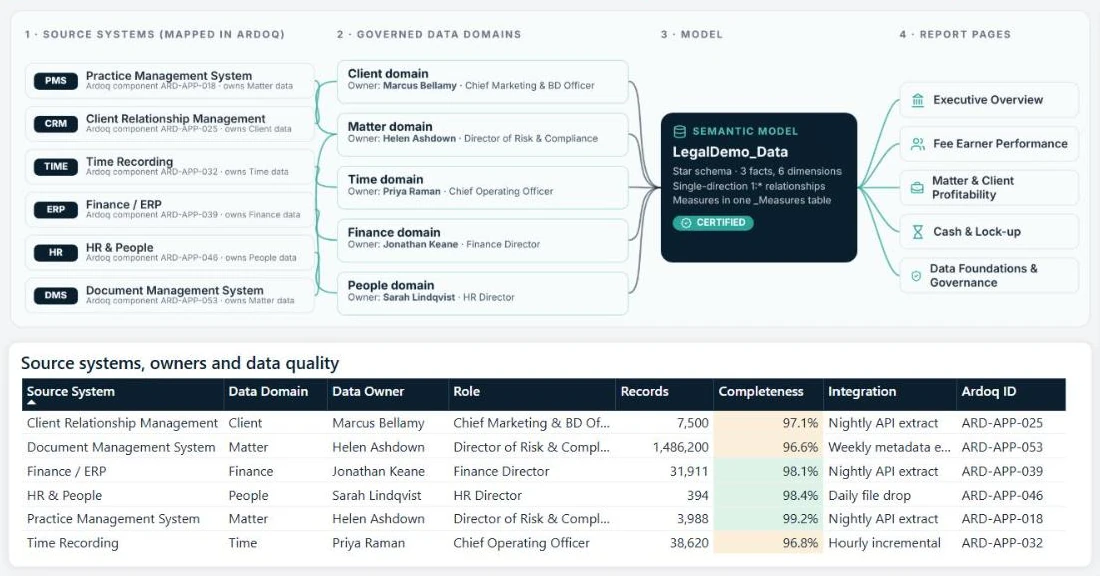
Who uses it: Chief Experience Officer, systems architect, Head of IT and data, risk and compliance.
Questions it answers:
- Where does each number come from, and who is accountable for it?
- How complete and timely is the data in each system?
- Which data quality issues should we fix first?
Want to click through it yourself? We can give you live access to the demo report, or book a no-obligation chat about reporting for your own firm.
Why data governance is the difference between a dashboard and a decision tool
A dashboard is only as useful as the trust people place in it. In law firms, that trust is earned by being open about the data. The governance page in this demo reflects how we design every engagement:
- Clear ownership. Every data domain has a named owner at leadership level and a data steward who fixes issues day to day.
- Mapped architecture. Source systems and data flows are documented in an enterprise architecture tool such as Ardoq, so the report and the architecture tell the same story.
- Measured quality. Data quality rules run on every refresh, and the results are reported like any other KPI.
- One certified semantic model. Reports, Excel analysis and future AI use cases all read from the same governed model, not from copies of the data.
- Visible lineage. Anyone can trace a figure from the report page back to the domain and the system it came from.
For firms planning AI initiatives, this foundation matters even more. Copilot and other AI tools are only as reliable as the data they draw on. A governed semantic model with agreed definitions is the safest place to start.
How it is built: Power BI and Microsoft Fabric under the bonnet
The demo follows the same build standards we use with clients in Microsoft Fabric:
- Star schema. Time entries, bills and WIP are fact tables (with payments alongside). Matters, clients, fee earners, offices, practice areas and date are dimensions. Relationships are single-direction and one-to-many, with a marked date table.
- One measures table. More than 70 DAX measures, organised in display folders, including period-end logic for WIP, debtors and aged debt, and prior-year comparisons.
- Consistent design. One colour palette, one font, red / amber / green used only for status, £ values shown in K and M, percentages to one decimal place and days as whole numbers.
- Synced filters and page navigation. Date, office and practice area stay in sync as users move between pages using the navigation bar.
- Mobile layouts. Every page has a phone layout for partners on the move.
- Security. Row-level security can restrict views by office, practice area or partner. Confidential and ethically walled matters can be excluded or masked, in line with your SRA and GDPR obligations.
- Scheduled refresh. Data refreshes automatically from source systems, with no month-end spreadsheet in the loop.
Connecting your firm’s systems
Every firm has a different technology stack, so every build is tailored to the firm’s own systems and data. Typical sources include:
| Source | Examples | What it feeds |
|---|---|---|
| Practice management | Elite 3E, Aderant Expert, Peppermint, Clio, Actionstep, LEAP, Proclaim | Matters, clients, work types, responsible partners |
| Time recording | Built-in PMS time, Intapp Time and similar tools | Chargeable and non-chargeable hours, recorded value |
| Finance / ERP | PMS finance modules, Microsoft Dynamics 365, Sage, Xero | Bills, payments, WIP, debtors |
| CRM | Microsoft Dynamics 365, Salesforce, Intapp / InterAction | Client sectors, relationships, new business |
| HR | MHR iTrent, Cezanne, HiBob, Workday | Fee earners, grades, offices, targets, joiners and leavers |
| Document management | iManage, NetDocuments | Document profiling and records governance |
Data is brought in through APIs, database connections or scheduled exports, depending on what each system supports. Where a system is hosted by a third party, we work with the vendor and your IT team to agree the most secure route.
Who this is for
- Managing partners and boards who want one trusted view of firm performance.
- COOs and finance directors who want to end manual month-end reporting and improve lock-up.
- Practice heads who need to manage utilisation, pricing and realisation in their teams.
- Chief Experience Officers, CIOs and systems architects who want reporting that reflects the firm’s data architecture and governance model.
- Risk and compliance teams who need data quality and ownership to be visible.
How we deliver law firm Power BI reporting
We deliver in phases, so the firm sees value quickly and the reporting grows with its needs.
- Discovery and KPI definitions. We agree the KPIs, definitions and targets with partners and finance, and capture the questions each audience needs answered.
- Data audit and architecture. We map the source systems, data domains, owners and data flows, using your architecture tool (such as Ardoq) where you have one.
- Semantic model. We build a governed star-schema model in Power BI or Microsoft Fabric, with all measures in one place.
- Report build. We design pages for each audience, with mobile layouts, security and scheduled refresh.
- Data quality and governance. We set up data quality rules, ownership and the governance page.
- Handover and training. We document the model and measures and train your team to use and extend them.
Phase 1 (the first release of the dashboard) typically takes four to six weeks from discovery to go-live. As part of continuous improvement, and as new requirements come up, further phases of delivery are often needed. These might add more KPIs, pages, data sources or audiences.
Tailored to your firm and your data
The demo shows the art of the possible. Every client build is customised to the firm’s practice areas, KPIs, targets, branding and, above all, its own source systems and data. The aim is not to install a template, but to give your firm reporting it owns, understands and trusts.
Frequently asked questions about law firm reporting in Power BI
What is a law firm Power BI dashboard?
It is an interactive report built in Microsoft Power BI that brings together data from a firm’s practice management, time recording, finance, CRM and HR systems. It shows KPIs such as utilisation, realisation, lock-up and matter profitability in one place, with drill-down to the detail.
Which KPIs should a law firm track?
Most firms start with revenue against last year, utilisation, realisation, recovery, WIP days, debtor days, lock-up days, aged debt, revenue per fee earner, new matters and client concentration. The right set depends on the firm’s strategy, but each KPI needs one agreed definition and a target.
What is the difference between realisation and recovery?
Realisation compares the value billed with the value of time recorded at standard rates, so it measures write-offs before billing. Recovery compares the cash actually collected with the value of time recorded, so it also captures write-offs and bad debt after billing.
How is lock-up calculated?
Lock-up days are WIP days plus debtor days. WIP days are unbilled work in progress divided by recent recorded value. Debtor days are unpaid bills divided by recent billing. Both are scaled to days and measured at the end of the period.
Can Power BI connect to our practice management system?
In most cases, yes. Power BI and Microsoft Fabric can connect to the main practice management, finance, CRM and HR systems used by law firms, through APIs, database connections or scheduled exports. We confirm the best route for each system during discovery.
How do you keep confidential matters secure?
Access is controlled with Microsoft Entra ID and row-level security, so users only see the offices, practice areas or matters they are entitled to see. Confidential or ethically walled matters can be excluded or masked, and all data stays within your Microsoft tenant.
How long does it take to build?
A first release (Phase 1) typically takes four to six weeks from discovery to go-live. Further phases are then added as part of continuous improvement, as new KPIs, data sources and requirements come up.
Is the Brampton Legal Group data real?
No. Brampton Legal Group is a fictional firm and all the data in the demo is synthetic. The model structure, measures and design reflect how we build reporting for real firms.
See the law firm dashboard in action
If you would like to explore the demo yourself, we can give you live access to the Power BI report. Or, if you are looking at reporting for your own firm, book a no-obligation discovery call. We will talk through your systems, your KPIs and what a first release could look like.
Brampton Legal Group is a fictional firm created for demonstration purposes. All names, clients, matters and figures are synthetic.
Comments are closed