
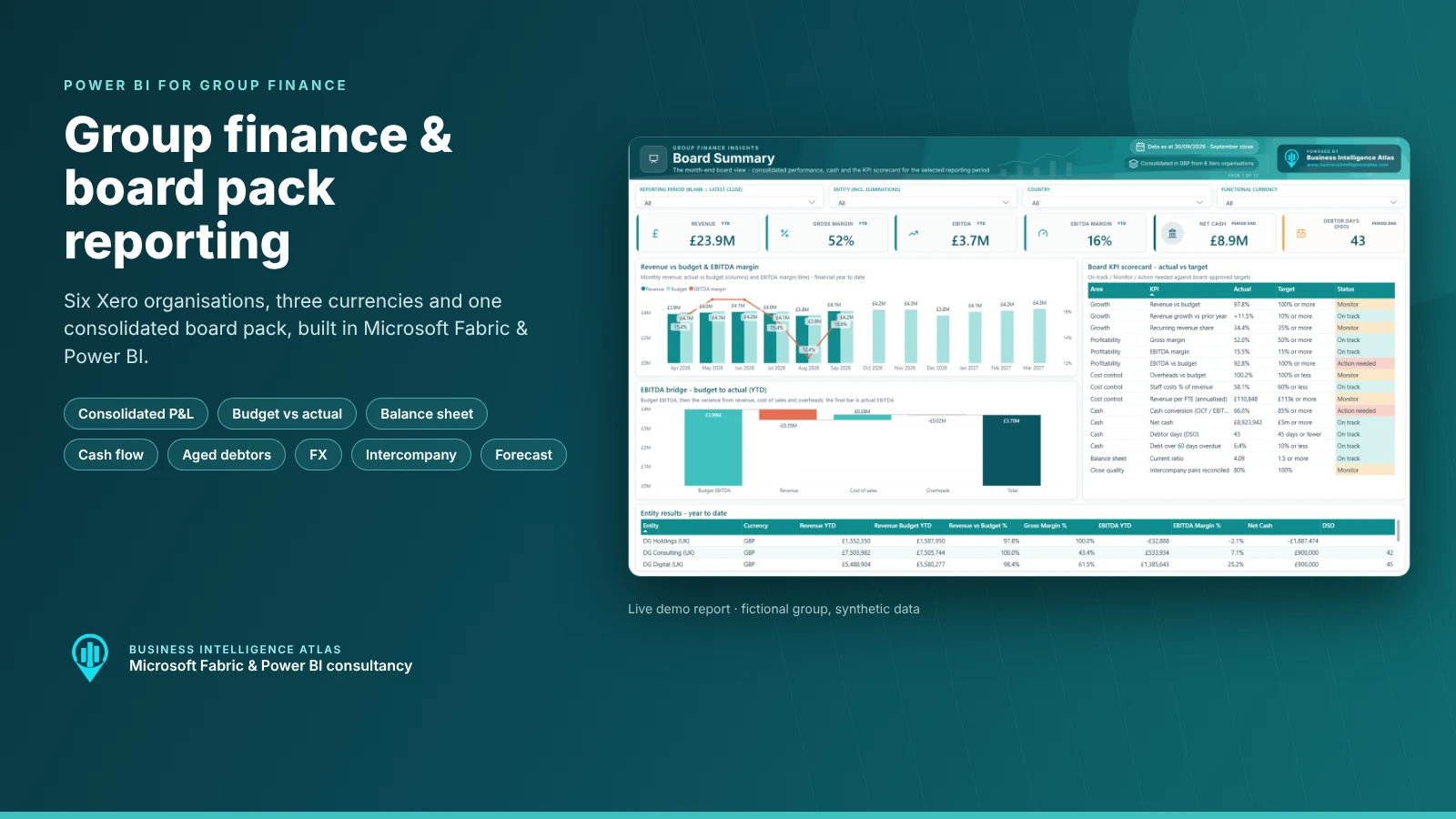
Month end in a growing group usually looks the same. Each company closes its own books. Someone exports trial balances from every entity, converts the foreign currency ones, strips out the intercompany charges, reconciles the balances that do not quite match and pastes it all into a board pack template. By the time the pack reaches the board, the numbers are two or three weeks old and nobody wants to change a figure in case something else breaks.
This article walks through a group finance and board pack report in Power BI that replaces that process. It consolidates six Xero organisations in three currencies into one governed model in Microsoft Fabric, then presents it as a twelve-page board pack: board summary, consolidated P&L, budget vs actual, revenue and customers, operating costs and people, balance sheet, cash flow, aged debtors, entities and FX, intercompany eliminations, the full-year forecast and a glossary.
The group in the demo, Demo Group, is fictional and every figure is synthetic. The consolidation logic, measures and design are what we build for real multi-entity businesses.
Watch the group finance and board pack demo
A short walkthrough of the Power BI board pack, from the board summary through consolidation, cash, debtors, intercompany and the forecast:
Key takeaways
- Six Xero organisations in GBP, EUR and USD are consolidated automatically into one GBP view, with no spreadsheet in the middle.
- The P&L and cash flow are translated at monthly average rates and the balance sheet at closing rates, the way the statutory accounts are prepared.
- Intercompany charges, balances, cash pooling and investments are eliminated on consolidation, and every elimination is visible and reconciled.
- The board summary puts performance, cash, debtors and a red / amber / green KPI scorecard on one page.
- Every number can be traced back to the Xero journal line, invoice or balance behind it.
- A first release (Phase 1) typically takes four to six weeks. Further phases then extend it as new requirements come up.
Why group finance reporting and board packs take so long
Most finance teams are not short of data. Xero, Sage, Business Central, NetSuite and other accounting systems hold every journal, invoice and balance. The time goes on everything that happens after the books are closed:
- Consolidation by spreadsheet. Trial balances from each entity are exported, mapped to a group chart of accounts and added up by hand. One mapping change can break the whole workbook.
- Foreign currency translation. Overseas subsidiaries need average rates for the P&L and closing rates for the balance sheet. Getting the translation difference to land in the right place is fiddly and easy to get wrong.
- Intercompany that never quite agrees. Management charges, recharges and loans between group companies have to be matched and eliminated. Timing differences and cash in transit mean the two sides rarely match on day one.
- Budget and forecast in a different file. The budget lives in one workbook, the reforecast in another, and the variance commentary is written against numbers that have since changed.
- No drill-down. When a board member asks what is behind that overspend?, the answer takes a day, because the pack is a picture of the numbers rather than a route back to the transactions.
A good group reporting model fixes this once. The consolidation rules are built into the model, the board pack refreshes from the source systems, and the finance team spends close week explaining the numbers instead of assembling them.
The board pack KPIs, and how they are defined
Every measure is defined once in the semantic model and used the same way on every page. These are the core board pack KPIs in the demo:
| KPI | What it tells the board | How it is calculated | Example target |
|---|---|---|---|
| Revenue vs budget % | Are we on plan? | Consolidated revenue (excluding intercompany) / budget for the same period | 100% or more |
| Gross margin % | Is delivery profitable? | (Revenue – cost of sales) / revenue | Board-set, e.g. 45% |
| EBITDA and EBITDA margin % | Underlying operating profit | Gross profit – overheads, before depreciation, interest and tax | Board-set, e.g. 15% |
| Net cash | Liquidity and headroom | Cash at bank – bank loans at the period end, at closing rates | Positive / covenant headroom |
| Debtor days (DSO) | How fast customers pay | Trade debtors / last 3 months’ revenue x 91 | 45 days or fewer |
| % debt overdue | Credit control performance | Overdue invoices / total open invoices | 20% or less |
| Cash conversion % | How much profit turns into cash | Operating cash flow / EBITDA | 85% or more |
| Recurring revenue % and ARR | Quality and predictability of revenue | Subscription and support revenue / total; annualised run-rate | Board-set |
| Revenue per FTE | Productivity | Annualised revenue / full-time equivalent headcount | By business unit |
| Intercompany pairs reconciled % | Consolidation quality | Counterparty pairs where receivable equals payable / all pairs | 100% at year end |
The targets are illustrative and are agreed with each client. The important point is that they are written down, visible on the scorecard and applied the same way every month.

Inside the Power BI board pack, page by page
Every page follows the same layout: filters at the top, headline KPI cards, two or three focused visuals and the underlying records at the bottom. A single reporting period selector drives the whole report. Leave it blank and every page shows the latest month-end close; pick an earlier month and the whole pack rolls back to that close, including balances, ageing and year-to-date figures.
1. Board Summary
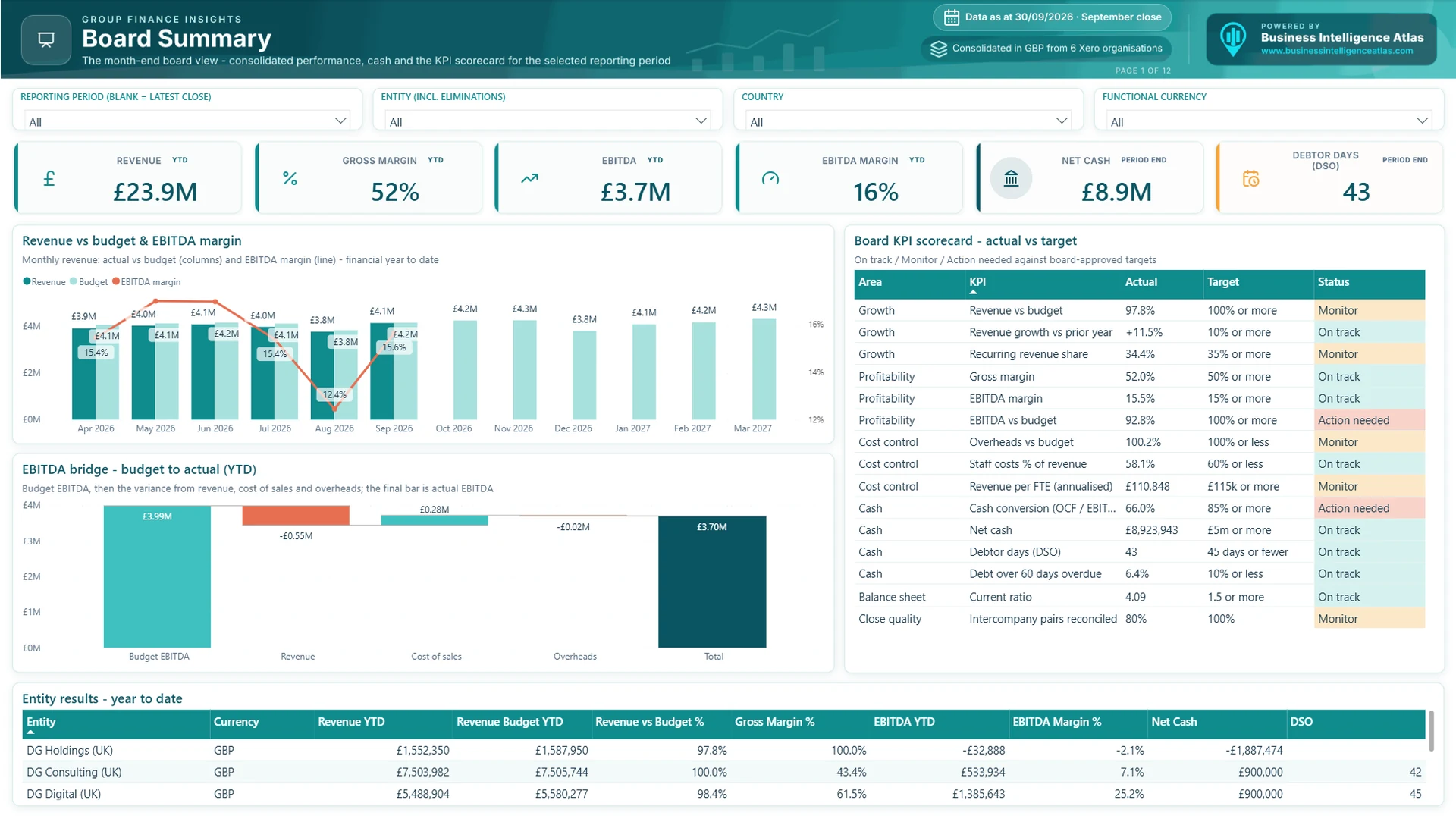
The page the board opens first. Revenue against budget by month, with EBITDA margin on the same chart. An EBITDA bridge walks from budget to actual through the revenue, cost of sales and overhead variances. The board KPI scorecard scores each measure against its target as On track, Monitor or Action needed. The table at the bottom gives the same view entity by entity.
In the demo, the September close shows £23.9M of revenue for the first six months of FY 2026/27, up 11.5% on last year but 2.2% behind budget. EBITDA is £3.7M (a 15.5% margin), £289K behind budget. Net cash is £8.9M and debtor days are 43 against a 45-day target. The scorecard flags two items for action: EBITDA against budget and cash conversion, which is 66% against an 85% target.
Who uses it: Board, CEO, CFO and investors.
Questions it answers:
- Are we ahead of or behind budget, and is that coming from revenue, delivery costs or overheads?
- How much cash do we have, and how quickly are customers paying?
- Which entities are driving the result?
2. Consolidated P&L
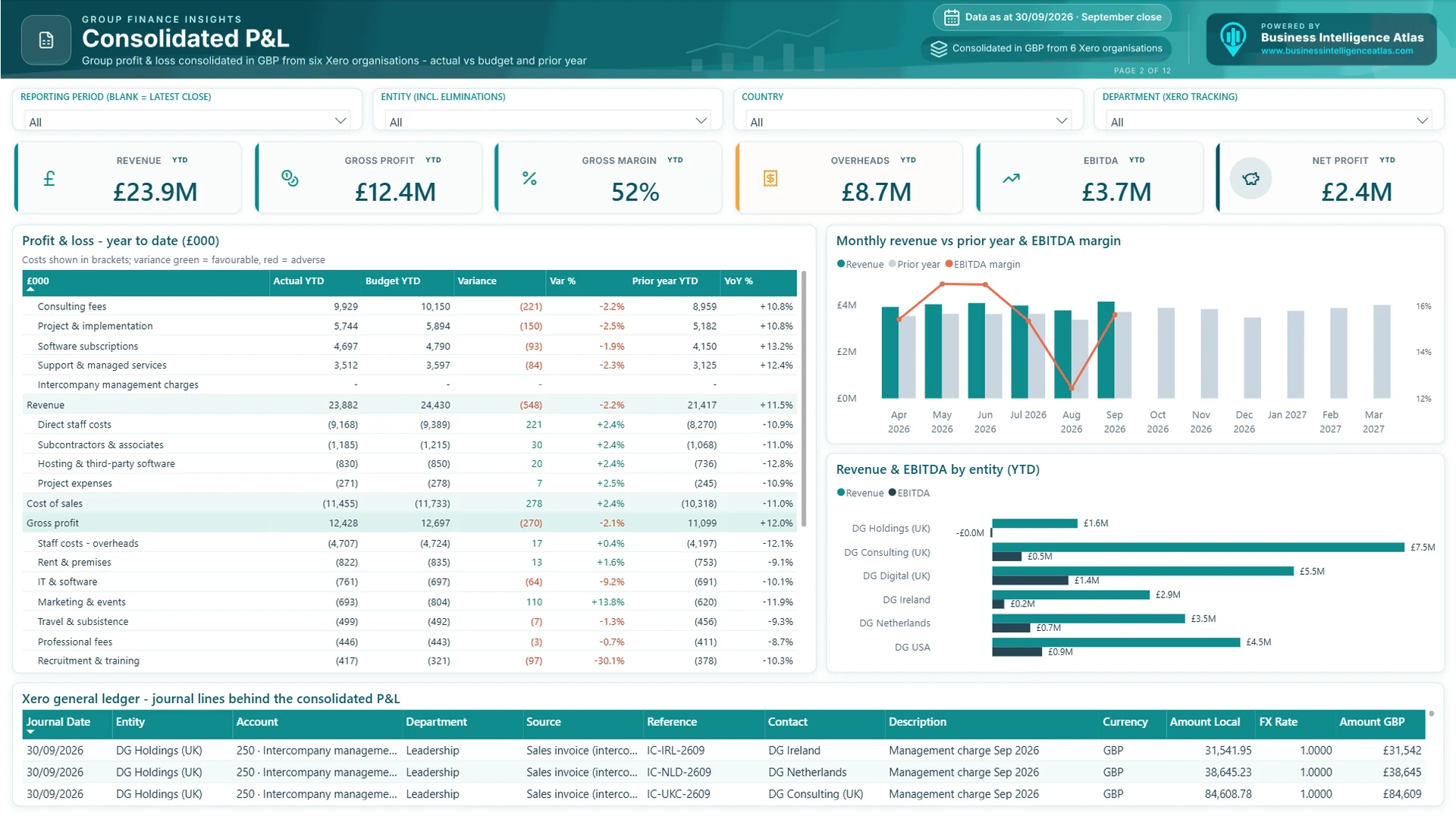
A proper management accounts layout, not a chart of accounts dump. Revenue and cost lines roll up into gross profit, EBITDA, operating profit and net profit, with budget, variance and prior year alongside. Favourable variances are green and adverse ones red, whether the line is income or cost. The table at the bottom lists the Xero journal lines behind the numbers, in local currency and in GBP, so any figure can be traced back to its source. In the demo, gross profit is £12.4M (a 52% margin) and net profit £2.4M after overheads of £8.7M.
Who uses it: CFO, financial controller and the board.
Questions it answers:
- How does this year compare with budget and with last year, line by line?
- Which entity contributes most to revenue and EBITDA?
- What exactly is in that line? (Drill to the journals.)
3. Budget vs Actual
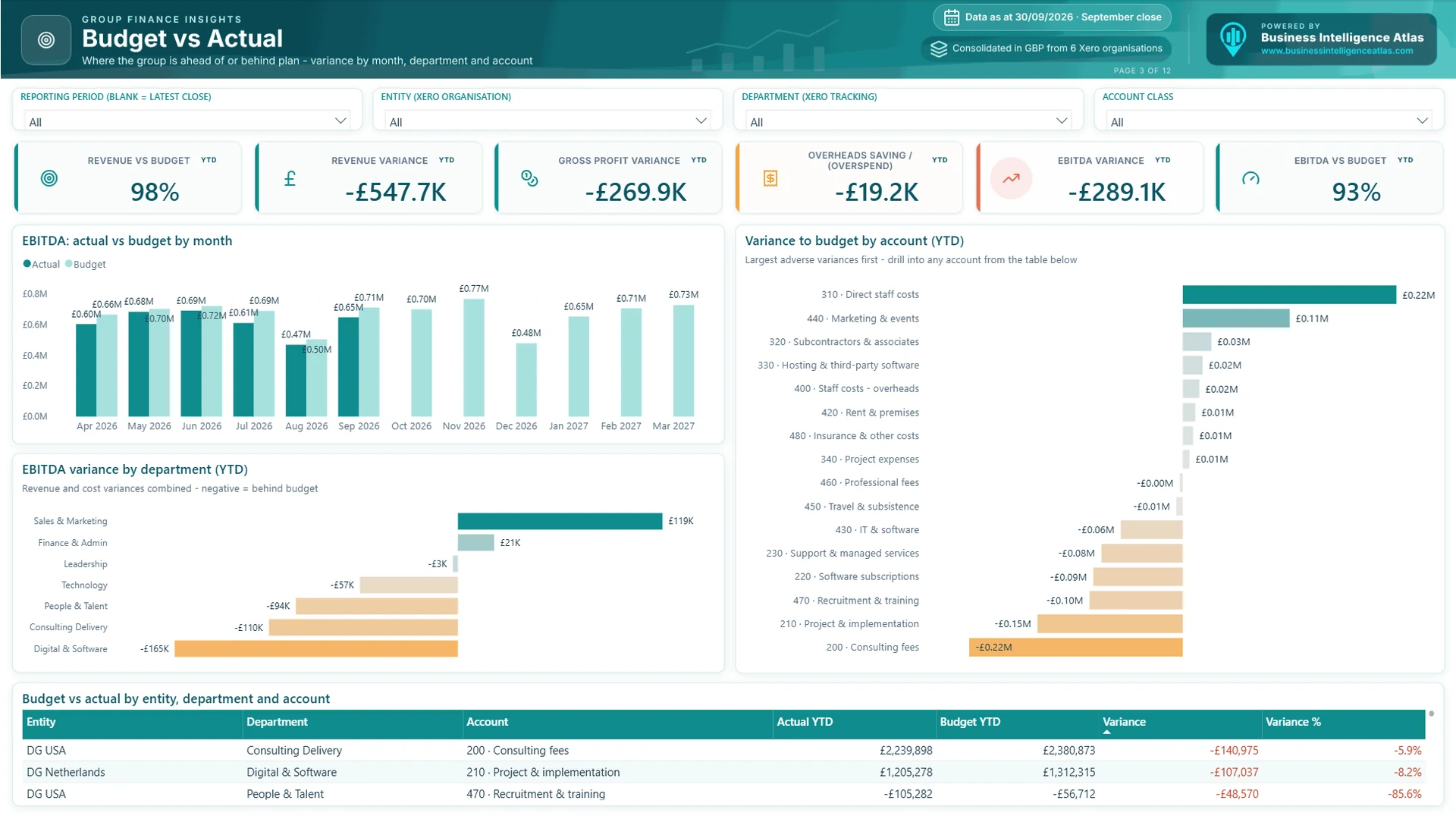
Where the group is ahead of or behind plan. EBITDA against budget by month shows whether a variance is a one-off or a trend. Variances are then split by department, using the Xero tracking categories, and by account, with the largest adverse variances first. Budget holders can filter to their own department and see exactly which accounts are over or under. In the demo, revenue is £548K behind budget, mostly in consulting fees and project work, partly offset by lower direct staff costs.
Who uses it: CFO, finance business partners and budget holders.
Questions it answers:
- Which departments and accounts explain the variance?
- Is an overspend timing, or a real cost pressure?
- Where should the reforecast change?
4. Revenue & Customers
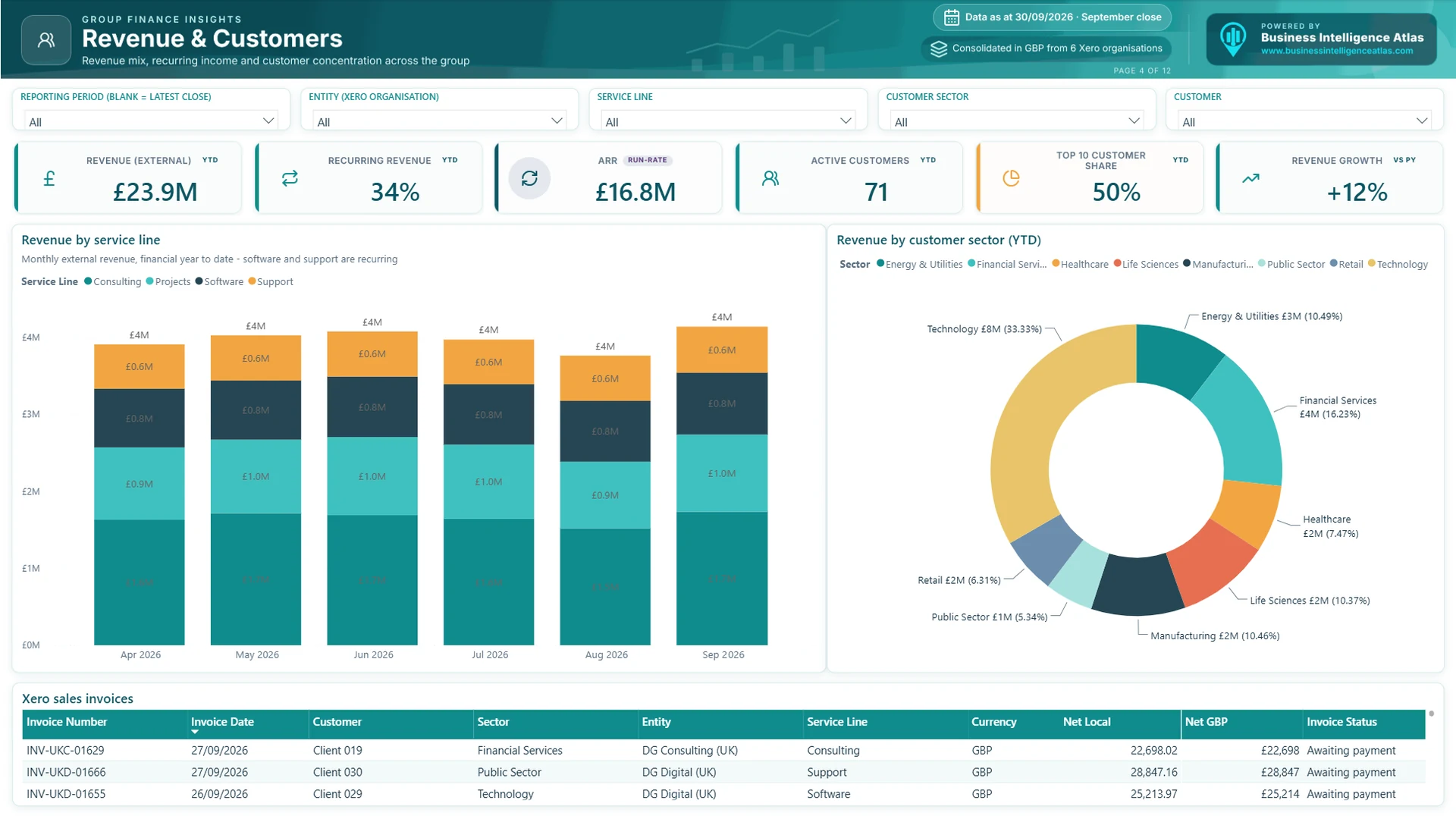
Revenue split by service line, with recurring software and support income shown separately from project and consulting work. ARR, recurring revenue %, active customers and top 10 customer share sit on the KPI row: in the demo, 34% of revenue is recurring, ARR is £16.8M and the ten largest of 71 active customers account for half of revenue. Revenue by customer sector is shown next to the trend, and the table lists the Xero sales invoices behind it.
Who uses it: CEO, CFO, sales leadership and investors.
Questions it answers:
- How much of our revenue is recurring, and is that share growing?
- How dependent are we on our largest customers?
- Which sectors are growing?
5. Operating Costs & People
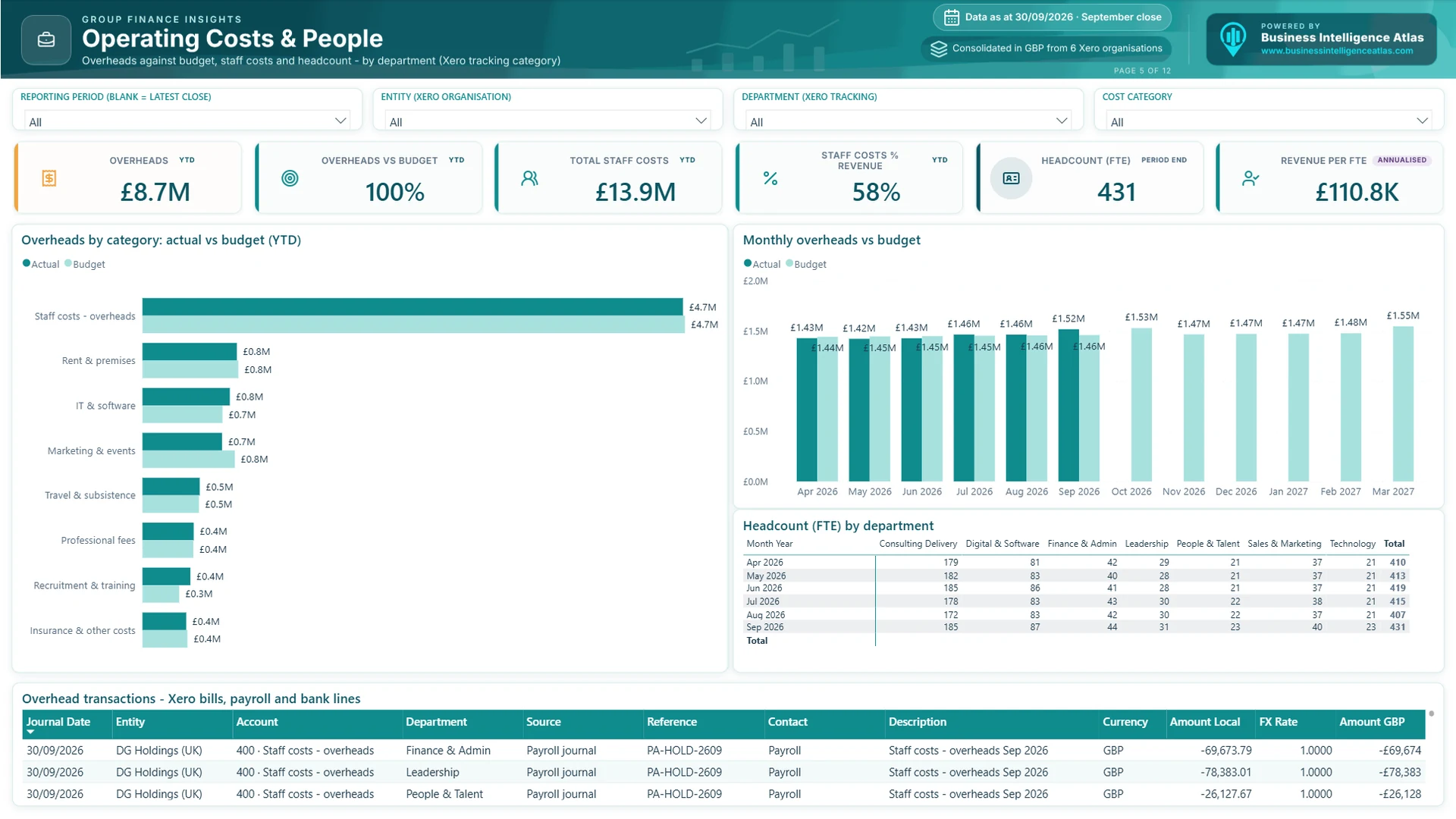
Overheads by category against budget, staff costs as a percentage of revenue, headcount (FTE) by department and revenue per FTE. For most service businesses people are the largest cost, so this page connects the payroll and headcount view with the P&L. In the demo, staff costs are 58% of revenue across 431 FTE, and revenue per FTE is £110.8K annualised. Overhead transactions (bills, payroll journals and bank lines) are listed at the bottom.
6. Balance Sheet
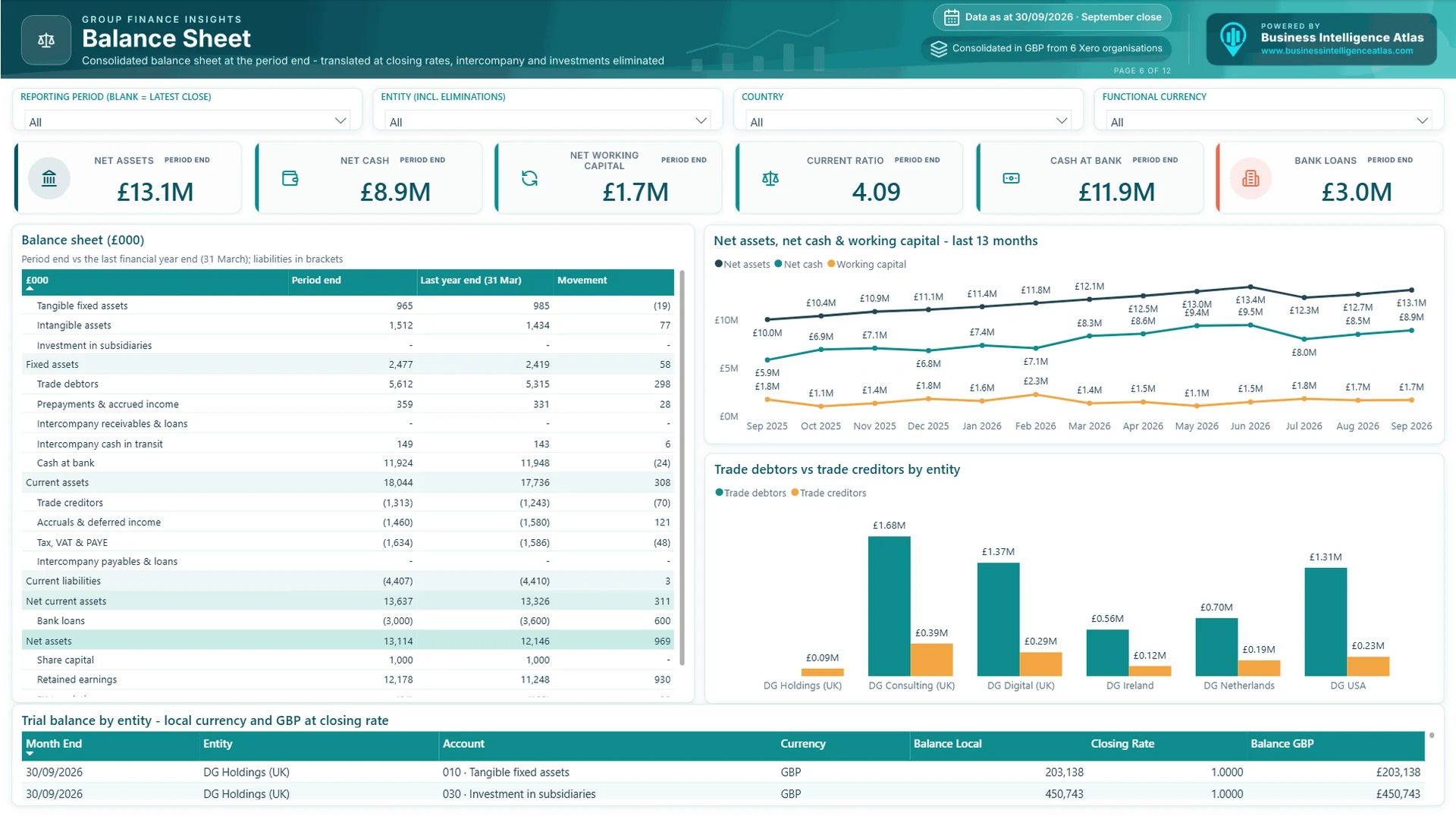
The consolidated balance sheet at the period end, compared with the last financial year end. Overseas balances are translated at closing rates; intercompany balances and investments in subsidiaries are eliminated. Trends for net assets, net cash and working capital over 13 months sit alongside trade debtors and creditors by entity, and the trial balance by entity is available underneath in local currency and GBP. In the demo, net assets are £13.1M, with £11.9M of cash at bank against £3.0M of bank loans and a current ratio of 4.1.
7. Cash Flow
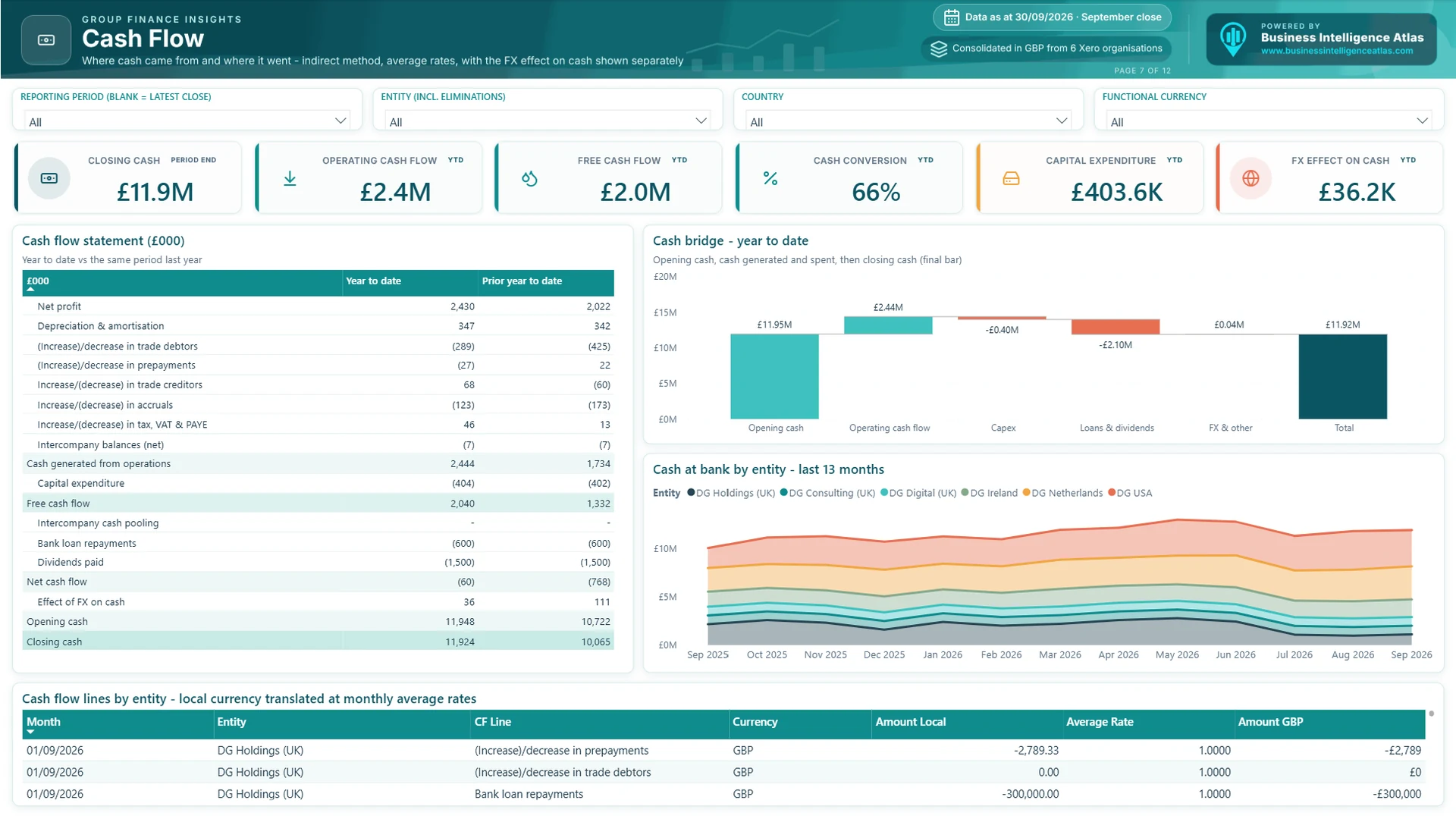
A cash flow statement on the indirect method: net profit adjusted for depreciation and working capital movements, then investing and financing flows. Flows are translated at monthly average rates and the FX effect on cash is shown as its own line, so the statement reconciles exactly to the movement in cash on the balance sheet. A cash bridge shows the story from opening to closing cash, and free cash flow and cash conversion sit on the KPI row. In the demo, operating cash flow is £2.4M, free cash flow £2.0M after £404K of capital expenditure, and £1.5M of dividends and £0.6M of loan repayments are paid out.
8. Aged Debtors & Credit Control
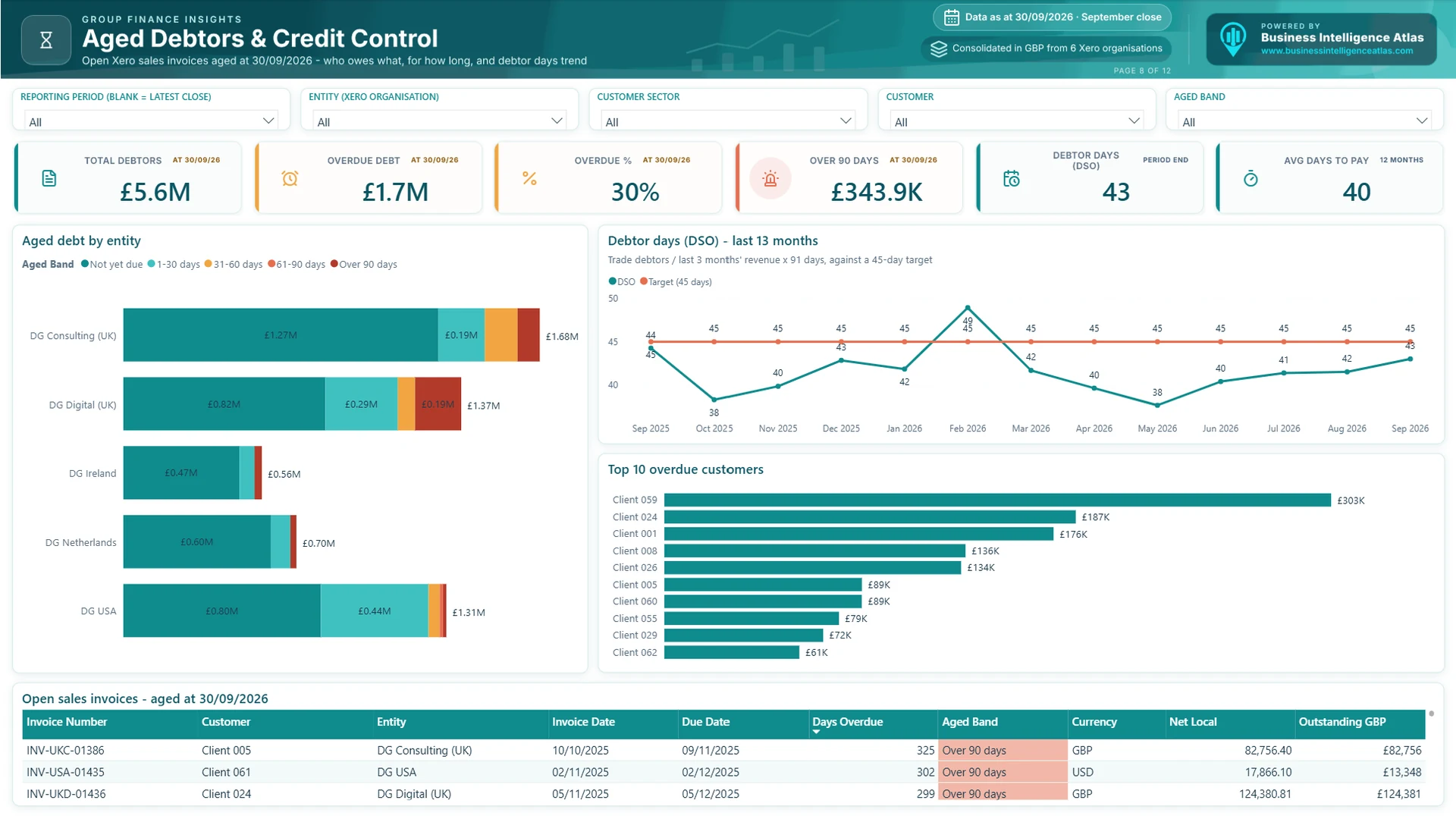
Open sales invoices aged at the period end into Not yet due, 1-30, 31-60, 61-90 and over 90 days. Debtor days (DSO) are tracked over 13 months against a 45-day target, the top 10 overdue customers are listed, and the table at the bottom is the credit control chase list, oldest first. In the demo, £5.6M is outstanding, 30% of it overdue and £344K over 90 days.
Who uses it: CFO, credit control and account managers.
Questions it answers:
- How much is overdue, and how much is over 90 days?
- Who should we chase first?
- Is DSO improving?
9. Entities & FX
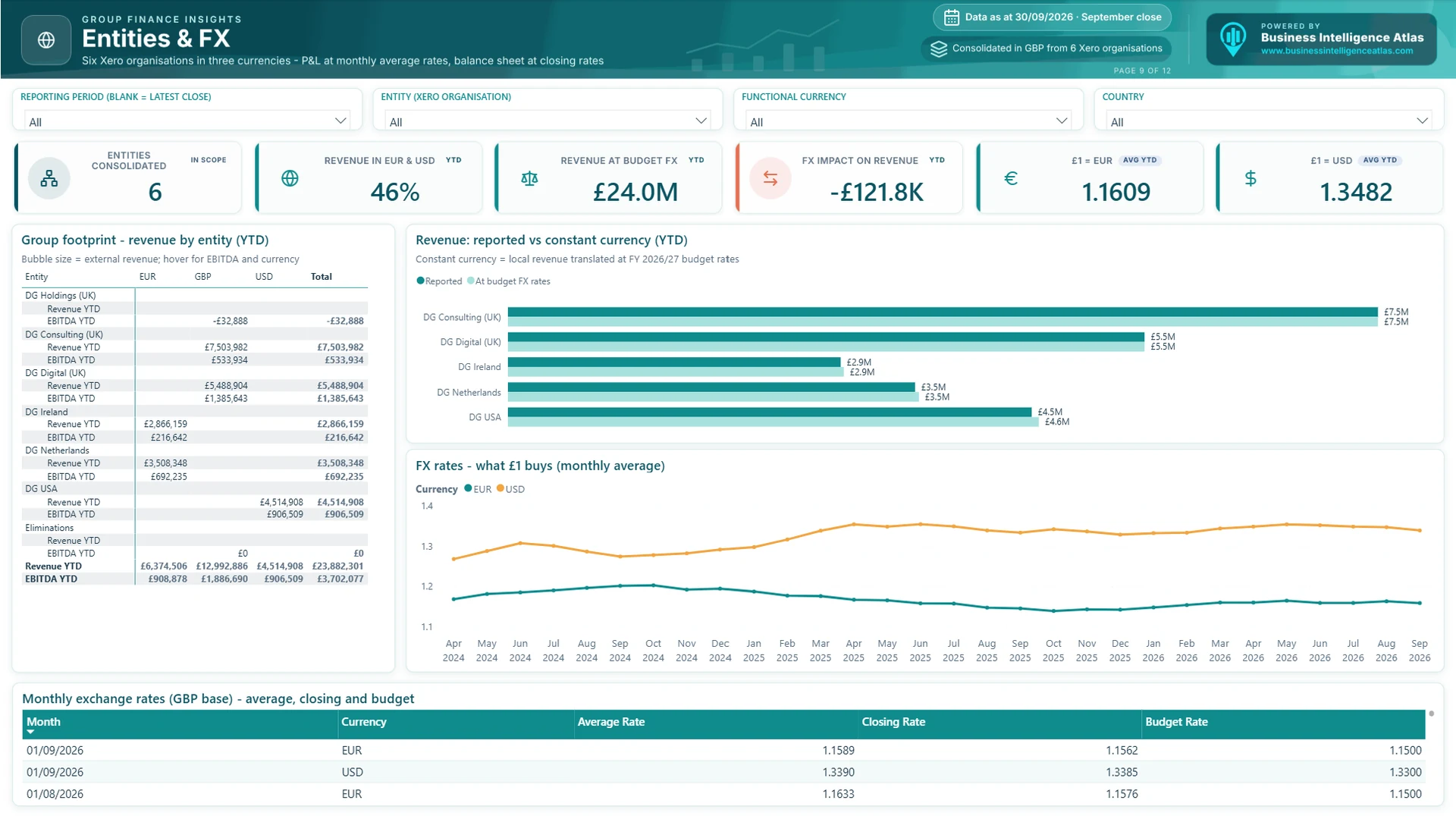
A multi-currency group needs to separate trading performance from exchange rate movements. This page shows revenue and EBITDA for each entity by functional currency, revenue at reported and at constant currency (local revenue translated at budget rates), the FX impact on revenue and the monthly average rates for EUR and USD. In the demo, 46% of revenue is earned in euros and dollars, and exchange rates have reduced reported revenue by £122K compared with budget rates. The rates table at the bottom lists the average, closing and budget rates used in the consolidation.
10. Intercompany & Eliminations
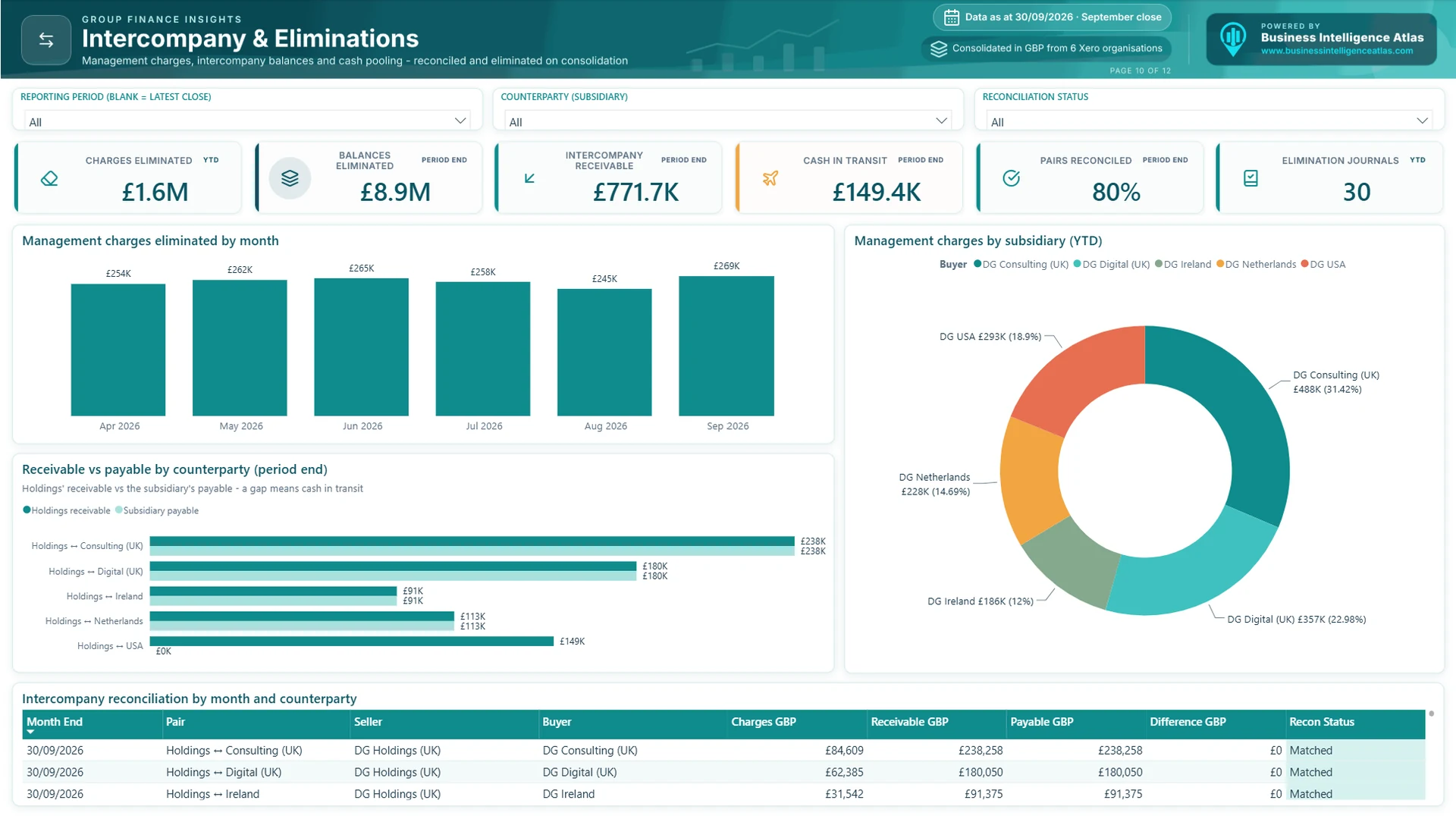
Consolidation is only as good as its eliminations. This page shows the management charges eliminated each month, the intercompany receivable and payable for each counterparty pair, and any difference, which in the demo is cash in transit at the month end. Every pair is marked Matched or flagged, and the number of elimination journals is shown on the KPI row, so the auditors and the board can see that nothing has been double counted. In the demo, £1.6M of management charges have been eliminated this year; four of the five counterparty pairs match exactly, and the fifth carries £149K of cash in transit.
11. Full-Year Forecast
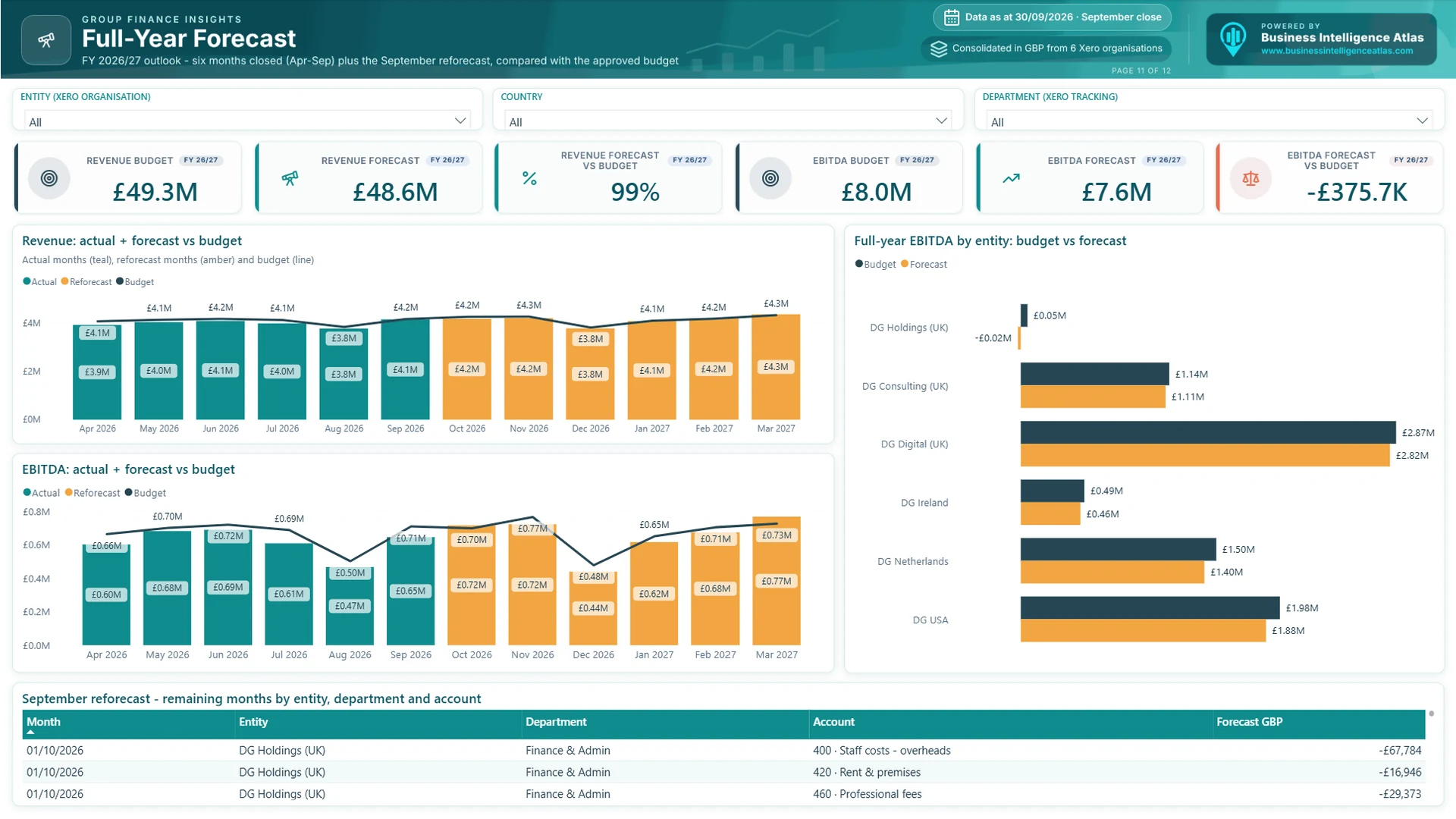
Six months closed plus the latest reforecast for the remaining months, compared with the approved budget. Actual and forecast months are stacked in different colours with budget as a line, so the board can see at a glance where the year will land. Full-year EBITDA by entity, budget against forecast, shows which businesses are expected to beat or miss their plan. In the demo, the September reforecast puts full-year revenue at £48.6M against a £49.3M budget (99%), and EBITDA at £7.6M, £376K below the £8.0M budget.
12. Glossary
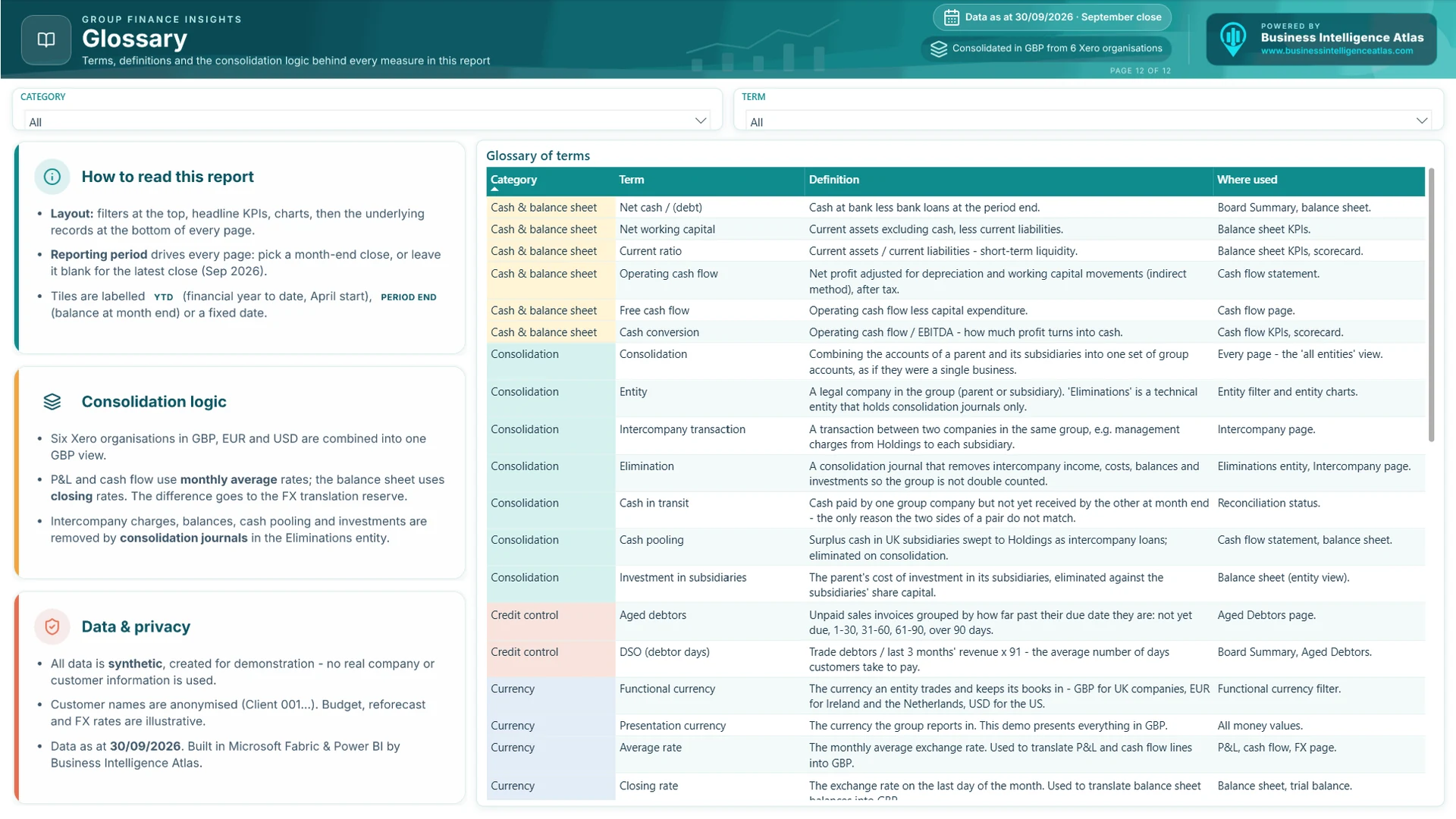
Every board pack should explain itself. The glossary page sets out how to read the report, the consolidation logic (rates, eliminations and the translation reserve), the data and privacy notes, and a searchable definition of every term and where it is used.
Want to click through it yourself? We can give you live access to the demo report, or book a no-obligation chat about group reporting for your own business.
How the consolidation works in Power BI and Microsoft Fabric
The consolidation logic lives in the model, not in a spreadsheet. That is what makes the board pack repeatable month after month:
- One group chart of accounts. Each entity’s Xero accounts are mapped once to a group account, account class and service line. New accounts are picked up by the mapping rather than by editing formulas.
- Currency translation. P&L and cash flow lines are translated at the monthly average rate; balance sheet lines at the closing rate. The difference goes to the translation reserve, so the balance sheet always balances.
- Eliminations. Intercompany revenue and costs, receivables and payables, cash pooling and investments in subsidiaries are removed by consolidation journals held in a separate Eliminations entity. They can be switched on and off in the report to show the effect.
- Budget and reforecast in the same model. Budgets and reforecasts are loaded by entity, department and account, so variances are always calculated against the same structure as the actuals.
- Period-end logic. Balances, ageing and DSO are calculated at the selected month end, so the pack can be rerun for any past close and give the same answer.
- Full audit trail. Every consolidated number drills back to the journal line, invoice or balance in the source system.
Built for Xero, and for other accounting systems
The demo uses six Xero organisations because Xero is a common choice for growing UK groups that do not have a consolidation module. The same approach works for Sage Intacct, Sage 200, Microsoft Dynamics 365 Business Central, NetSuite, QuickBooks and mixed estates where different entities run different systems. In Microsoft Fabric, data is brought in through the accounting system API or database, landed in a lakehouse, shaped into a star schema and served to Power BI through one certified semantic model.
How it is built: the technical detail
- Star schema. General ledger, sales invoices, balances, cash flow, budget, forecast, headcount, FX and intercompany are fact tables. Date, entity, account, department and customer are shared dimensions.
- Statement layouts as data. The P&L, balance sheet and cash flow layouts are tables, so subtotals, ordering and formatting are controlled in one place and can be changed without rewriting measures.
- One measures table. More than 400 DAX measures, organised in display folders, with year-to-date, prior-year, budget, forecast, constant currency and period-end logic.
- Consistent design. One palette, £ values in thousands or millions, red / amber / green used only for status, and the same layout on every page.
- Security. Row-level security can restrict each entity’s managers to their own company while the group finance team and the board see everything.
- Scheduled refresh. Data refreshes from the accounting systems automatically, so the pack is ready as soon as the books are closed.
Who this is for
- CFOs and finance directors of groups with several companies, currencies or accounting systems.
- Financial controllers who want to take consolidation and the board pack out of Excel.
- Boards, CEOs and investors who want a consistent, trusted view of performance and cash every month.
- Private equity portfolio companies that need fast, standardised monthly reporting to the fund.
- Businesses growing by acquisition, where each new company brings its own ledger and chart of accounts.
How we deliver group finance reporting
We deliver in phases, so the finance team sees value quickly and the reporting grows with the business.
- Discovery. We agree the board pack contents, KPIs, definitions and targets with the CFO and the board.
- Chart of accounts mapping. We map each entity’s accounts to a group structure and agree the consolidation rules, rates and eliminations.
- Data platform and model. We connect the accounting systems, land the data in Microsoft Fabric and build the governed semantic model.
- Board pack build. We design the pages, statement layouts and drill-downs, with security and scheduled refresh.
- Parallel run. We run the new pack alongside the existing one for a month end and reconcile every number.
- Handover and training. We document the model and train the finance team to maintain and extend it.
Phase 1 (the first release of the board pack) typically takes four to six weeks from discovery to go-live. As part of continuous improvement, and as new requirements come up, further phases are often added: new entities, cash forecasting, project or product profitability, or management reporting for each business unit.
Tailored to your group and your data
The demo shows the art of the possible. Every client build is tailored to the group’s own entities, chart of accounts, consolidation rules, KPIs, branding and, above all, its own systems and data. The aim is a board pack your finance team owns, understands and trusts.
Frequently asked questions about group finance reporting in Power BI
Can Power BI consolidate multiple Xero organisations?
Yes. Data from each Xero organisation is brought into one model, mapped to a group chart of accounts, translated into the group currency and consolidated with intercompany eliminations. The same approach works for other accounting systems and for mixed estates.
What should a monthly board pack include?
Most board packs cover a summary with a KPI scorecard, the P&L against budget and prior year, the balance sheet, cash flow, aged debtors, the full-year forecast and commentary. Multi-entity groups also need entity results, FX and intercompany reconciliation.
How is foreign currency handled in a Power BI consolidation?
P&L and cash flow figures are translated at monthly average rates and balance sheet figures at closing rates, with the difference taken to the translation reserve. Constant currency views use budget rates so that trading performance can be separated from exchange rate movements.
How are intercompany transactions eliminated?
Intercompany charges, receivables and payables, cash pooling and investments are removed with consolidation journals held in a separate eliminations entity. The report shows each counterparty pair, whether it reconciles and any difference, such as cash in transit.
Does this replace our consolidation software?
For many growing groups it does, because the consolidation rules and the board pack live in one governed model. Groups with complex statutory consolidation may keep a dedicated tool and use Power BI for management reporting on top of it.
Is our financial data secure?
Data stays within your Microsoft tenant. Access is controlled with Microsoft Entra ID and row-level security, so entity managers can be limited to their own company while the group finance team and the board see the whole group.
How long does it take to build?
A first release (Phase 1) typically takes four to six weeks from discovery to go-live, including a parallel run against the existing month-end pack. Further phases are then added as part of continuous improvement.
Is the Demo Group data real?
No. Demo Group is fictional and all the data in the demo is synthetic. The consolidation logic, measures and design reflect how we build group reporting for real businesses.
See the board pack in action
If you would like to explore the demo yourself, we can give you live access to the Power BI report. Or, if you are looking at group reporting for your own business, book a no-obligation discovery call. We will talk through your entities, systems, month-end process and what a first release could look like.
Demo Group is a fictional group created for demonstration purposes. All names, customers and figures are synthetic.
Comments are closed