
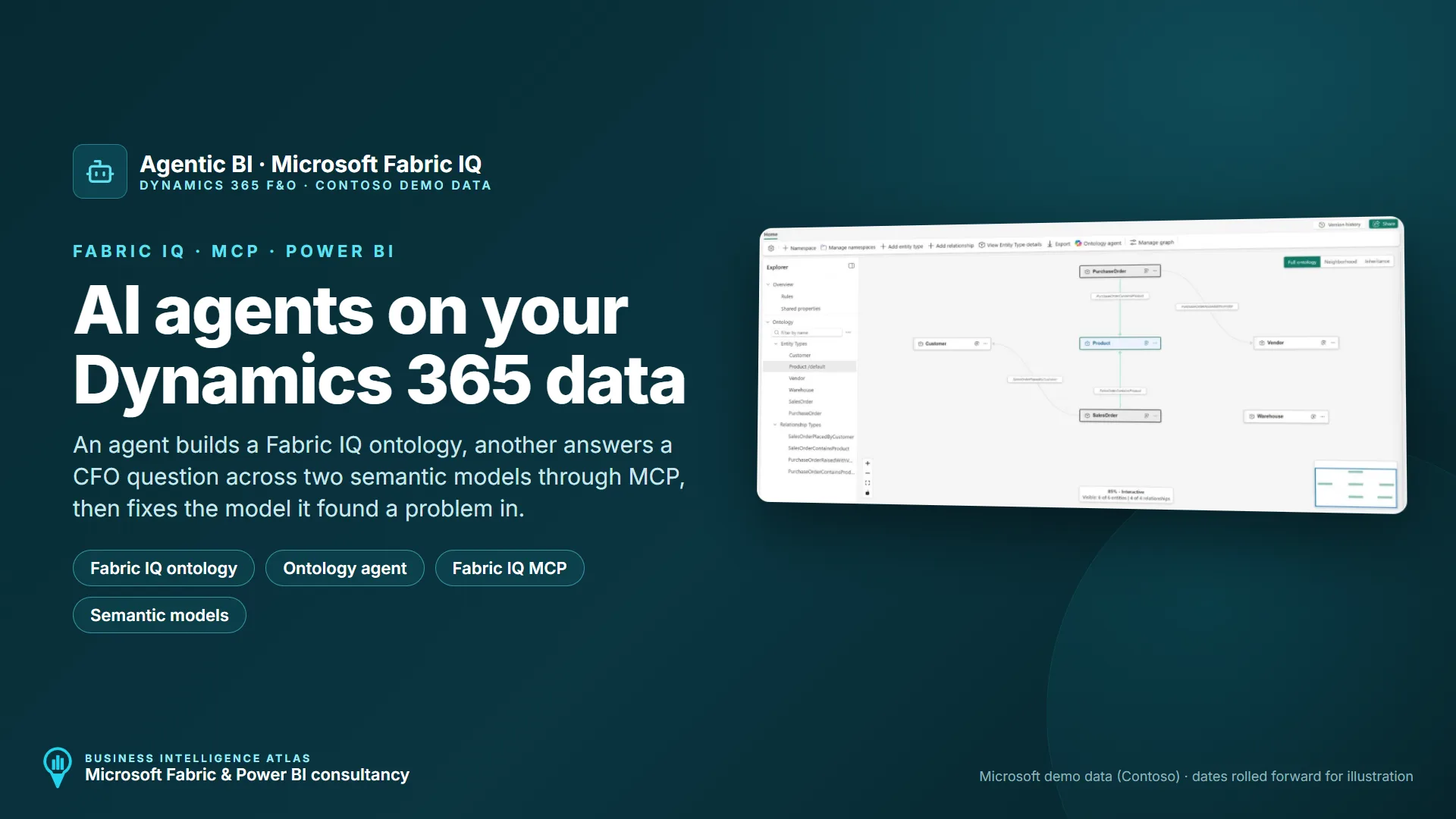
Everyone is talking about AI agents that work with your data. We wanted to see what they actually do on a real ERP data model, so we pointed them at Dynamics 365 Finance & Operations (D365 F&O) data in Microsoft Fabric: the same platform and semantic models as our D365 module series.
Three acts, all on live data. First, Fabric’s Ontology agent builds a business ontology from our semantic models. Second, an AI agent connected to the Fabric IQ MCP server answers a CFO question that spans two semantic models, writing its own DAX. Third, the agent fixes the model after finding that reported margin was overstated, and checks its own fix. Every tool call below is from the logged run.
Watch: AI agents on Dynamics 365 data in Fabric
Key takeaways
- The Ontology agent (preview) read our D365 semantic models and proposed six entity types and four relationships, each bound to a real table and key. It left out two relationships it couldn’t ground instead of inventing joins.
- The Fabric IQ MCP server (generally available, read-only) let an agent discover two models, read their schemas and chain DAX queries across them, under the user’s own permissions.
- The answer: the three biggest wholesalers earn £18.7M margin with nothing overdue; three public-sector customers owe £3.39M overdue, and their “100% margin” is uncosted revenue.
- D365 traps the agent had to handle: customer account numbers repeat across legal entities, and free-text invoices carry no cost.
- The agent added two measures to the model and verified them: £8.3M of £116.8M revenue has no cost, so margin on costed sales is 43.3%, not 47.4%.
What’s new: three building blocks for agentic BI

Model Context Protocol (MCP) is the open standard AI agents use to call tools. Microsoft now ships MCP servers for Fabric and Power BI, alongside a new way to describe your business to agents:
| Building block | What it does | Status (November 2026) |
|---|---|---|
| Fabric IQ ontology | Business concepts (customer, product, order) as entity types bound to your data, with relationships, rules and metrics | Preview |
| Ontology agent | A Copilot chat in the ontology item that plans and builds the ontology from your data | Preview |
| Fabric IQ MCP server | Remote MCP server: find reports and semantic models, read metadata, search values, run DAX; read-only | Generally available |
| Power BI Authoring MCP server | Create and edit semantic models (and reports) from an agent: measures, relationships, descriptions, TMDL and PBIP | Local: generally available · Hosted: preview |
The setup: Dynamics 365 to Fabric IQ
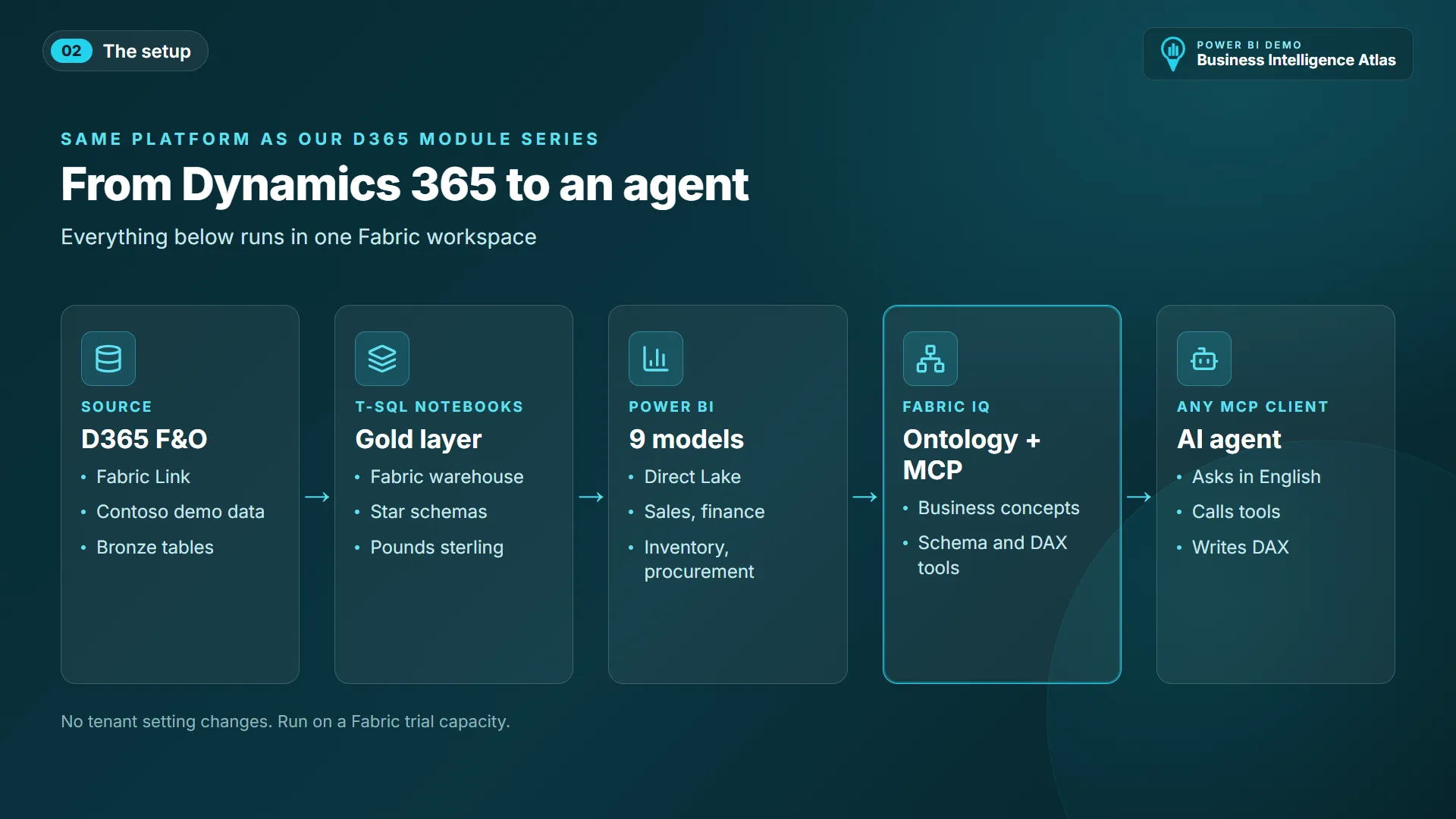
Dynamics 365 F&O replicates into Fabric through Fabric Link. T-SQL notebooks build a Gold layer, and nine Direct Lake semantic models sit on top (sales, finance, inventory, procurement, production and others): the platform described in D365 F&O to a Power BI board pack in Microsoft Fabric. Fabric IQ adds the ontology and the MCP endpoint. We didn’t change any tenant settings for this demo, and it ran on a Fabric trial capacity.
Act 1: the Ontology agent builds a business ontology
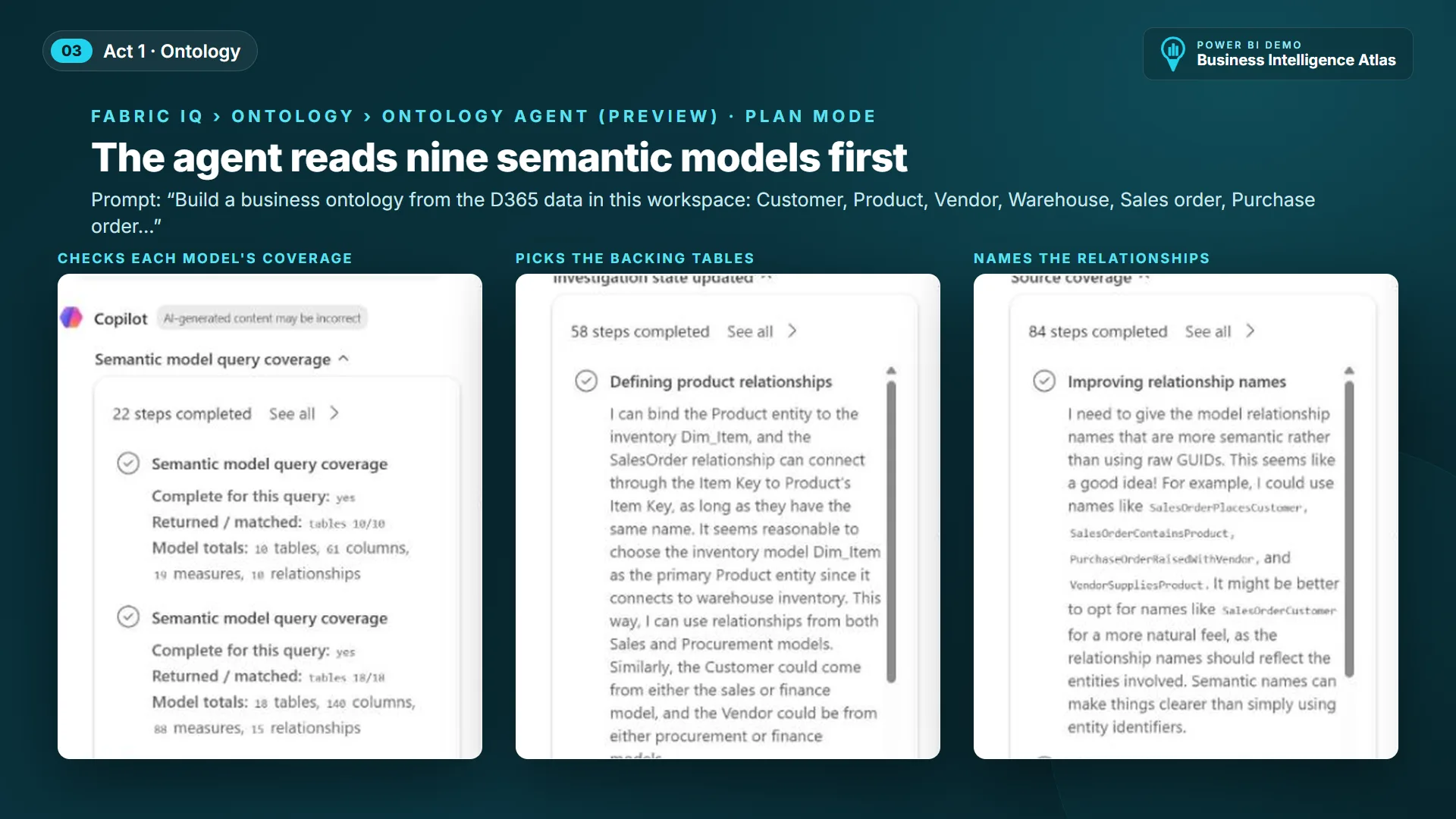
We created an ontology item in the workspace, opened the Ontology agent, switched to Plan mode and asked:
Discover the Dynamics 365 Finance & Operations data in this workspace (semantic models and the gold tables) and build a business ontology from it. I want entity types for Customer, Product (item), Vendor, Warehouse, Sales order and Purchase order, with their key properties, and relationships such as Customer places Sales order, Sales order contains Product, Vendor supplies Product, Purchase order is raised with Vendor, Product is stocked in Warehouse. Show me the plan first.
It queried the semantic models in the workspace (more than 80 steps), checked how much of each model its queries covered, and reasoned in the open about which table should back each concept and how to name each relationship.
The plan
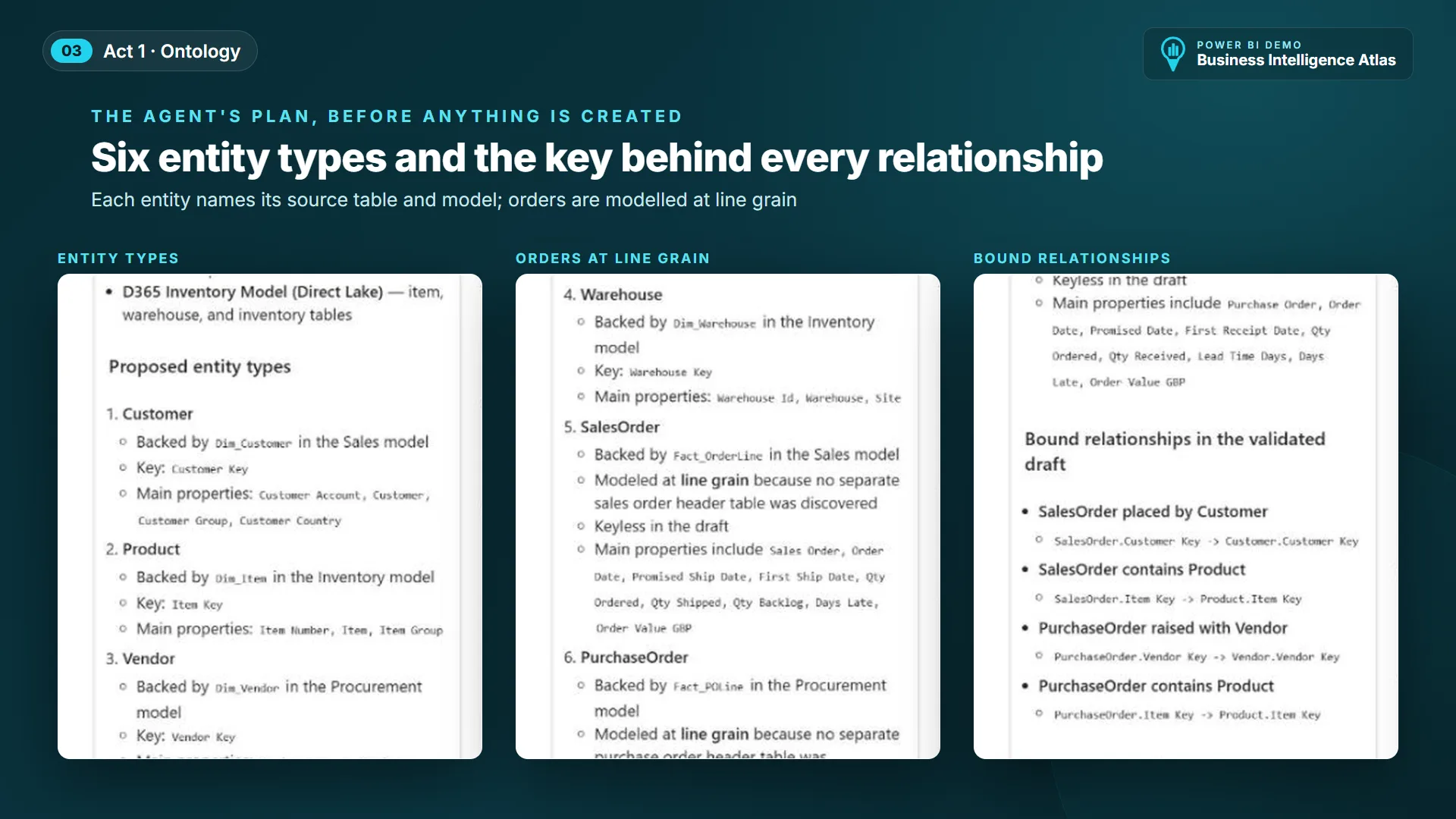
The plan named a source for every entity: Customer from Dim_Customer in the Sales model, Product from Dim_Item in the Inventory model, Vendor from Dim_Vendor in Procurement and Warehouse from Dim_Warehouse. Sales and purchase orders were modelled at line grain, because our models have no order header table. Each of the four relationships came with the exact key it joins on, for example SalesOrder.Customer Key → Customer.Customer Key.
It left out what it couldn’t ground

We had also asked for Vendor supplies Product and Product is stocked in Warehouse. Our models only connect those through fact tables, not through a direct relationship between the dimensions, so the agent left them out of the draft and explained why. That is exactly what you want: an ontology that only states relationships the data supports. We switched to Act, approved, and it applied the draft.
The result
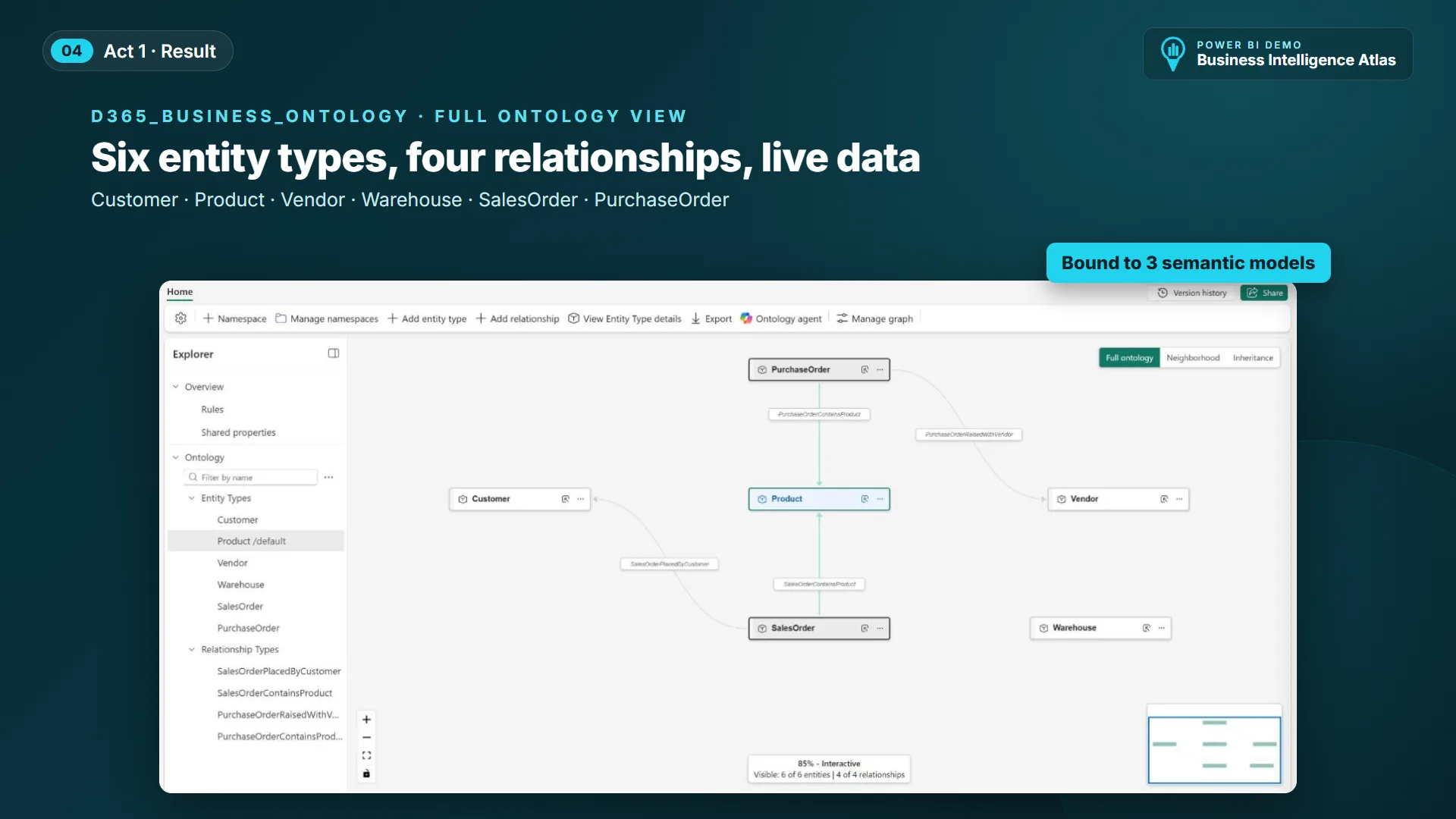
Six entity types and four relationship types, bound to live data in three semantic models. Warehouse stands alone for now, which is accurate: nothing in our models links it directly to the others yet.
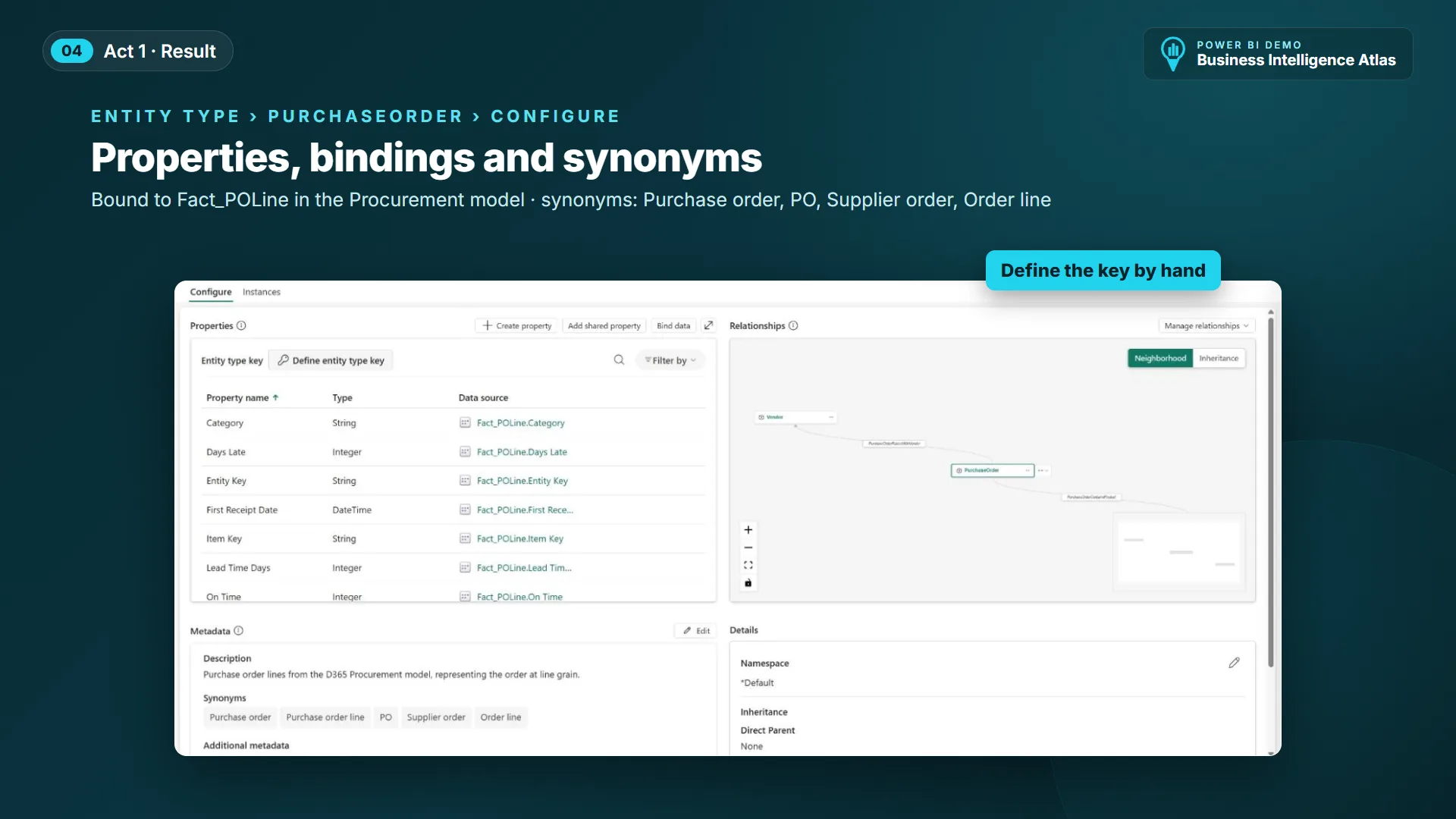
Each entity’s properties are bound to real columns (here Fact_POLine in the Procurement model), with a description and synonyms the agent added: Purchase order, PO, Supplier order, Order line. Synonyms are what let a plain-English question land on the right table. One thing to finish by hand: the order entities have no entity type key yet, so define one before relying on them for graph queries.
Act 2: an agent answers a CFO question through MCP
The question: which of our most profitable customers are slow to pay us? Margin lives in the Sales model and aged debt in the Finance model, so no single report answers it.
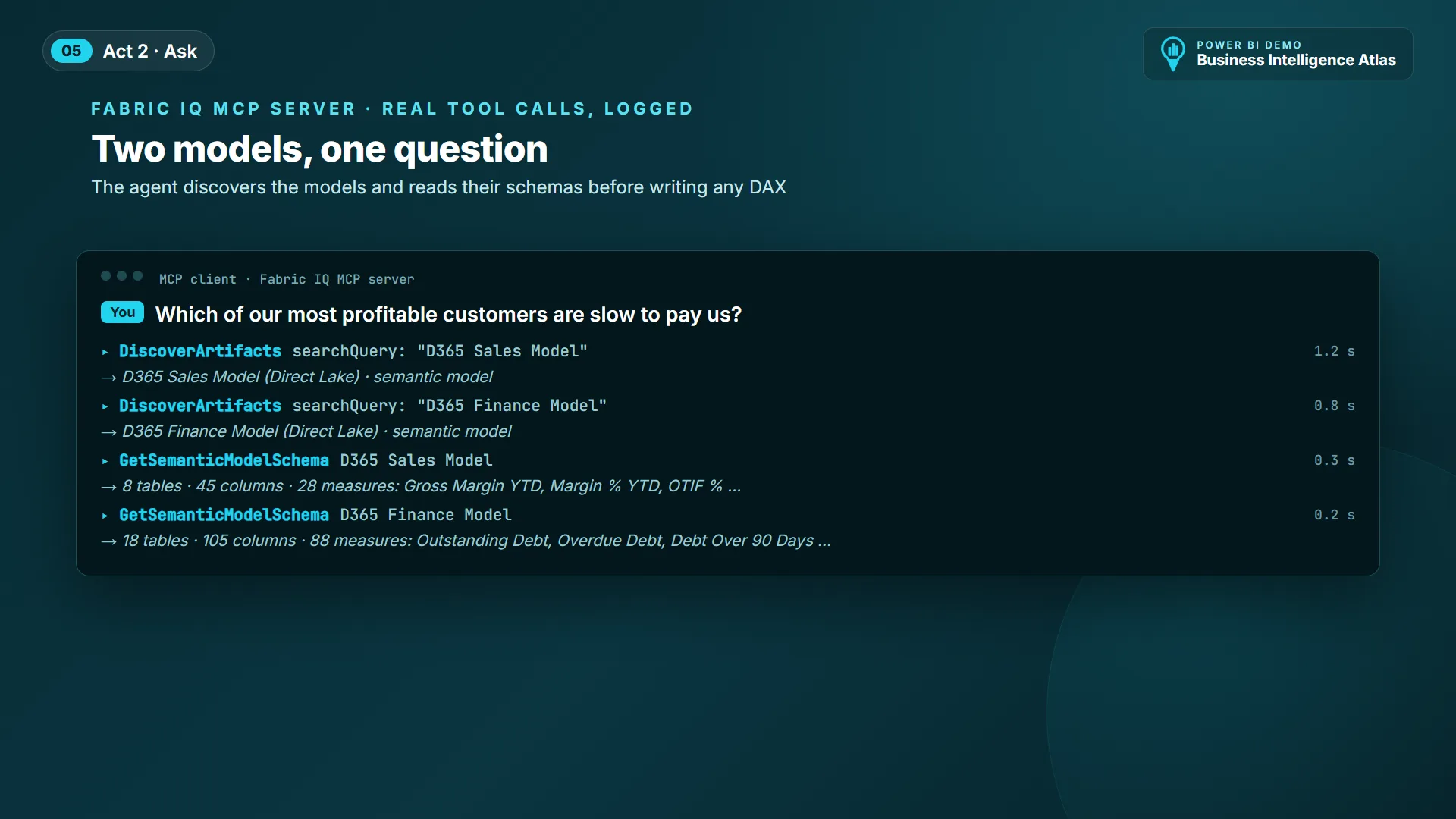
The agent connected to the Fabric IQ MCP server (https://api.fabric.microsoft.com/v1/mcp/fabriciq) as the signed-in user. Here is the logged sequence:
| # | Tool | Target | What came back |
|---|---|---|---|
| 1 | DiscoverArtifacts | “D365 Sales Model” | D365 Sales Model (Direct Lake) |
| 2 | DiscoverArtifacts | “D365 Finance Model” | D365 Finance Model (Direct Lake) |
| 3 | GetSemanticModelSchema | Sales model | 8 tables, 45 columns, 28 measures |
| 4 | GetSemanticModelSchema | Finance model | 18 tables, 105 columns, 88 measures |
| 5 | ExecuteQuery | Sales model | Top 10 customers by gross margin YTD |
| 6 | ExecuteQuery | Finance model | Outstanding, overdue and 90+ day debt for those 10 customers |
Margin from the Sales model
The agent reused the model’s own measures rather than re-deriving margin from columns:
EVALUATE TOPN(10,
  SUMMARIZECOLUMNS(Dim_Customer[Customer Key], Dim_Customer[Customer],
    "Gross Margin YTD", [Gross Margin YTD], "Margin % YTD", [Margin % YTD]),
  [Gross Margin YTD], DESC)
ORDER BY [Gross Margin YTD] DESC
Three wholesalers lead with more than £6M margin each. Rows four to six stand out: three public-sector customers, all at 100% margin.
Debt from the Finance model, chained
The agent passed the ten customer keys from the first result into the Finance model with TREATAS, so both models line up on exactly the same customers:
EVALUATE SUMMARIZECOLUMNS(Dim_Customer[Customer Key], Dim_Customer[Customer],
  TREATAS({"USPI|US-024", "USPI|US-025", "USPI|US-021", "PSGB|000005", ...}, Dim_Customer[Customer Key]),
  "Outstanding Debt", [Outstanding Debt], "Overdue Debt", [Overdue Debt], "Debt Over 90 Days", [Debt Over 90 Days])
ORDER BY [Overdue Debt] DESC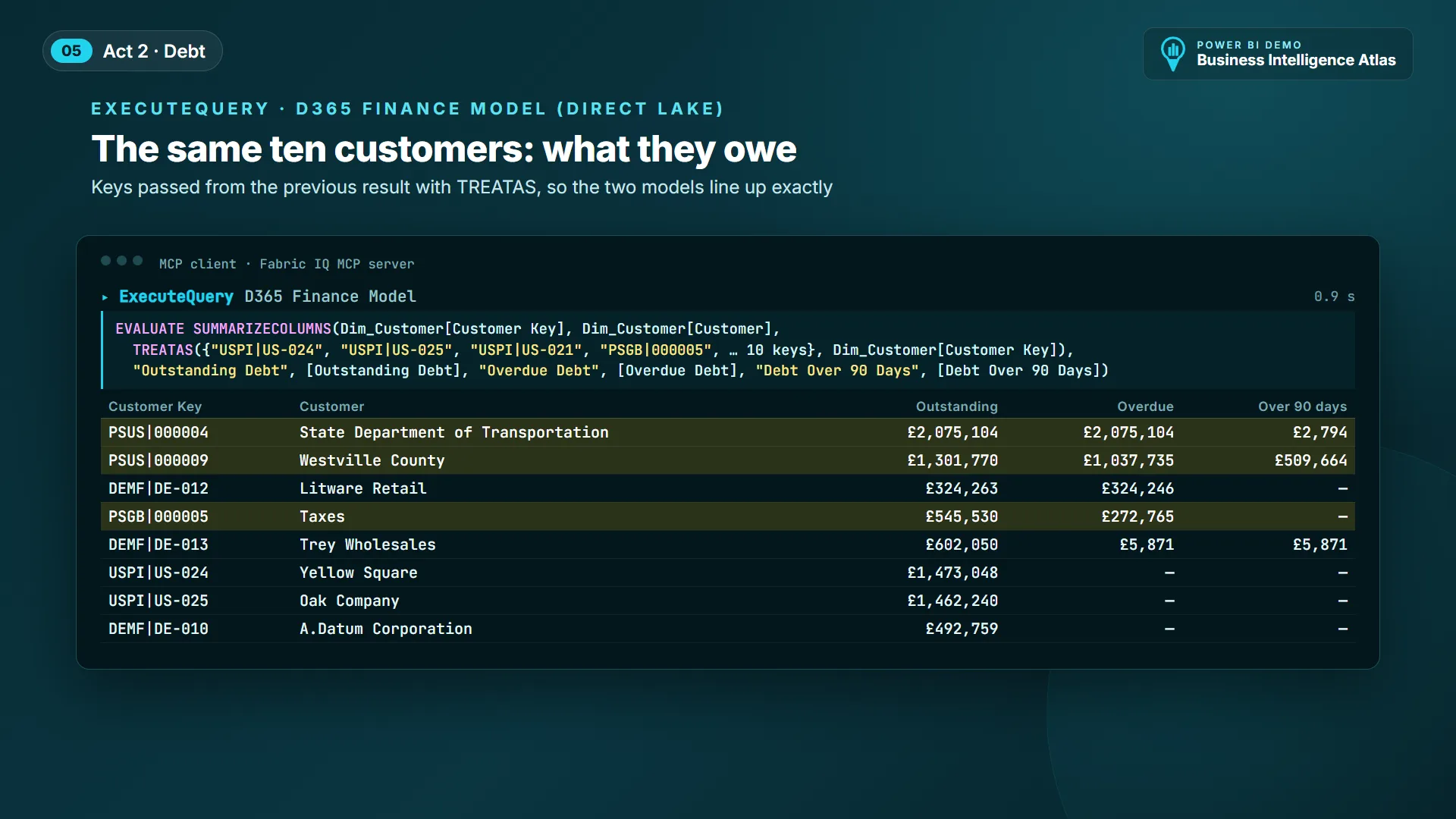
Three D365 gotchas the agent hit

- Account numbers repeat across legal entities. In D365, a customer account belongs to a company. Account 000005 is “Taxes” in one legal entity and “State University” in another, and US-024 exists in two companies too. A first attempt that joined on account number alone merged them; the agent switched to the model’s
Customer Key(entity + account). - 100% margin means no cost. The public-sector revenue comes from free-text invoices: no item and no cost of sales recorded, so margin shows as 100%.
- The MCP server reviews the DAX.
ExecuteQueryreturned optional style notes with the results, for example to pass filters straight toSUMMARIZECOLUMNSinstead of wrapping it inCALCULATETABLE.
The answer
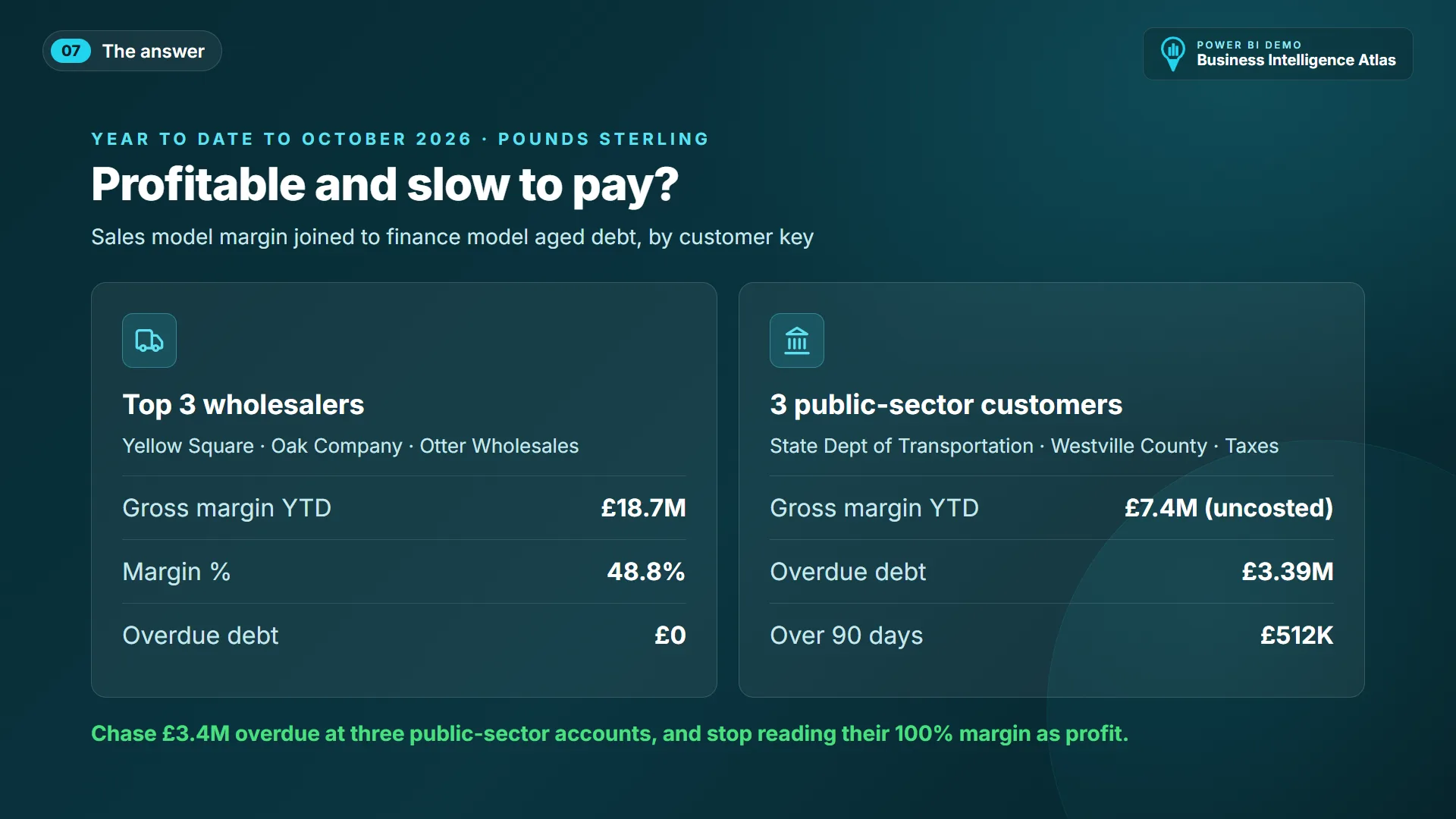
| Top 3 wholesalers | 3 public-sector customers | |
|---|---|---|
| Customers | Yellow Square, Oak Company, Otter Wholesales | State Department of Transportation, Westville County, Taxes |
| Gross margin YTD | £18.7M (48.8%) | £7.4M (100%, uncosted) |
| Overdue debt | £0 | £3.39M |
| Over 90 days | £0 | £512K |
So: chase £3.4M overdue at three public-sector accounts, and stop reading their 100% margin as profit. Year to date to October 2026, pounds sterling.
Act 3: the agent fixes the model
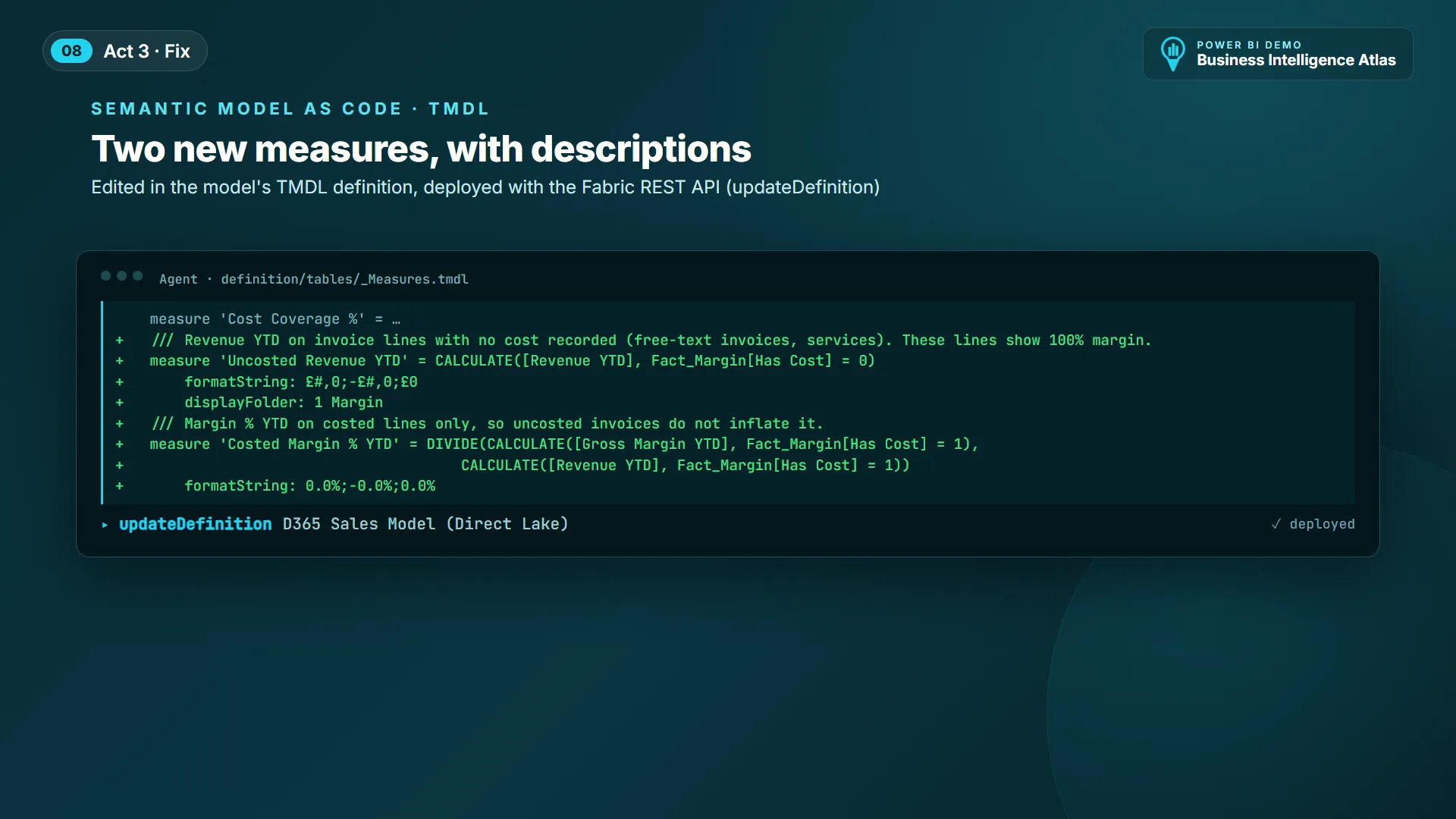
A 100% margin will mislead every report and every future agent that uses this model, so the agent fixed the model rather than the answer. It added two measures to the model’s TMDL definition, each with a description, and deployed the model through the Fabric REST API (updateDefinition):
/// Revenue YTD on invoice lines with no cost recorded (free-text invoices, services). These lines show 100% margin.
measure 'Uncosted Revenue YTD' = CALCULATE([Revenue YTD], Fact_Margin[Has Cost] = 0)

/// Margin % YTD on costed lines only, so uncosted invoices do not inflate it.
measure 'Costed Margin % YTD' = DIVIDE(CALCULATE([Gross Margin YTD], Fact_Margin[Has Cost] = 1),
                                      CALCULATE([Revenue YTD], Fact_Margin[Has Cost] = 1))
Microsoft’s Power BI Authoring MCP server is built for exactly this kind of change, from Power BI Desktop, Power BI Project (PBIP) files or TMDL. We used the model’s TMDL source directly because that is how our models are deployed.
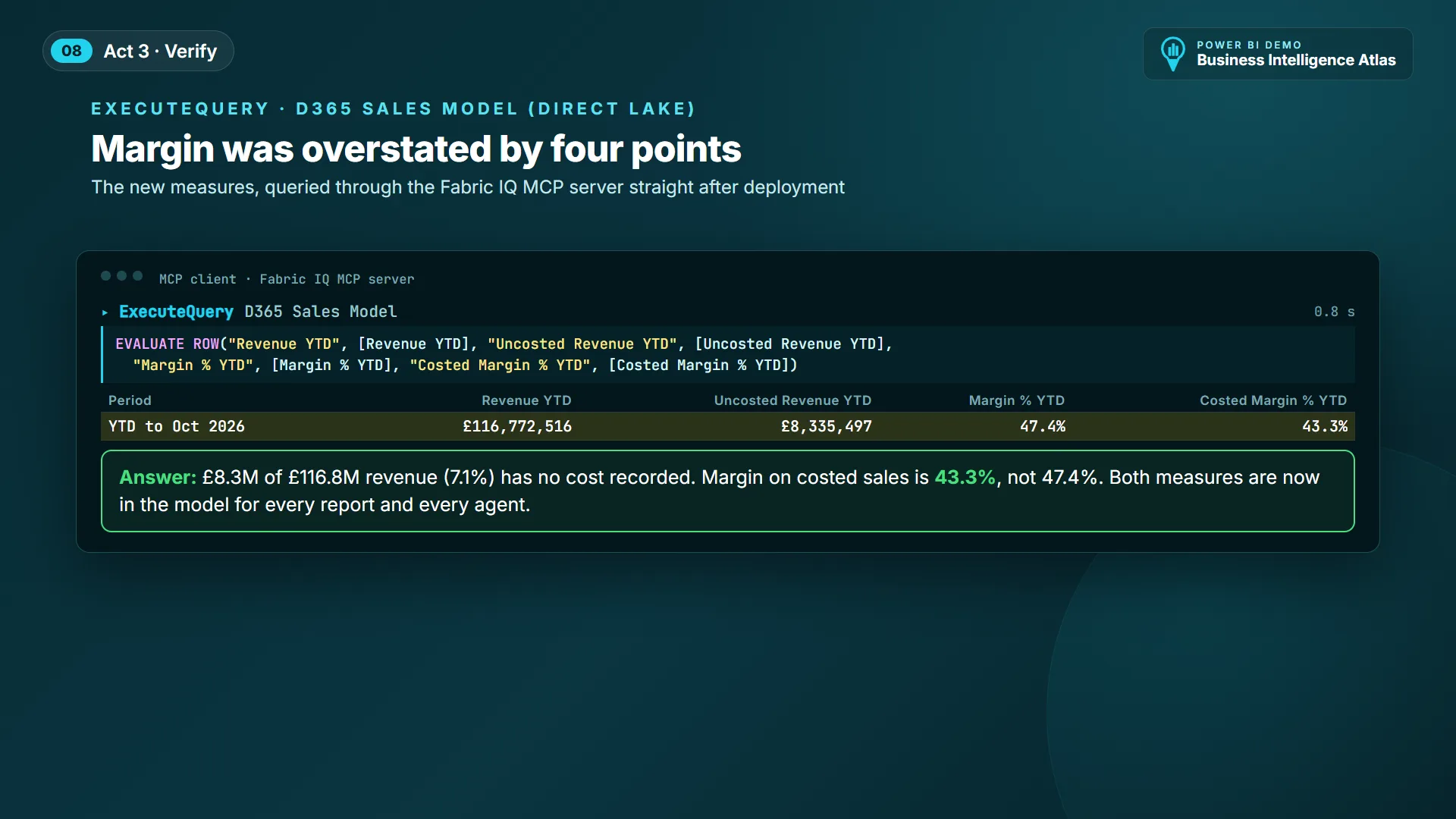
Then it checked its own work through the same MCP server. Revenue year to date is £116.8M, of which £8.3M (7.1%) has no cost. Reported margin is 47.4%; margin on costed sales is 43.3%. A four-point overstatement, found and fixed, and now in the model for every report.
Before you point agents at your ERP data
- Permissions. The Fabric IQ MCP server applies the caller’s existing Fabric permissions, and the Ontology agent uses your identity. Govern agent access as you would a person’s.
- Model quality decides answer quality. Names, descriptions, keys and tested measures are what the agent reads. The agent got the margin question right because the models already had reliable measures and entity-scoped keys.
- Preview vs GA. The ontology and the Ontology agent are in preview; the Fabric IQ MCP server and the local Power BI Authoring MCP server are generally available. Check status and capacity before production use.
Prerequisites
- A Fabric capacity in a supported region. The Ontology agent follows Copilot in Fabric regional processing (US and EU Data Boundary): see Use the ontology agent.
- Tenant settings for ontology: Users can create Fabric items and Users can create ontology (preview) items (required tenant settings). In our tenant they were already on.
- For the agent: any MCP-capable client signed in with Microsoft Entra ID, connected to the Fabric IQ MCP server.
- Semantic models worth reading: in our case the D365 F&O Direct Lake models from the module series, built from Fabric Link data.
Frequently asked questions
What is a Fabric IQ ontology?
A Fabric item (in preview) that describes business concepts such as customer, product and order as entity types, binds their properties to data in Fabric, and defines the relationships between them, so people and AI agents can work with business terms instead of table names.
What does the Fabric IQ MCP server do?
It is a remote Model Context Protocol server, generally available, that lets AI agents and MCP clients find Power BI reports and semantic models, read their metadata, search values and run DAX queries. It is read-only and applies the caller’s existing Fabric permissions.
Can an AI agent change a Power BI semantic model?
Yes. Microsoft’s Power BI Authoring MCP server lets an agent create and edit models, such as measures, relationships and descriptions, locally against Power BI Desktop or project files, or through a hosted endpoint in preview. In this demo the agent edited the model’s TMDL and deployed it with the Fabric REST API.
Why do Dynamics 365 customer numbers break cross-model joins?
Customer accounts in D365 F&O belong to a legal entity, so the same account number can be a different customer in another company. Join on legal entity plus account, as the models’ Customer Key does.
Why does D365 show 100% margin for some customers?
Free-text invoices have no item and no cost of sales, so their margin shows as 100%. Report margin on costed lines separately, as the agent’s new Costed Margin % YTD measure does.
Is this real customer data?
No. It is Microsoft’s Contoso demo data for Dynamics 365, with dates rolled forward for illustration.
AI agents on your own data
Agents are only as good as the platform and semantic models underneath them. If you want agents working on your own Dynamics 365 or ERP data, we can show you the live demo, review whether your models are agent-ready, or talk through your set-up on a no-obligation discovery call.
Business Intelligence Atlas (Atlas BI) is a UK Microsoft Fabric and Power BI consultancy. The demo uses Microsoft’s Contoso sample data for Dynamics 365; company and item names are fictional and dates have been rolled forward for illustration.
Comments are closed