
AI and Copilot only give useful answers when the data underneath them is trusted. We help organisations running Power BI and Microsoft Fabric get Copilot, Fabric data agents and document AI working on governed business data, with answers people can check and controls that hold up.
See it working: Copilot Studio agents for NHS operations and private equity portfolio reporting, and AI agents on Dynamics 365 data using a Fabric IQ ontology and MCP, all built on demo data with the Power BI reporting behind them. See the demos below or browse all AI & Data insights.
AI and Copilot services for Power BI and Microsoft Fabric
Most organisations already pay for the Microsoft platform that can run AI on their data. What is usually missing is the groundwork: a semantic model Copilot can understand, clear metric definitions, permissions that carry through and a short list of use cases worth automating. That is the work we do.
Copilot in Power BI
Readiness checks for capacity and tenant settings, then the model work that makes Copilot accurate: clear names, measure descriptions, synonyms and the Prep data for AI features (AI data schemas, verified answers and AI instructions), so business users get reliable summaries, report pages and answers.
Fabric data agents
Conversational agents that answer questions in plain English over your lakehouse, warehouse and semantic models. We configure the data sources, agent instructions and example queries, test them against real business questions and make them available where your teams work, including Microsoft Copilot Studio.
Document intelligence
Extracting fields from invoices, purchase orders, statements and contracts with Azure Document Intelligence and Azure Content Understanding, validating the output and landing it in Fabric next to your ERP data. More detail on AI-ready data and document intelligence.
Forecasting and machine learning
Cash, demand and sales forecasts, anomaly detection on journals and stock adjustments, and customer payment risk, built in Fabric notebooks on the same governed data as your reports, with results surfaced in Power BI.
AI-ready data foundations
The unglamorous part that decides whether AI works: a single set of metric definitions, a clean star-schema semantic model, master data that matches across systems and data quality checks that run before anything reaches a model.
Governance, security and cost
Row-level security and workspace permissions that Copilot respects, sensitivity labels, approved models for Copilot, evaluation question sets that measure accuracy, and monitoring of Fabric capacity so AI usage does not surprise the budget.
Where AI pays back first
- Finance teams asking why margin, cost or cash moved, with answers drawn from the governed model instead of a spreadsheet
- Draft month-end and board pack commentary generated from actual-versus-budget variances, reviewed by finance before it is issued
- Operations managers asking about production variance, yield, stock cover and expiry risk without waiting for a new report
- Supplier invoices and purchase orders captured automatically and matched to ERP records, with exceptions flagged for review
- Key dates, values and obligations pulled from contracts into a searchable register
- Credit control prioritised by predicted late payment rather than invoice age alone
- Unusual journals and stock adjustments flagged for review before the period closes
How an AI engagement runs
- AI readiness review
Check licensing, Fabric capacity, tenant settings, security and the semantic models you already have, and agree what good looks like. - Choose one use case
Pick a question or process with a measurable outcome, an owner and representative data, rather than starting with a platform programme. - Prepare the data
Fix names, definitions, relationships and data quality, add descriptions and AI instructions, and set permissions. - Build and evaluate
Configure Copilot, the data agent or the extraction pipeline, then test it against a set of real questions or documents and measure accuracy. - Roll out with guardrails
Publish to the people who need it, train them on what it can and cannot answer, and document ownership. - Monitor and extend
Track usage, accuracy and capacity cost, then add the next use case on the same foundations.
Copilot is only as good as your semantic model
When Copilot gives a wrong answer, the cause is rarely the AI. It is usually two measures with similar names, a revenue figure defined three different ways, a missing relationship or a column called Amt2. The same problems confuse people, so fixing them improves both. This is why AI work sits on the same foundations as Power BI consultancy and Microsoft Fabric implementation: one governed model that reports, Copilot and data agents all read from.
The demo reports on this site are built that way. The Dynamics 365 manufacturing report, the group finance board pack and the Dynamics 365 Finance and Operations reporting all use clear measure names and definitions that Copilot can work with.

Why work with Atlas BI on AI
- Senior-only: the consultant who scopes the work builds it, with no hand-off to a junior team
- Data first: Microsoft Fabric and Power BI specialists, so AI is built on a model that already reconciles to the ledger
- Real ERP experience with Dynamics 365 Finance and Operations, Unit4, Oracle Fusion, SAP, Xero and Sage data
- Practical about cost: AI is recommended where it saves time, not because it is new
AI consultants for business data: Copilot, agents and AI-ready data
People look for this work under many names: an AI consultant, a Copilot consultant, a Copilot Studio developer or an AI consultancy for Power BI and Microsoft Fabric. Our focus is narrower and more practical than general AI consulting: putting AI to work on the business data you already report on, with the governance to trust the answers. That includes:
- Copilot readiness reviews of semantic models, security and licensing
- Copilot in Power BI and Fabric data agents configured and tested on real questions
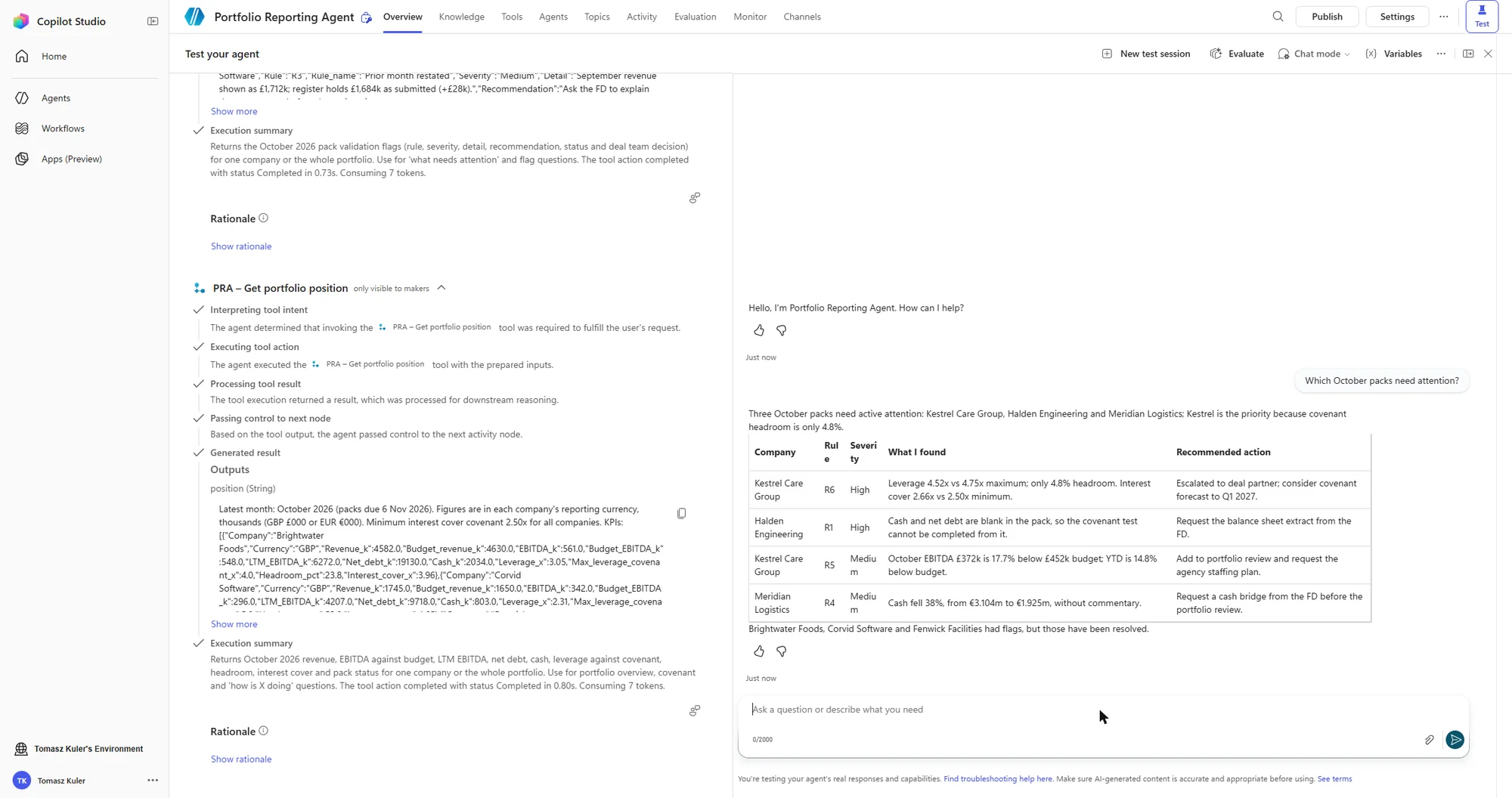
- Copilot Studio agents that apply business rules and hand work to people in Teams
- Document extraction with Azure AI and OpenAI models into the lakehouse
- Grounding company data for LLM chatbots and assistants
- Data quality monitoring so AI is not built on bad data
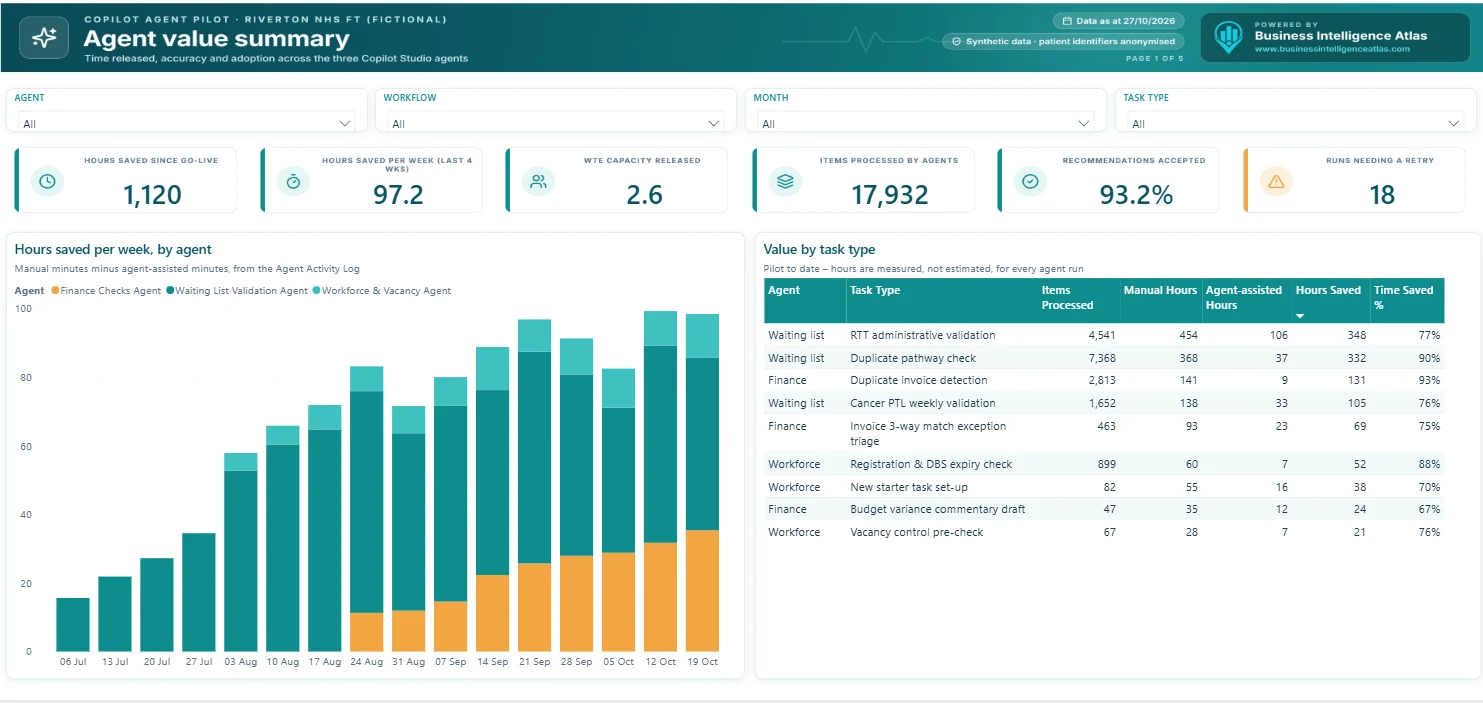
See it in practice in our Copilot Studio agent demos for NHS waiting list validation, finance invoice exceptions and vacancy control, and how their value is measured in measuring the value of Copilot agents. AI work builds on the same foundations as our business intelligence consultancy.
AI and Copilot demos you can watch
Each demo is built end to end on synthetic or Microsoft demo data: the agent, the tools it calls, the governance around it and the Power BI reporting that shows what it is worth.
| Demo | What it shows |
|---|---|
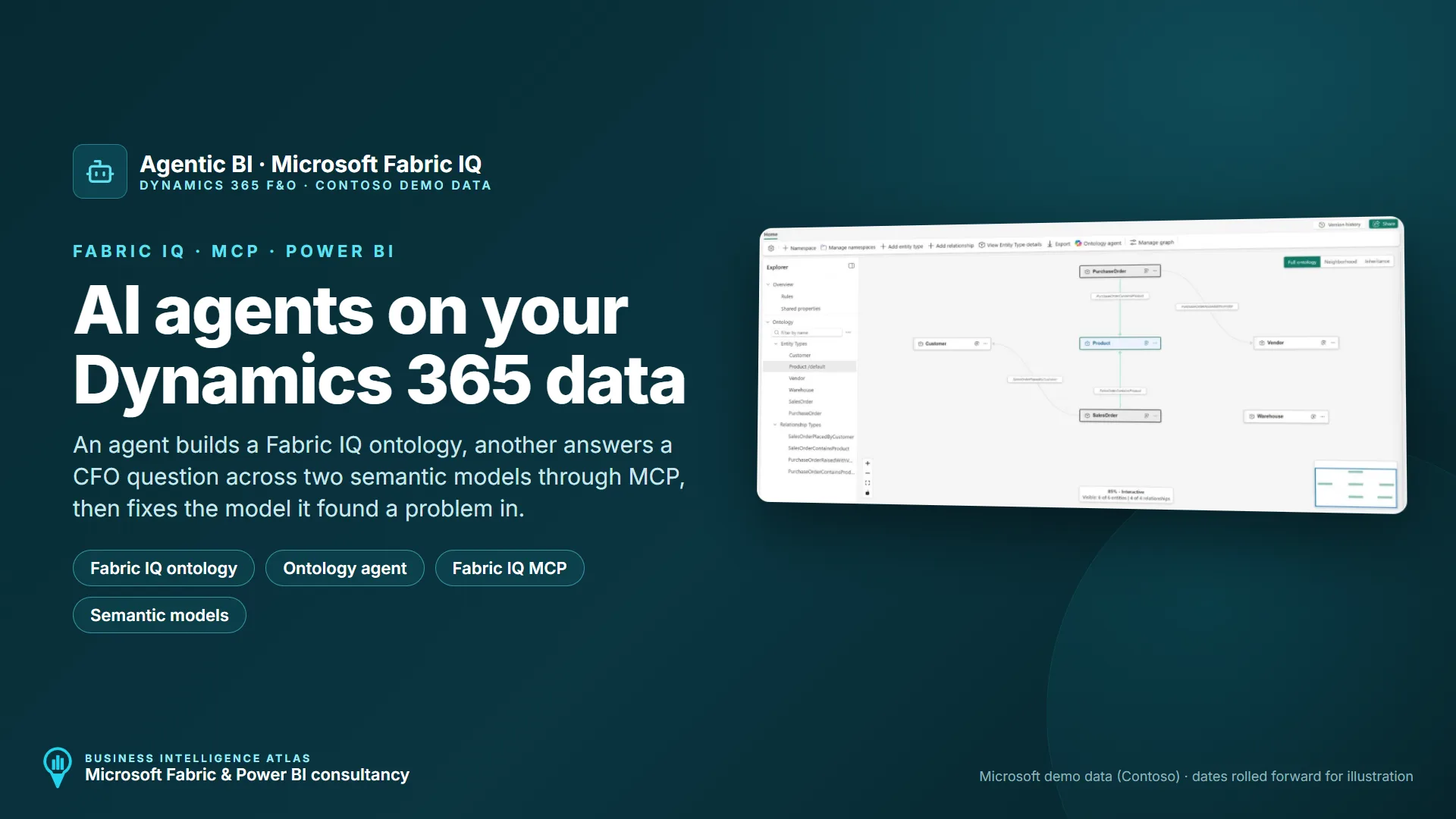
| AI agents on Dynamics 365 data | Fabric IQ ontology built from semantic models; an MCP agent answers a CFO question with real DAX and fixes a measure |
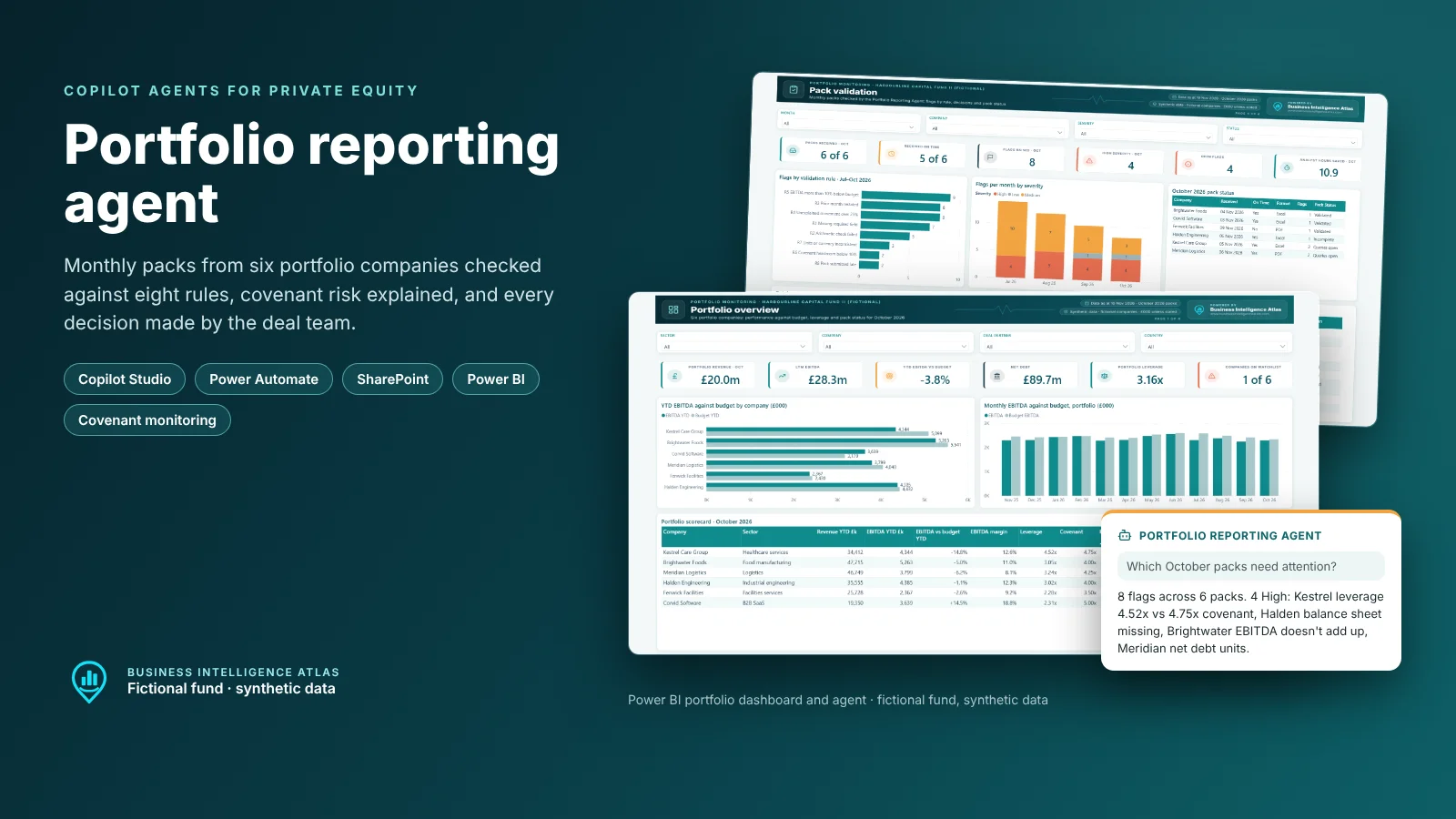
| Private equity portfolio reporting | Checks monthly packs against eight rules, explains covenant risk, drafts FD queries, posts to Teams |
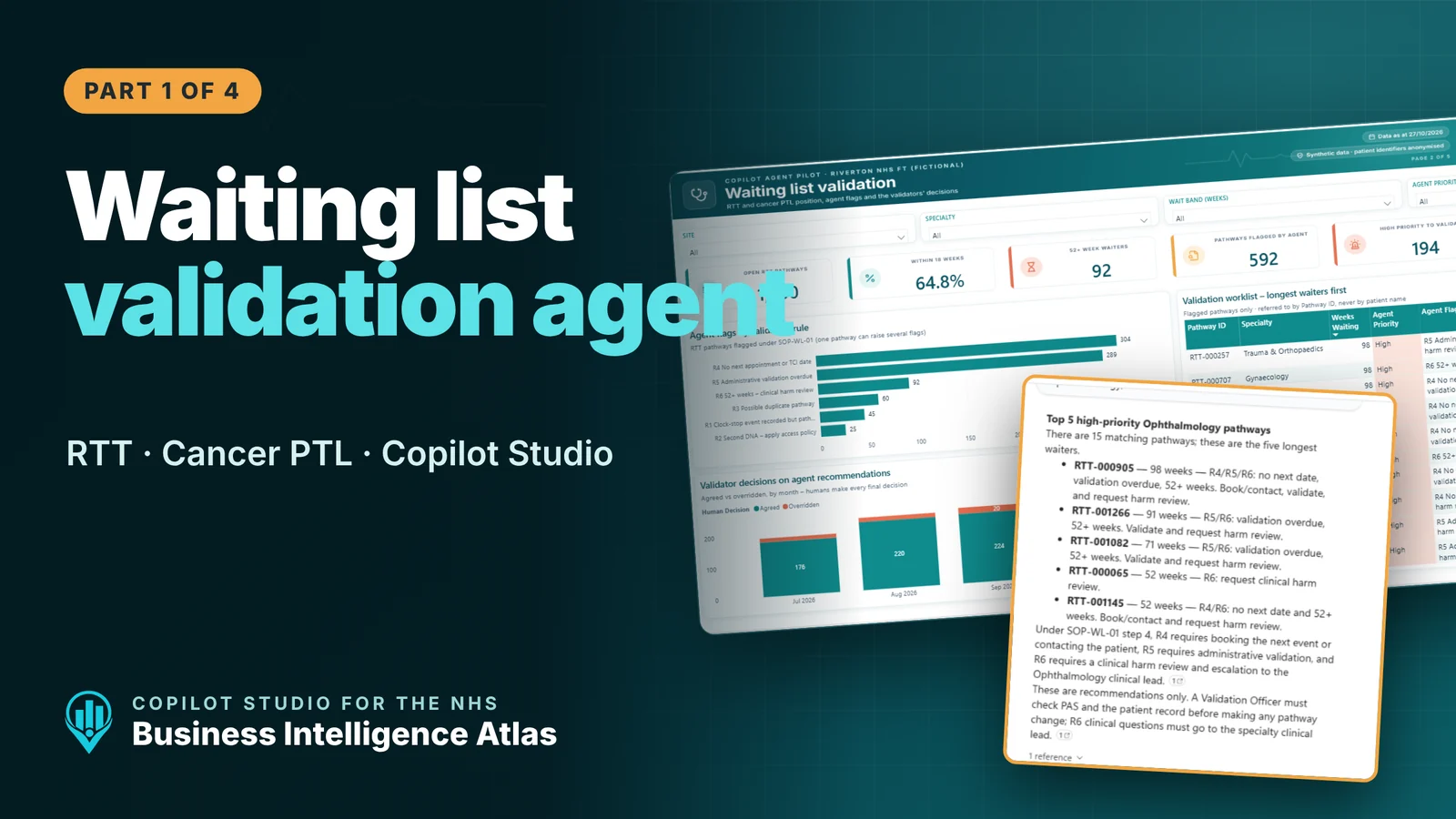
| NHS waiting list validation | RTT and cancer PTL validation with a person approving every change |
| NHS vacancy control | Pre-checks vacancy requests and routes approvals through Teams |
| NHS finance invoice exceptions | Duplicate and exception checks with BPPC reporting |
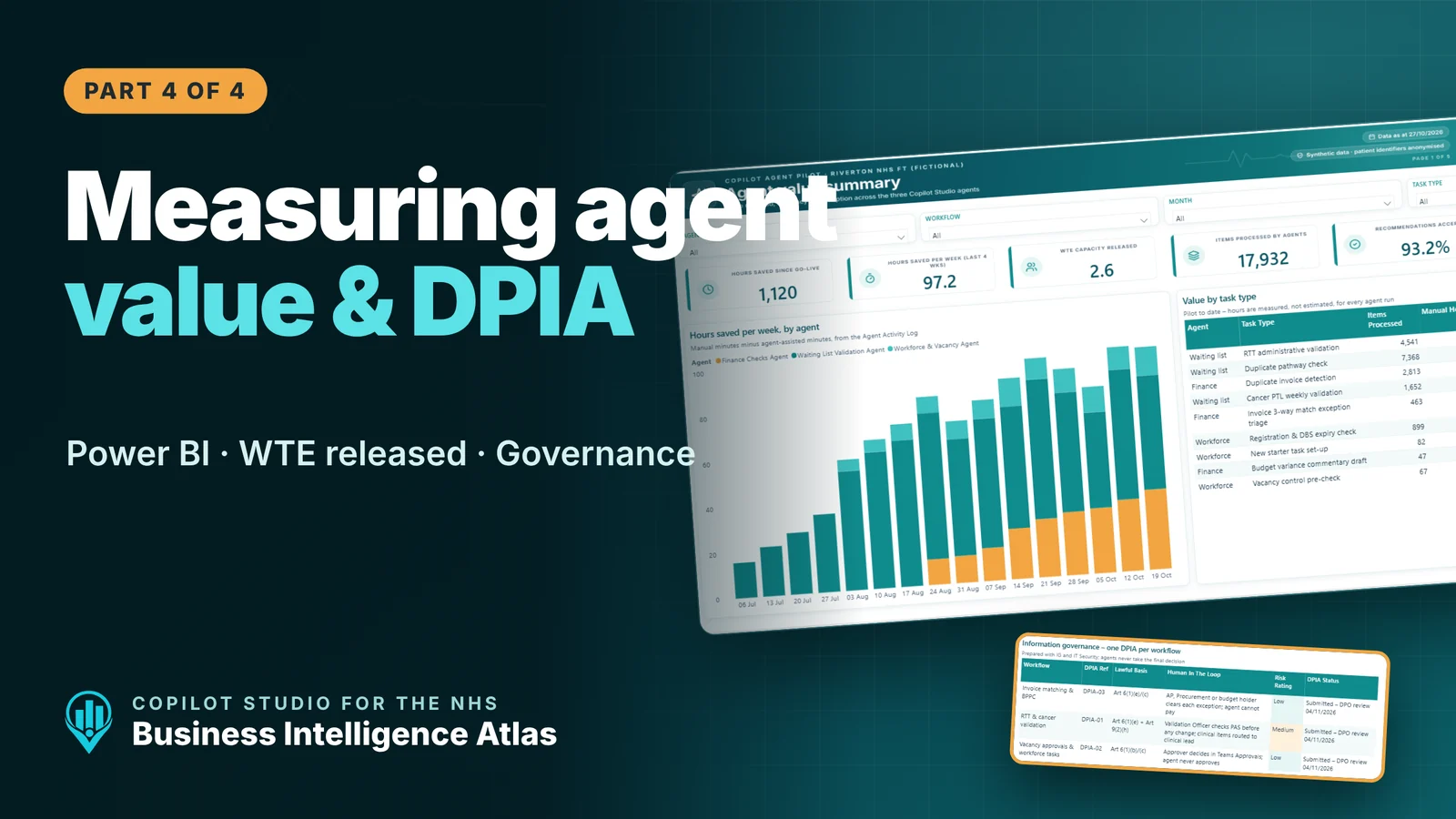
| Measuring agent value | Hours and WTE released, benefits method and DPIA in Power BI |
| AI-ready data quality | Rules, owners and alerts in Microsoft Fabric before AI uses the data |
Browse every article on our AI & Data insights page.
AI projects, contractors or partner delivery
Project or fixed scope
A defined deliverable and price, agreed before work starts. See pricing.
Hire a contractor direct
A senior contractor inside your team on a day rate, without agency markup. Hire direct or see who you would work with.
Consultancies and Microsoft partners
White-label or named subcontracting for your projects. See partner delivery support.
Specialist services: Copilot Studio agents · AI readiness assessment · Microsoft Purview · Data quality consultancy.
AI and Copilot FAQs
Are you an AI consultancy?
We are a business intelligence consultancy that specialises in AI on business data: Copilot, Fabric data agents, Copilot Studio agents, document extraction and AI-ready data. We do not build general-purpose AI products or train large models.
Do you build Copilot Studio agents?
Yes. We build Copilot Studio agents that read governed data, apply your business rules, record outcomes with an audit trail and hand decisions to people in Microsoft Teams. See the NHS agent demos linked above.
What do we need to use Copilot in Power BI?
Copilot in Power BI needs the workspace to run on a paid Microsoft Fabric capacity (F2 or above) or Power BI Premium (P1 or above), or to use a Fabric Copilot capacity, and Copilot must be enabled in the tenant settings. Trial capacities are not supported. Licensing is the easy part; the accuracy of the answers depends on how well the semantic model is prepared.
Is Copilot safe to use with our financial data?
Copilot works inside your Microsoft tenant and respects the permissions you already have, including workspace access and row-level security, so people only get answers from data they can already see. Part of the work is checking those permissions, applying sensitivity labels and restricting Copilot to approved models before it is switched on for a wider audience.
What is a Microsoft Fabric data agent?
A Fabric data agent is a conversational AI agent that answers business questions in plain English using data in your lakehouse, warehouse or Power BI semantic models. You give it instructions and example questions so it understands your terminology, and it can be used from Fabric and from tools such as Microsoft Copilot Studio.
Why does Copilot give wrong or inconsistent answers?
Usually because the semantic model is ambiguous: similar measure names, missing descriptions, unclear relationships or several versions of the same metric. Renaming, documenting and simplifying the model, then adding AI instructions and verified answers, makes a large difference to accuracy.
Can AI read our invoices and contracts?
Yes. Azure Document Intelligence and Azure Content Understanding extract fields such as supplier, dates, amounts and line items from invoices, statements and purchase orders, and key terms from contracts. The important part is validation: low-confidence results go to a person, and approved data lands in Fabric next to your ERP records.
Do we need Microsoft Fabric before we can use AI?
Not always. Copilot can work with Power BI semantic models on Premium or Fabric capacity, and document extraction can start on its own. Fabric becomes valuable when you want data agents, machine learning and AI to work across several systems from one governed copy of the data.
How do we start?
With a short AI readiness review: what you are licensed for, how ready your semantic models are, and one or two use cases with a clear business owner. You then have a costed plan rather than a broad AI programme.
Which systems do you work with?
Microsoft Dynamics 365 Finance and Operations, Business Central, Unit4, Oracle Fusion, SAP S/4HANA, Xero, Sage, CRM systems, SQL Server and Excel, brought together in Microsoft Fabric and Power BI.
Find out if your data is ready for Copilot
Book a call to review your Power BI and Fabric setup and pick the first AI use case worth building.