
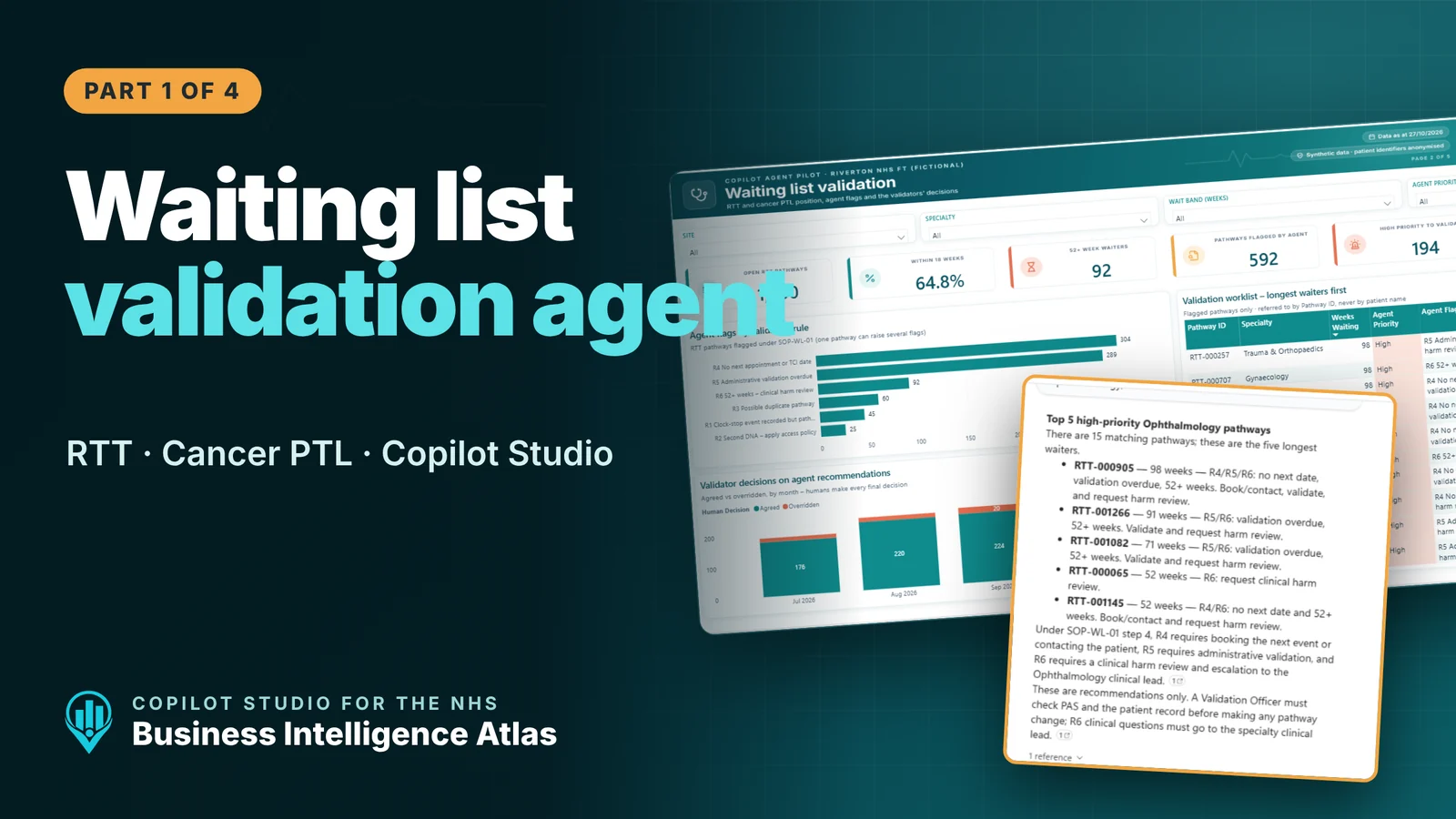
Validation officers in every NHS trust spend hours each week checking the RTT waiting list and the cancer PTL line by line: pathways with no next appointment, administrative validation that is overdue, possible duplicates, and long waiters who need a clinical harm review. The rules are written down in standard operating procedures, but applying them by hand is slow, and the longest waiters are the ones most at risk.
This demo shows a Copilot Studio agent doing that first pass in seconds. It reads the waiting list through Power Automate, applies the trust’s validation rules, builds a prioritised worklist, records what the validator decided and posts a daily summary to Microsoft Teams. A person makes every final decision, and every minute saved is measured in Power BI.
This article is part 1 of a four-part series on our Copilot agent pilot for a fictional NHS trust: waiting list validation, workforce and vacancy approvals, finance checks, measuring value and governance.
Watch the waiting list validation demo
A walkthrough of the agent, from the SharePoint hub and the agent’s flags to the worklist, the audit trail, the Teams summary and the Power BI page:
Why waiting list validation is a good first job for an agent
Waiting list validation is repetitive, rule-based and high volume, which makes it a natural fit for an AI agent. It is also safety-critical, which is why the design matters more than the technology. In our pilot the agent never changes a pathway. It recommends, explains which rule it applied and which SOP step it relied on, and the validation officer checks the patient administration system (PAS) before anything changes.
- Volume: 1,530 open RTT pathways and a cancer PTL at our fictional trust, Riverton NHS Foundation Trust.
- Rules: twelve validation rules across two SOPs, six for RTT (R1 to R6) and six for cancer (C1 to C6).
- Risk: 92 patients waiting 52 weeks or more, and 194 pathways the agent rates as high priority to validate.
- Accountability: every recommendation and every human decision is recorded, so the audit trail is complete.
What the demo covers
| Item | In the demo |
|---|---|
| Agent | Waiting List Validation Agent, built in Copilot Studio and published to Microsoft Teams and Microsoft 365 Copilot |
| Data | SharePoint lists: RTT Waiting List (1,530 pathways), Cancer PTL, Validation Outcomes and the Agent Activity Log |
| Rules | SOP-WL-01 RTT validation (R1 to R6) and SOP-WL-02 cancer PTL validation (C1 to C6) |
| Tools | Five Power Automate flows: RTT summary, RTT worklist, cancer PTL worklist, record outcome, post summary to Teams |
| Outputs | Answers in chat, prioritised worklists, outcome records with references, a daily Teams summary and a Power BI page |
| Governance | DPIA for the workflow, handover runbook for the BAU team, no patient names or NHS numbers anywhere |
How the waiting list agent works
1. One SharePoint hub for the pilot
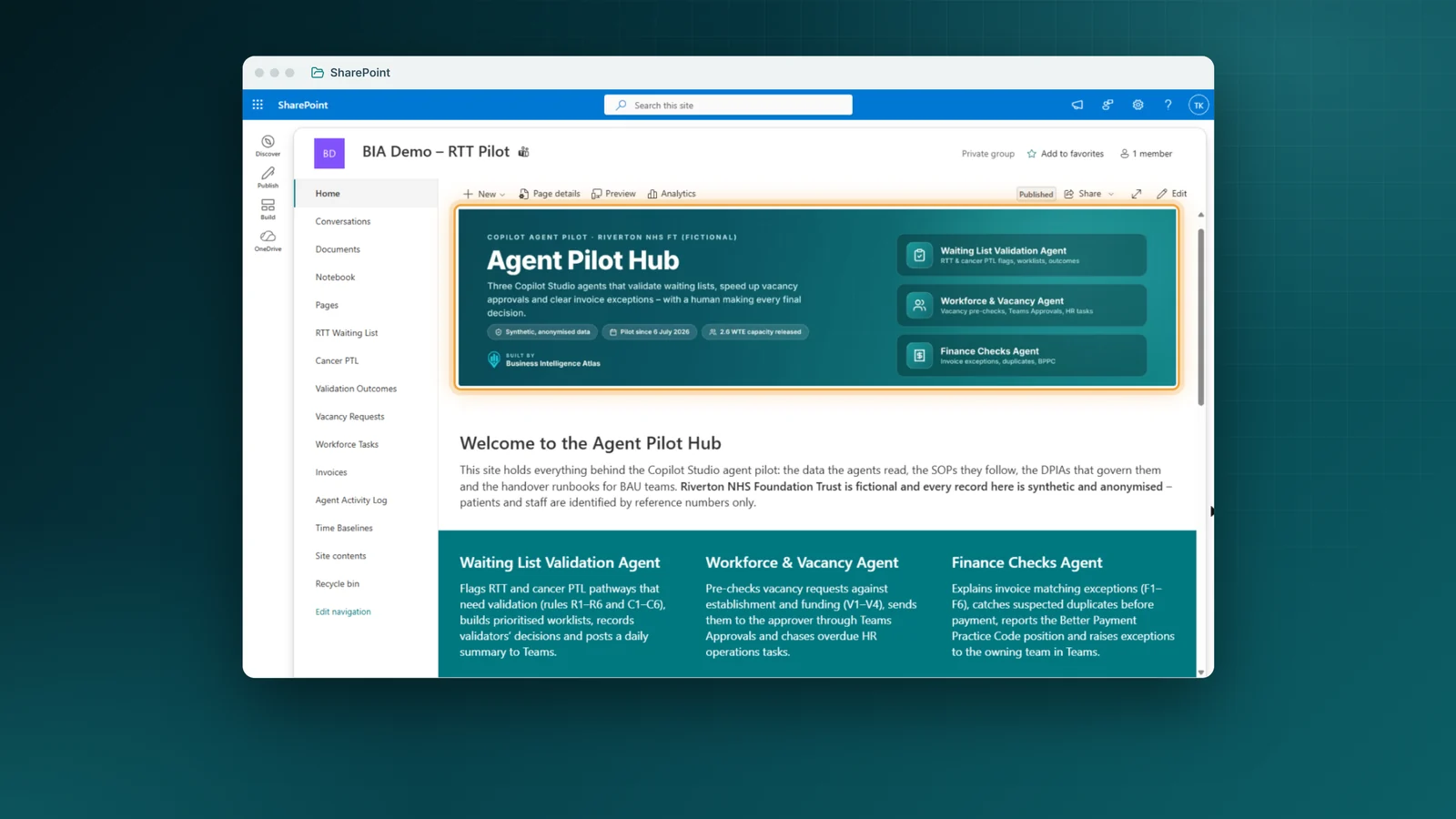
Everything sits in one SharePoint site: the waiting list data the agent reads, the SOPs it follows, the DPIA that governs it and the handover runbook for the business-as-usual team. Clinicians, validators and the board all find the same information in the same place.
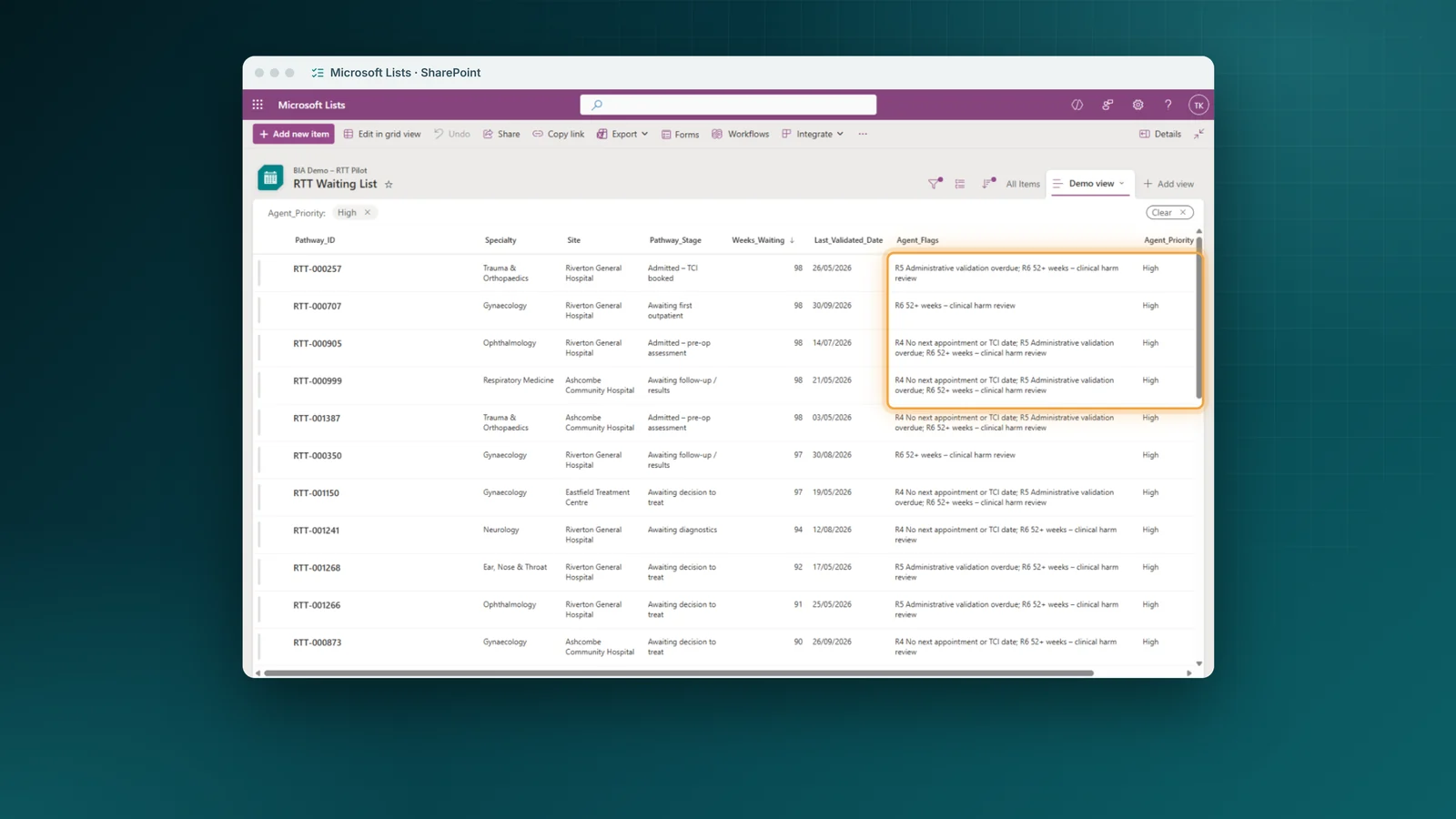
2. Every pathway carries the agent’s flags
Each RTT pathway is checked against the six RTT rules, for example R4 no next appointment or TCI date, R5 administrative validation overdue and R6 52+ weeks, clinical harm review. The agent gives each pathway a priority, and patients are only ever referred to by pathway ID.
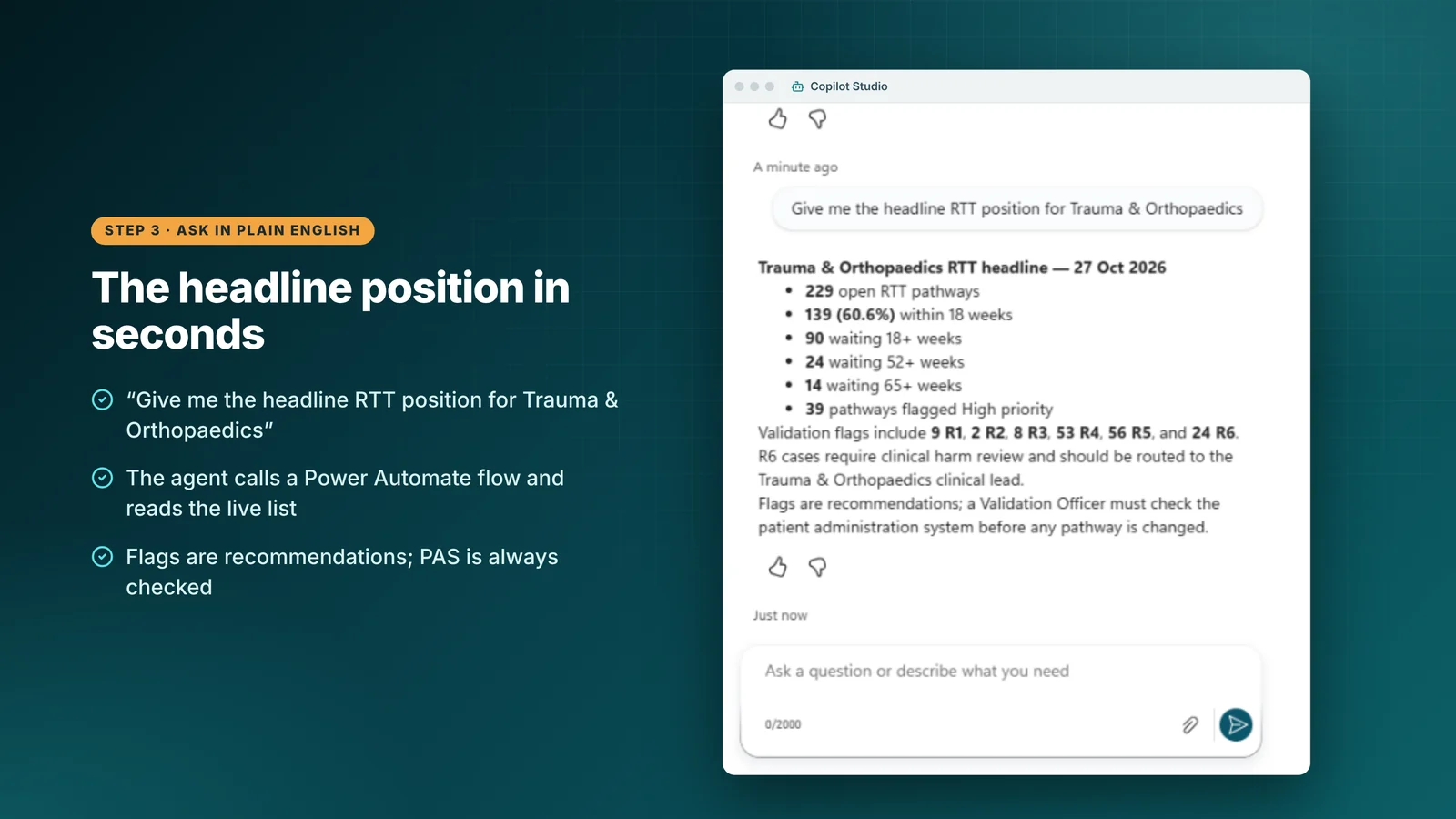
3. Ask for the headline position in plain English
A validation officer asks the agent, in Teams or Copilot, for the headline RTT position for a specialty. The agent calls a Power Automate flow, reads the live list and answers in seconds. For Trauma and Orthopaedics: 229 open pathways, 60.6% within 18 weeks, 24 waiting 52 weeks or more and 39 flagged as high priority.
4. A prioritised worklist, with the rules explained
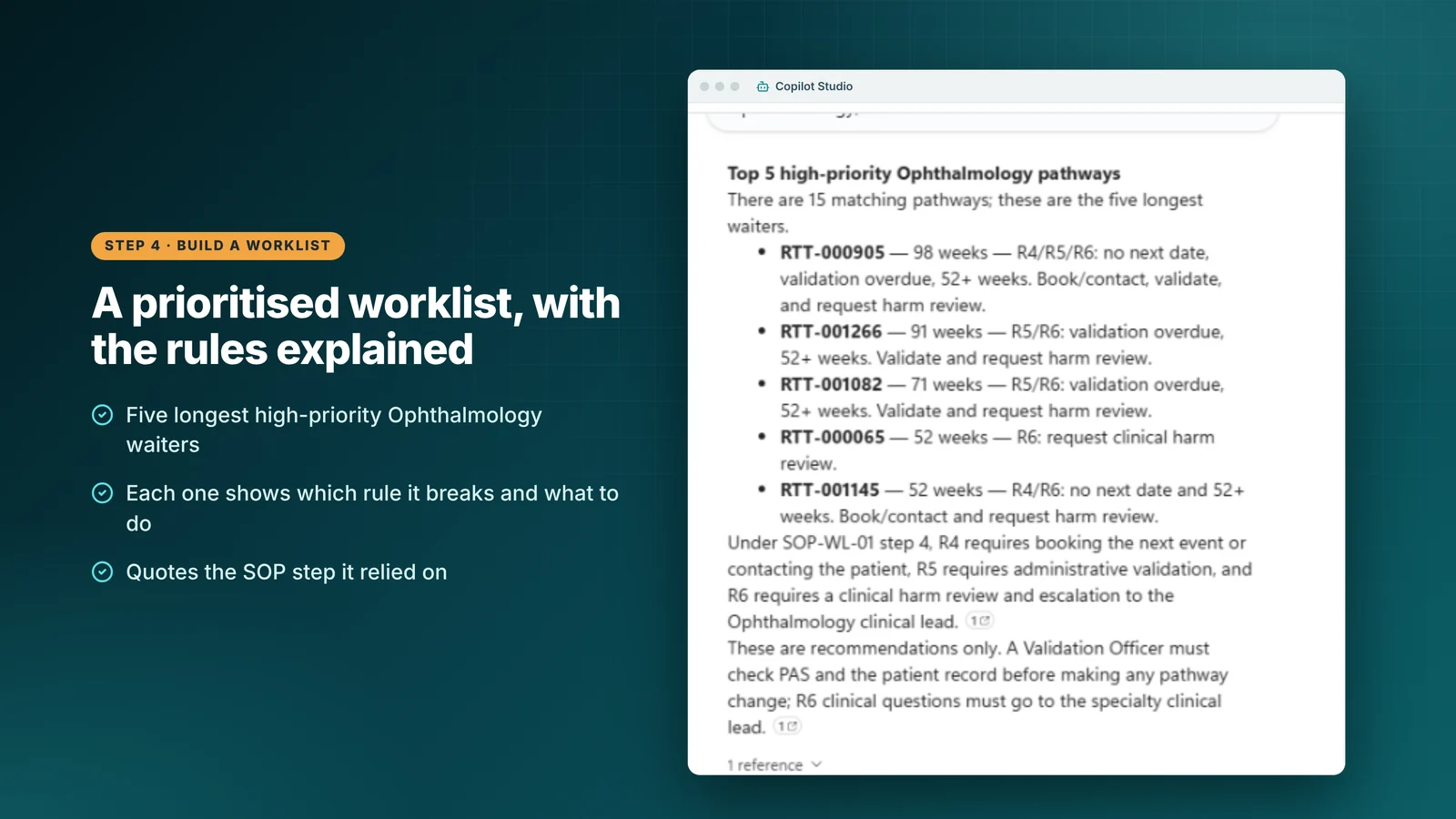
Next the officer asks for a worklist. The agent returns the five longest high-priority Ophthalmology waiters, explains which rules each pathway breaks and what to do, and quotes the SOP step it relied on. In the Copilot Studio activity map you can see exactly which tool it called, the inputs it prepared and the data it received, which matters for clinical safety and audit.
5. The human decision is recorded
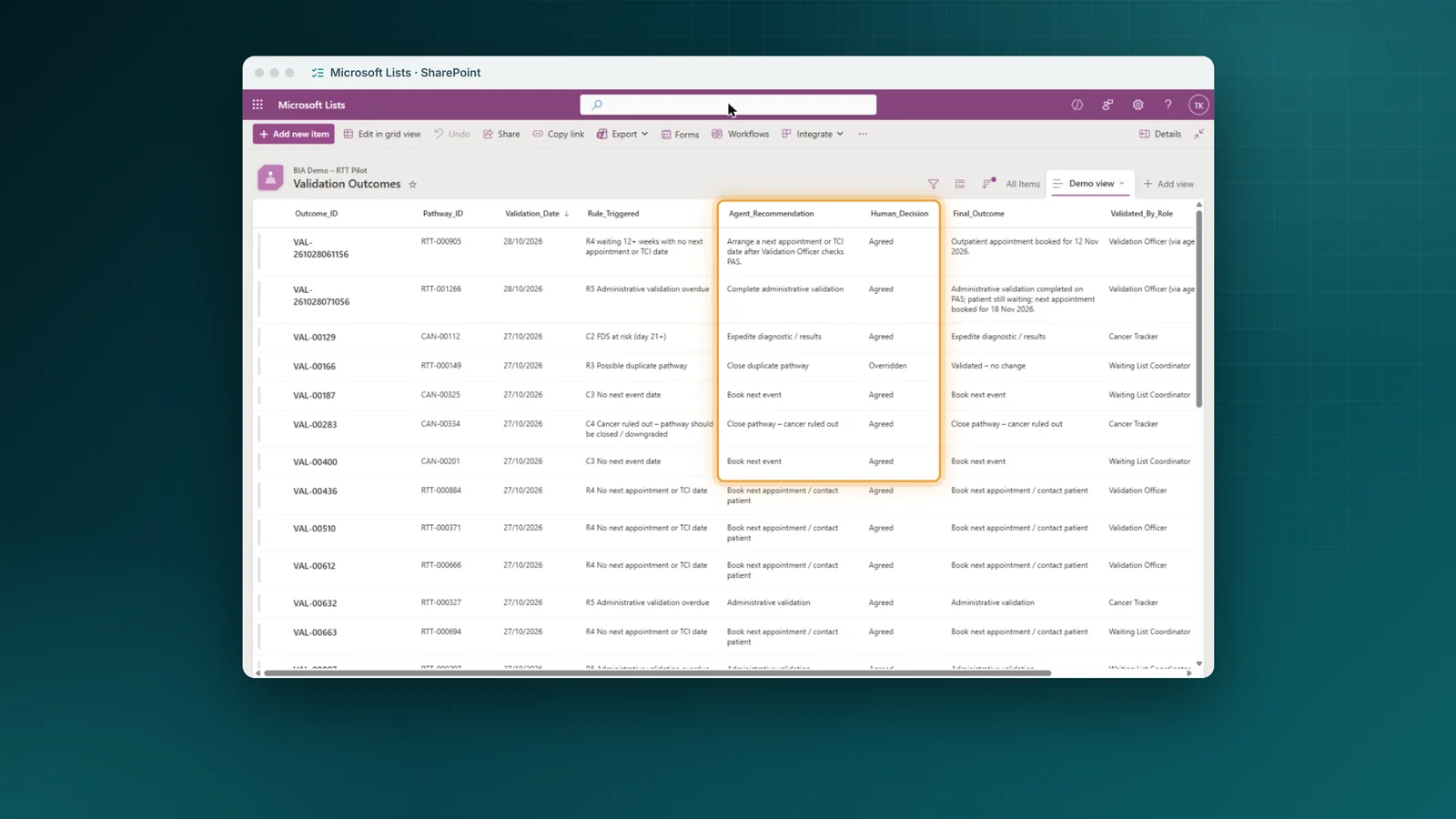
Once the officer has checked PAS, they tell the agent the outcome in one sentence. The agent records it in the Validation Outcomes list against the pathway, with the rule, the agent’s recommendation, the human decision and an outcome reference. Across the pilot, validators accepted 93% of the agent’s recommendations and overrode the rest, which is exactly how human-in-the-loop should work.
6. A daily validation summary in Teams
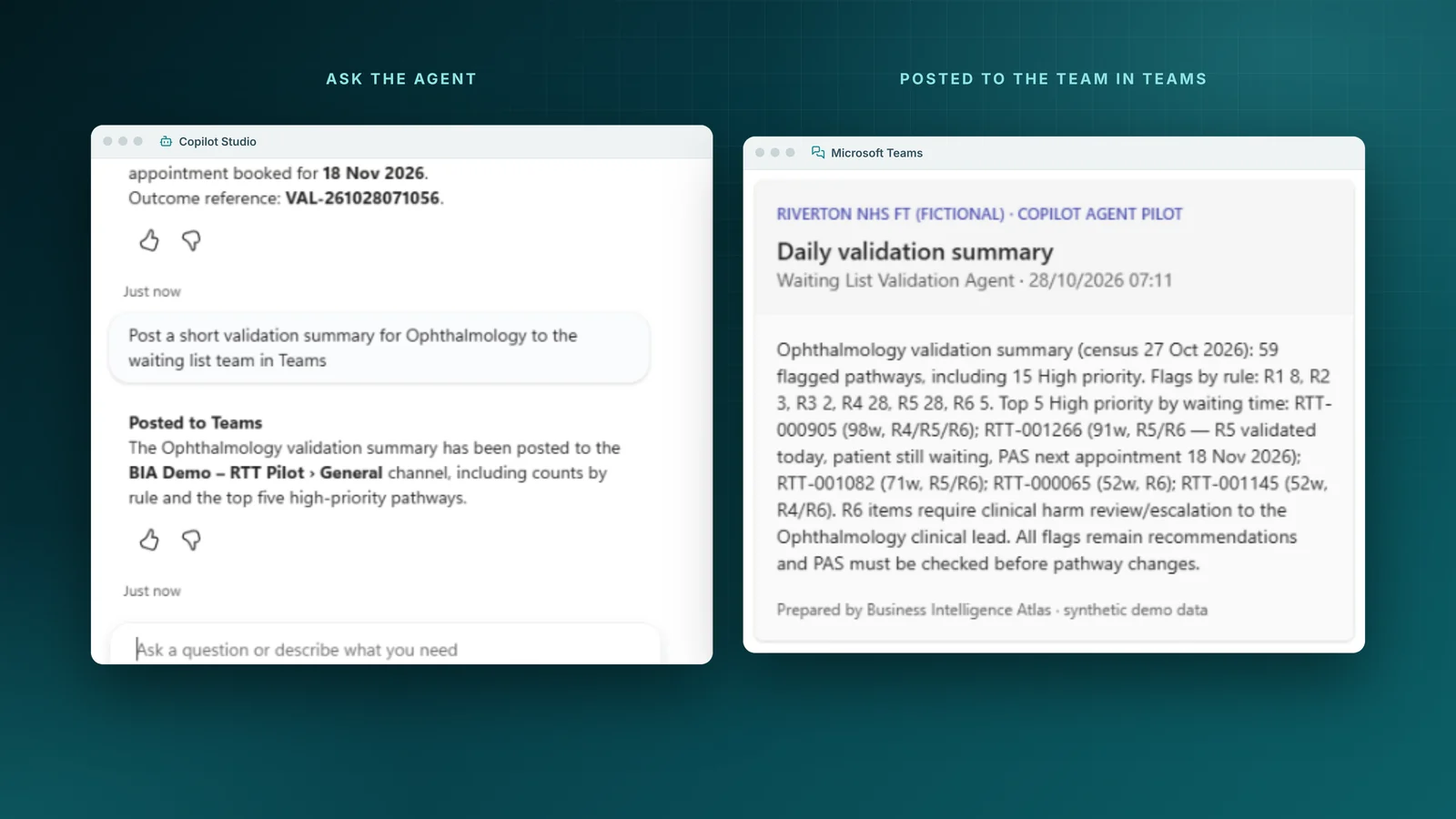
Finally, the agent posts a validation summary to the waiting list team’s Teams channel: counts by rule, the top high-priority pathways and a reminder that flags are recommendations. Everyone starts the day with the same picture.
Inside the Power BI waiting list page
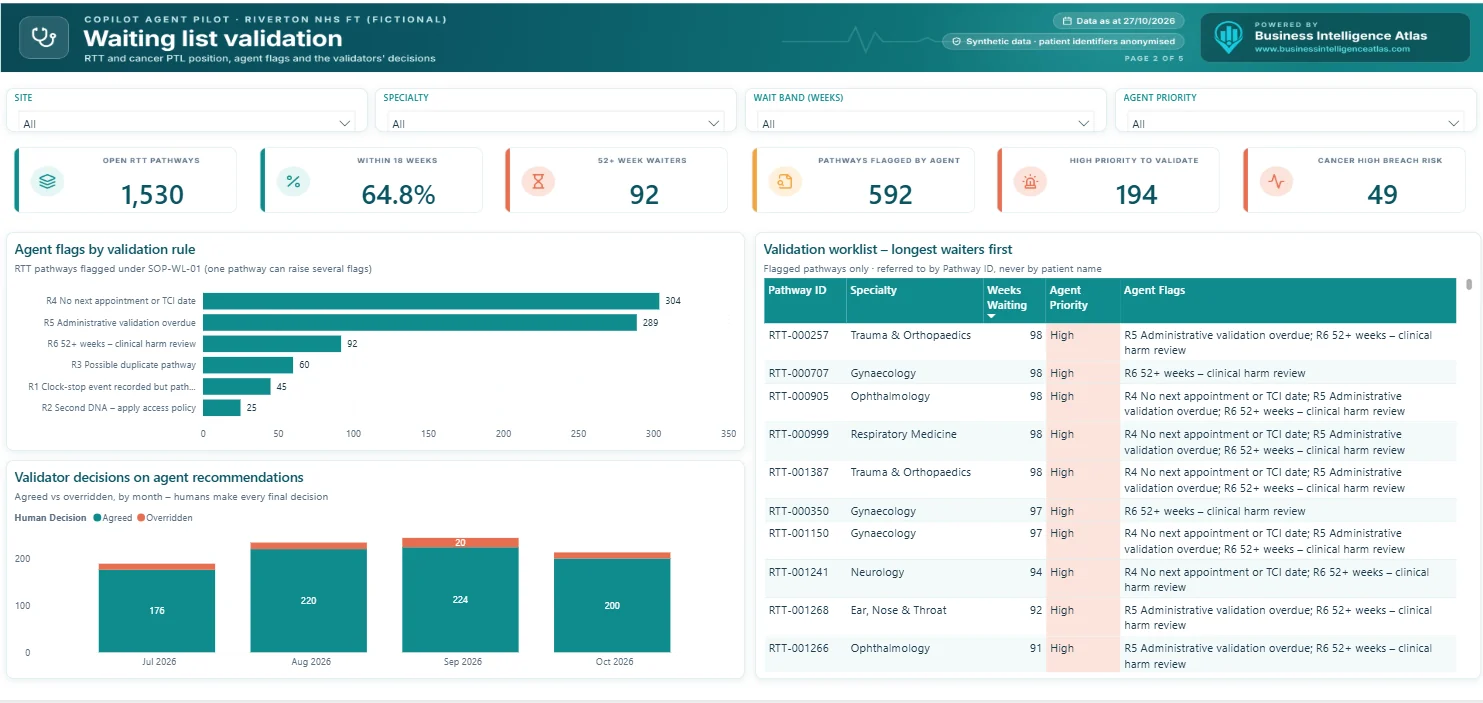
Every flag, decision and minute saved feeds the Copilot Agent Value report in Power BI. The waiting list page shows the RTT position, the agent’s flags by validation rule, how validators responded month by month and a worklist of the longest waiters, with slicers for site, specialty, wait band and priority. We cover the benefits method in part four.
How to design a waiting list agent that clinicians trust
- Start from the SOP, not the prompt. Write the rules down first, number them, and make the agent quote them.
- Recommend, never act. The agent flags and explains; a validator checks PAS and decides. Clinical questions route to the specialty lead.
- Use identifiers, not names. Pathway IDs are enough for validation. Names, NHS numbers and addresses never reach the agent.
- Record both sides. Store the agent’s recommendation next to the human decision, so you can measure accuracy honestly.
- Measure from day one. Every run writes to an activity log against agreed time-and-motion baselines.
Who this is for
- Heads of performance and elective recovery leads who need a cleaner PTL
- Validation teams, cancer trackers and waiting list coordinators
- Digital and BI teams exploring Copilot Studio and Microsoft 365 Copilot
- Information governance and clinical safety leads who want to see the controls
How we deliver waiting list validation agents
- Discovery (1 to 2 weeks): map the current validation process, the SOP rules and the data sources, and agree baselines with the service.
- Build (3 to 4 weeks): SharePoint or Fabric data layer, Power Automate tools, the Copilot Studio agent and Teams outputs.
- Governance: DPIA, clinical safety input, testing with validators and a clear human-in-the-loop design.
- Pilot and measure: run alongside the team, log every action and report benefits in Power BI.
- Handover: runbooks and training so your BAU team owns the agent.
Read more about our AI and Copilot services and our Power BI work in healthcare, including our continuing healthcare reporting demo.
Frequently asked questions about Copilot agents for waiting list validation
What is a Copilot Studio agent?
Copilot Studio is Microsoft’s low-code platform for building AI agents that work inside Microsoft Teams and Microsoft 365 Copilot. An agent combines instructions, knowledge and tools, such as Power Automate flows, so it can answer questions and take actions on your data.
Can an AI agent validate an RTT waiting list?
It can do the first pass. In our demo the agent applies the trust’s validation rules, flags pathways and builds a prioritised worklist. A validation officer still checks the patient administration system and makes every decision.
Does the agent change patient records?
No. The agent recommends and records the human decision in a separate outcomes list. It never updates PAS or the waiting list itself.
What data does the agent use?
Pathway-level data identified by pathway ID: specialty, site, stage, wait in weeks, dates and validation status. No names, NHS numbers or addresses are needed or used.
Does this work with the cancer PTL as well?
Yes. The same agent applies six cancer PTL rules, such as the 28-day Faster Diagnosis Standard being at risk or no next event date, and builds a separate cancer worklist.
How is information governance handled?
Each workflow has its own DPIA prepared with Information Governance and IT Security, setting out the lawful basis, the data used and the human in the loop. We cover this in part four.
How do you measure the time saved?
Every agent run writes a row to an activity log with items processed and minutes saved against time-and-motion baselines agreed with the service lead. Power BI turns that into hours and WTE released.
How long does it take to build?
A focused pilot like this typically takes four to six weeks from discovery to a working agent with validators, depending on data access and governance sign-off.
Want a waiting list validation agent in your trust?
If you would like to explore the demo yourself, we can give you live access to the agent and the Power BI report. If you are planning Copilot Studio or Microsoft 365 Copilot in your trust, book a no-obligation discovery call: we will look at your validation process and show you what an agent would look like on your data.
Business Intelligence Atlas (Atlas BI) is a UK Microsoft Fabric, Power BI and Copilot Studio consultancy. Riverton NHS Foundation Trust is fictional and all data in this demo is synthetic and anonymised: patients, staff and suppliers are invented and identified by reference numbers only.
Comments are closed