

Accounts payable teams in the NHS spend hours working out why invoices are on hold: a price above the purchase order, a missing goods receipt, no PO at all, or an invoice that looks like one already paid. Every day an invoice sits on hold puts the Better Payment Practice Code (BPPC) target of paying 95% of invoices within 30 days at risk.
This demo shows a Copilot Studio finance agent that explains each exception against the trust’s invoice matching rules, catches suspected duplicates before they are paid, raises each exception to the team that owns it in Microsoft Teams and reports the BPPC position on demand. The agent cannot approve or release a payment.
This article is part 3 of a four-part series on our Copilot agent pilot for a fictional NHS trust: waiting list validation, workforce and vacancy approvals, finance checks, measuring value and governance.
Watch the finance checks demo
A walkthrough of the agent, from the matching rules and the BPPC position to duplicate detection, raising an exception and the Power BI finance page:
Why invoice exceptions are a good job for an agent
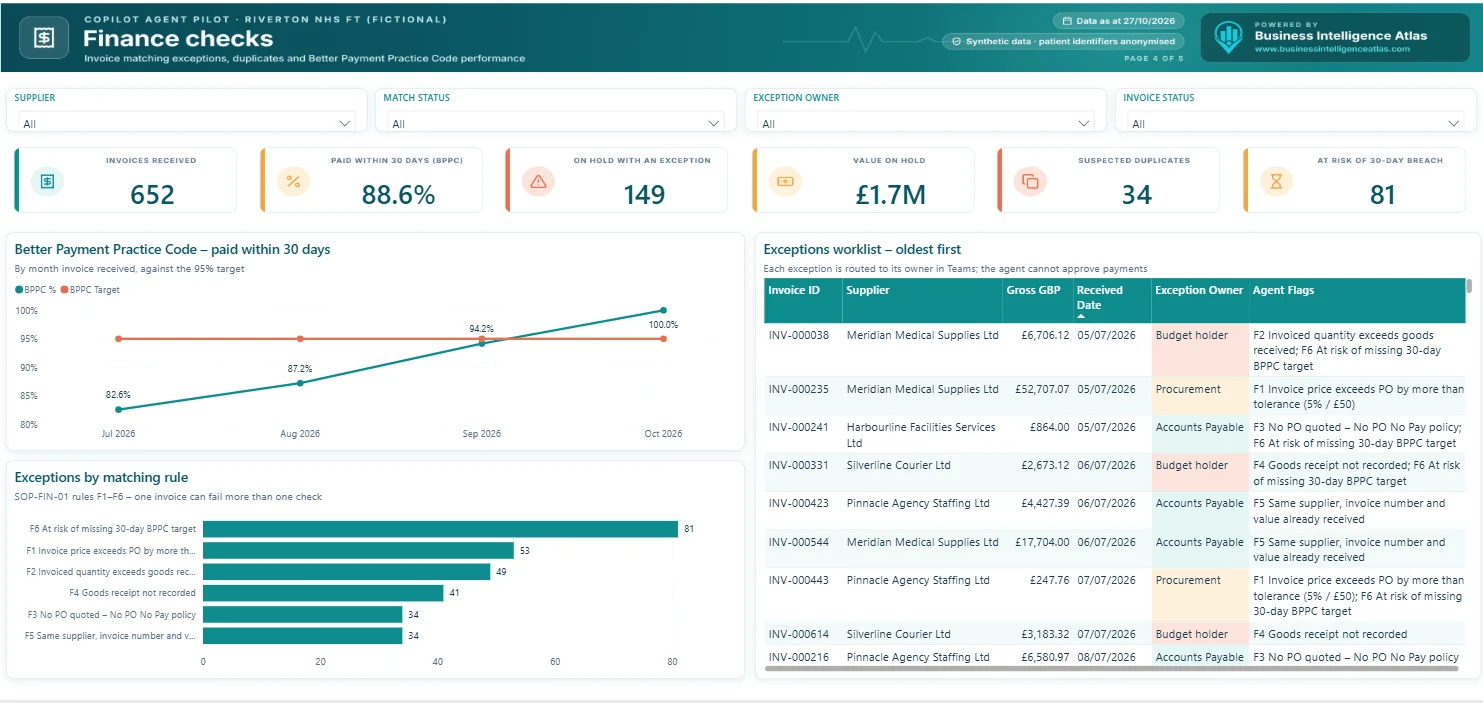
- 149 invoices on hold with an exception at our fictional trust, worth £1.7M.
- 34 suspected duplicates, where the same supplier, invoice number and value already exist.
- 81 invoices at risk of breaching the 30-day target.
- BPPC at 88.6% pilot to date, against the 95% target.
Each exception follows a written rule and has a known owner, whether Accounts Payable, Procurement or the budget holder. That is exactly the kind of repetitive, rule-based work where an agent can explain, route and chase, while people make the payment decisions.
What the demo covers
| Item | In the demo |
|---|---|
| Agent | Finance Checks Agent, built in Copilot Studio and published to Microsoft Teams |
| Data | SharePoint list of 652 invoices with PO, goods receipt, match status, owner and payment dates |
| Rules | SOP-FIN-01 Invoice Matching and Exceptions: F1 price variance, F2 quantity variance, F3 no PO, F4 missing goods receipt, F5 suspected duplicate, F6 at risk of 30-day breach |
| Tools | Three Power Automate flows: BPPC and exceptions summary, get invoice exceptions, raise invoice exception |
| Outputs | Answers in chat, exception cards in the owner’s Teams channel and the Power BI finance page |
| Controls | The agent cannot approve, release or change a payment; DPIA for the workflow; no bank details used |
How the finance agent works
1. Six matching rules, each routed to an owner
Invoices and their three-way match status sit in SharePoint, loaded from the finance system. The agent applies the six rules in the invoice matching SOP and routes each exception to the team that owns it: price variances to Procurement, quantity variances and missing goods receipts to the budget holder, and no-PO and duplicate exceptions to Accounts Payable.

2. The BPPC position and what is holding invoices up
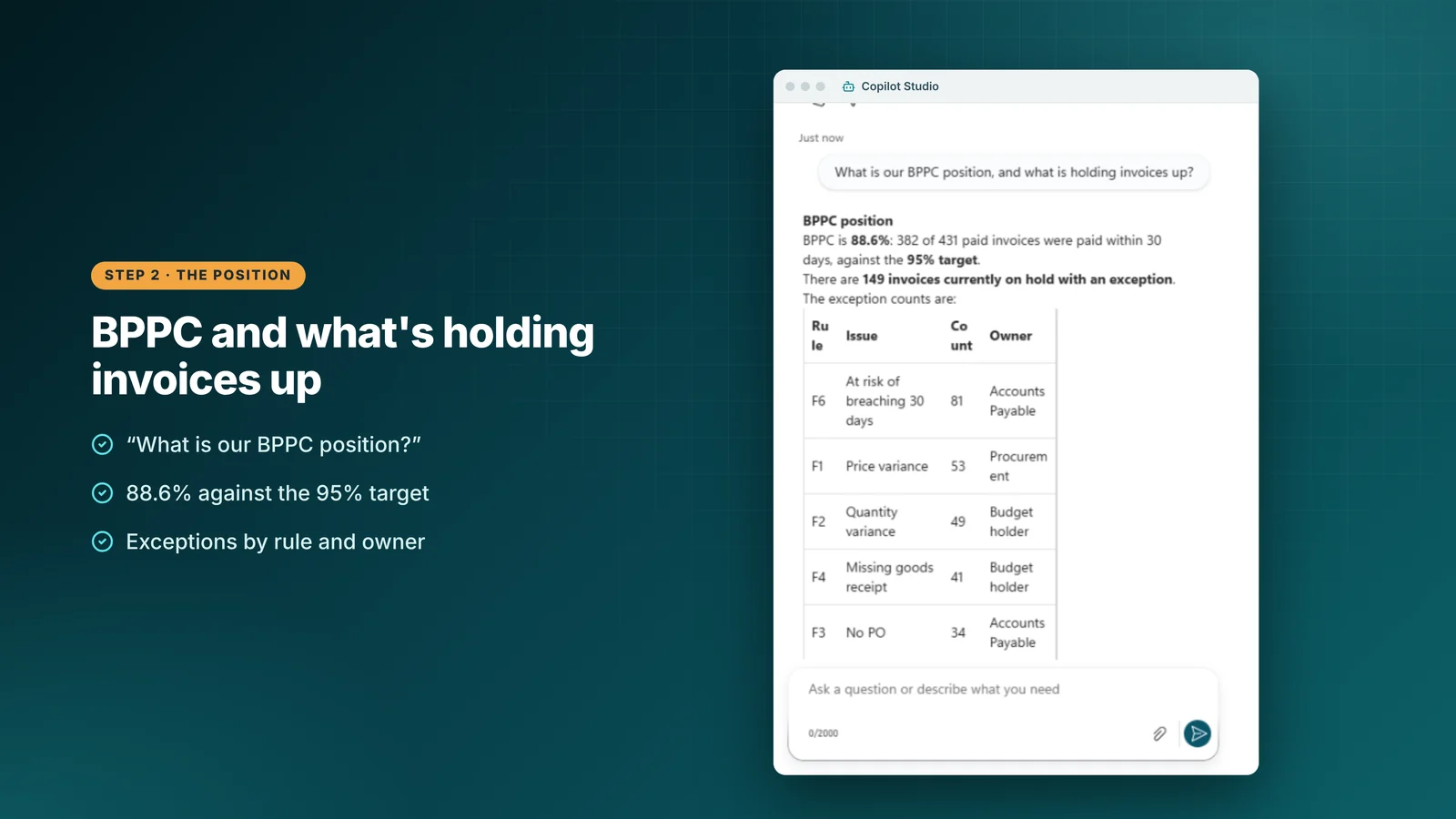
The head of financial services asks for the BPPC position. The agent answers with the live figure, 88.6% of paid invoices within 30 days against the 95% target, and breaks the 149 exceptions down by rule and owner. The biggest issue is F6: 81 invoices approaching the 30-day limit.
3. Duplicates caught before payment
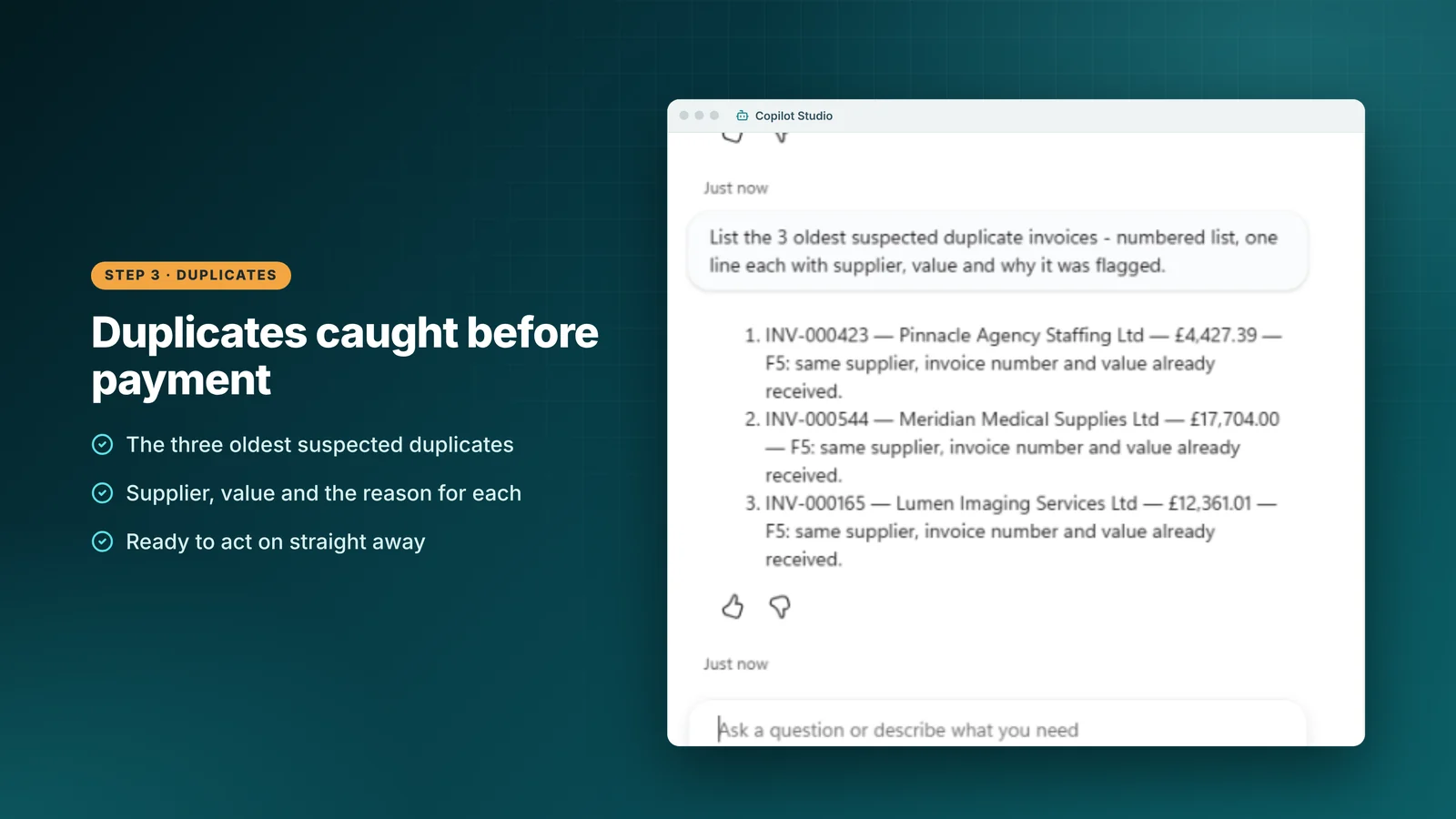
Asked for the three oldest suspected duplicates, the agent lists each with the supplier, the value and why it was flagged: the same supplier, invoice number and value have already been received. The team can act straight away.
4. Raise the exception to its owner
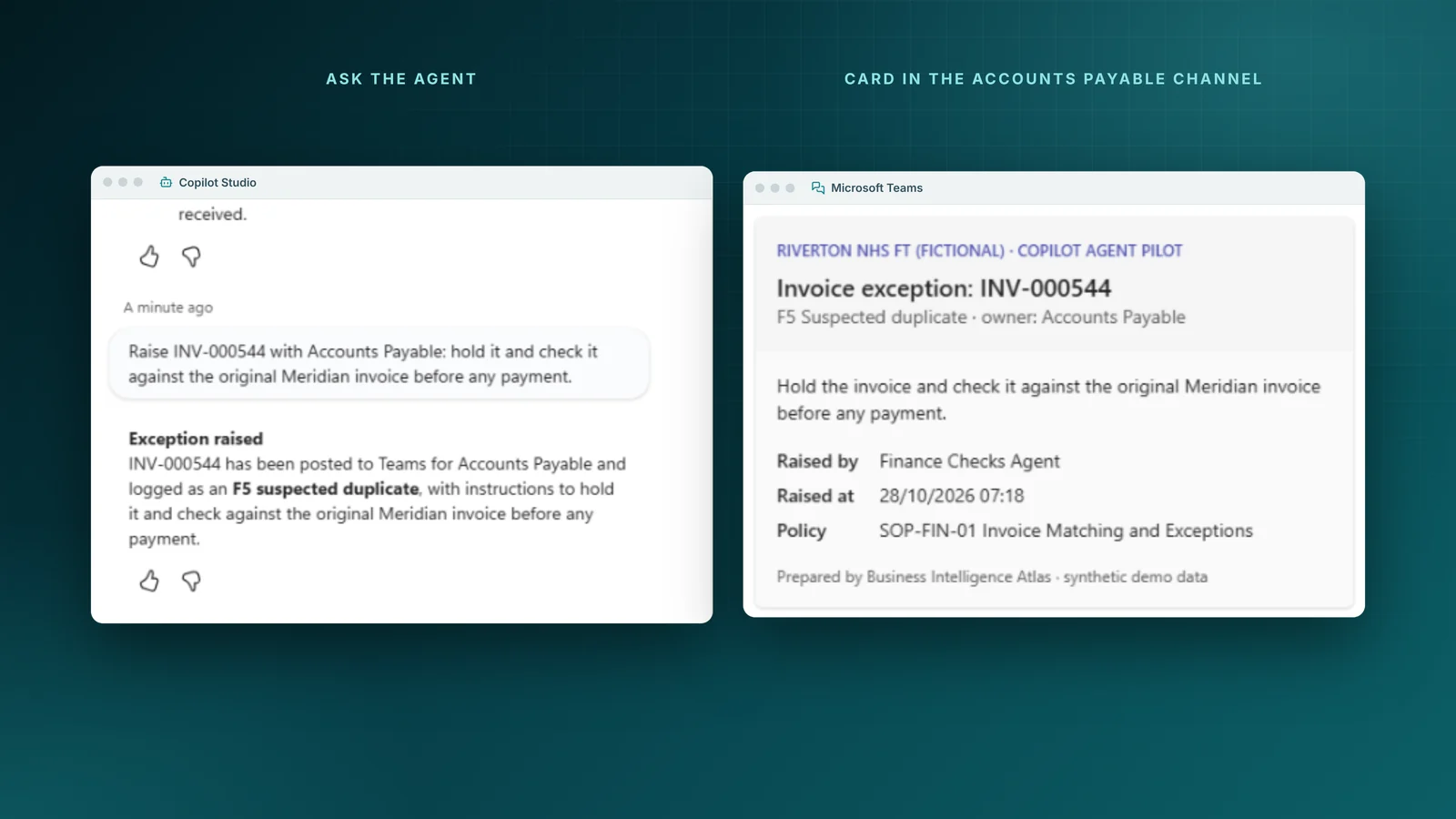
The user asks the agent to raise one duplicate with Accounts Payable. In the Copilot Studio activity map you can see it choose the right tool and prepare the inputs: invoice, rule, message and owner. The exception is logged and posted to the Accounts Payable channel in Teams with instructions to hold the invoice and check it against the original before any payment.
Inside the Power BI finance page
The finance page of the Copilot Agent Value report tracks BPPC month by month against the 95% target, rising from 82.6% in July to 100% in October in the demo data. It shows exceptions by matching rule and an oldest-first worklist of every exception with its owner, with slicers for supplier, match status, owner and invoice status.
How to design a finance agent auditors will accept
- No payment authority. The agent explains, routes and chases. People approve and release payments in the finance system.
- Rules from policy. Number the matching rules and cite the SOP in every exception.
- Route to an owner. Every exception has a named team, so nothing sits with Accounts Payable by default.
- Keep a log. Every exception raised is recorded with who raised it, when and under which rule.
- Measure what matters. Track BPPC and days on hold, not just the number of chats.
Who this is for
- Directors of finance and heads of financial services
- Accounts payable, procurement and financial control teams
- Shared services finance teams across ICSs and trusts
- Finance systems and BI teams looking at Copilot Studio
How we deliver finance agents
- Discovery: review exception types, owners, the matching policy and BPPC reporting.
- Data: regular extracts from your ledger or e-procurement system into SharePoint or Microsoft Fabric.
- Build: Power Automate tools, Teams routing and the Copilot Studio agent.
- Controls: DPIA, segregation of duties and testing with Accounts Payable.
- Report and hand over: Power BI finance reporting, runbooks and training.
Read more about our AI and Copilot services, Power BI for finance teams and AI-ready data and document intelligence.
Frequently asked questions about Copilot agents for NHS finance
What is the Better Payment Practice Code?
The BPPC asks NHS bodies to pay 95% of valid invoices within 30 days of receipt, or by the agreed due date. Trusts report performance by number and value of invoices.
Can a Copilot agent pay or release invoices?
No. In our design the agent has no access to approve, release or change payments. It explains exceptions and routes them to the right team.
How does the agent detect duplicate invoices?
It flags invoices where the same supplier, invoice number and value have already been received, and can be extended with fuzzier checks such as near-identical values or dates.
Which finance systems does this work with?
Any system that can provide a regular extract of invoices, purchase orders and goods receipts, such as Oracle, SAP, Unit4 or Dynamics 365, loaded into SharePoint or Microsoft Fabric.
Who receives the exceptions?
Each rule has an owner: Procurement for price variances, the budget holder for quantity variances and missing receipts, and Accounts Payable for no-PO and duplicate exceptions.
Is supplier bank information used?
No. The agent only needs invoice, PO and receipt details. Bank details are never part of the data set.
How do you measure the benefit?
We track BPPC, days on hold and minutes saved per exception against agreed baselines in Power BI. See part four for the method.
How long does a finance agent take to build?
Typically four to six weeks for a pilot, depending on data extracts and finance sign-off.
Want fewer invoices stuck on hold?
We can give you live access to the demo agent and the Power BI report. If you are looking at Copilot Studio for finance, book a no-obligation discovery call and we will show you what this would look like with your own exception data and policies.
Business Intelligence Atlas (Atlas BI) is a UK Microsoft Fabric, Power BI and Copilot Studio consultancy. Riverton NHS Foundation Trust is fictional and all data in this demo is synthetic and anonymised: patients, staff and suppliers are invented and identified by reference numbers only.
Comments are closed